Airdrop Scam Guide: Spot Fake Crypto Drops Before Claiming
Airdrop scam guide: spot fake crypto drops before claiming
You will learn a repeatable safety routine for checking any crypto airdrop before you click a link, connect a wallet, sign a message, or pay gas. The goal is simple: slow down at the exact points where scammers rely on speed, confusion, and normal wallet behavior.
Airdrop scams in 2026: what you’ll learn
An airdrop scam is a fake or malicious crypto token distribution designed to steal assets through fake claim sites, wallet approvals, or seed phrases. In 2026, the riskiest traps often look normal: a clean claim page, a gasless signature, or an approval request that quietly gives a contract permission to move your tokens.
If you searched for the phone file-sharing feature called AirDrop, the risks are different. This guide focuses on crypto airdrops, where an attacker targets your wallet address, token approvals, transaction signatures, or recovery phrase.
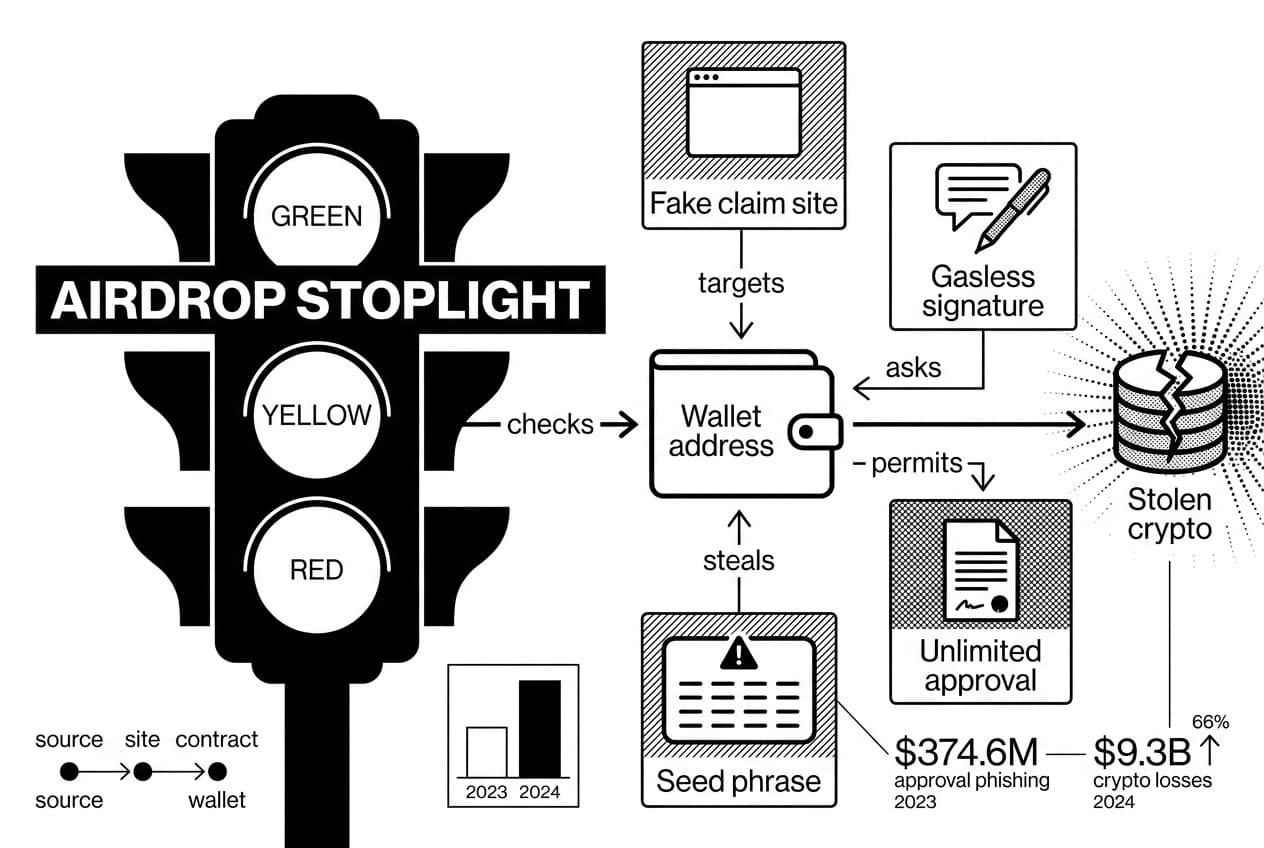
As of May 2026, the beginner mistake to watch is not only the obvious seed phrase form. Approval phishing caused at least $374.6 million in stolen crypto in 2023, Chainalysis, Feb. 2024. The wider damage is also large: the U.S. internet crime report recorded $9.3 billion in crypto-related losses in 2024 and a 66% increase from 2023, ic3 report, Apr. 2025.
This guide uses a simple original check called the airdrop scam stoplight framework. Green means a claim passes source, site, contract, and wallet checks. Yellow means you need more proof before connecting. Red means stop immediately because the request asks for a seed phrase, unlimited approval, upfront payment, or interaction with an unknown token.
For self-custody basics, the security-first teaching of Andreas Antonopoulos, author and educator, is a useful reference point. For broader risk thinking around crypto, Lyn Alden, founder of her public research site, is also worth following. Neither source replaces your own verification, but both reinforce the same habit: understand the risk before you authorize an action.
What you should be able to do by the end
- Verify whether an airdrop announcement came from an official source.
- Inspect a claim URL before connecting your wallet.
- Check a token contract on a block explorer.
- Read wallet requests before signing.
- Spot dusting attacks, fake support bots, and approval drainers.
- Lock down your wallet if you already clicked.
What you’ll need before you check any airdrop
Before you evaluate a claim, prepare your tools. You need a clean browser session, the project’s official domain typed manually or opened from a saved bookmark, and the relevant block explorer for the chain.
If you are still choosing a wallet, compare the tradeoffs first. You can compare DeFi wallets like MetaMask and Rabby before using any wallet for claims.
Hard rule: no real airdrop needs your seed phrase, private key, recovery phrase, or wallet backup. Not in a form, not in a direct message, not in a bot, and not on a claim page.
Set up a burner wallet
A burner wallet is a fresh address used only for testing unverified sites and contracts. Put only the gas you are willing to lose in it, and keep your long-term tokens, staking positions, and collectibles somewhere else.
Use a separate browser profile if you can. In MetaMask, click the account icon, choose add account or hardware wallet, and create an account that is clearly named for testing. If a seed phrase may have been exposed, create an entirely new wallet instead of another account under the same phrase.
Know your block explorer
A block explorer lets you read public contract data without connecting your wallet. Use it to confirm contract age, source verification, holders, and transaction history.
Chain | Explorer to type manually | What to check first |
|---|---|---|
ethereum | etherscan.io | verified contract and holder list |
BNB chain | bscscan.com | deployer address and token transfers |
solana | solscan.io | token mint and authority data |
base | basescan.org | contract age and labels |
arbitrum | arbiscan.io | contract match and approvals |
Paste the contract address into the explorer. Do not search by token name alone because scammers copy names and logos.
Never type your seed phrase
If any page asks for your recovery words, close the tab. Sending tokens to you only requires your public address. A seed phrase gives full control of the wallet to whoever sees it.
Do not paste a seed phrase into a support chat, cloud document, search bar, form, or browser extension prompt. If you already did, skip to the wallet recovery section below and move funds to a fresh wallet immediately.
Step 1: verify the source before you click
Start with one question: where did you first hear about the airdrop? A direct message, reply thread, search ad, or random token in your wallet should be treated as untrusted until proven otherwise.
Open the official website yourself
Type the known domain into a new tab. Do not click the first link someone sent you, and do not rely on a search ad. Once you are on the official site, look for an airdrop page, blog post, eligibility rules, or documentation page.
Pro tip: save the real project domain as a bookmark before a claim period begins. During a hyped airdrop, fake search ads and lookalike posts can appear faster than community moderators can remove them.
Compare official channels
A real campaign should have matching details across the official website, verified social account, documentation, and community announcements. Dates, eligibility rules, and claim links should match. If the link appears in only one channel, wait.
Single-account trust is not enough. In March 2024, the social account for the foundation behind ethereum.org was compromised and used to promote a malicious link, according to Bleepingcomputer, Mar. 2024. The lesson is to verify across more than one official source.
Source type | Trust level | Action |
|---|---|---|
official website typed manually | highest | check claim page and announcement date |
verified social account | medium | compare with the website and docs |
community server | medium | enter only through the official site |
governance forum or docs | high | confirm criteria and contract address |
direct message, reply, or ad | treat as untrusted | do not click until fully verified |
Step 2: inspect the claim site and URL
After you confirm that an airdrop exists, inspect the claim site before connecting. The domain is the first contract you read, because a cloned interface can look perfect while the URL gives the scam away.
Read the domain from right to left
The real owner of a URL is the root domain before the first single slash after the domain. A page such as uniswap.org.claim-drop.example is not owned by the real project. It is owned by the final root domain.
Also watch for lookalike characters. Punycode and other character swaps can make a fake domain look nearly identical to the real one. If your browser displays unusual characters, stop and compare the address against the official site typed manually.
Airdrop scam URL red flags
- Misspellings: swapped letters, extra letters, or brand names with small typos.
- Fake subdomains: a real brand placed before a scam root domain.
- Punycode: characters that look familiar but are not the standard letters.
- Shortened links: links from bots or help accounts that hide the destination.
- Search ads: sponsored results placed above the real site.
- Urgency timers: countdowns claiming you will lose eligibility soon.
- Copied branding: logos and colors that match while the domain does not.
- Wallet prompts before eligibility: connection requests before you can check an address.
Avoid search ads and short links
Do not search for a claim site and click the first sponsored result. Scammers buy ads during airdrop seasons because beginners are in a hurry.
Short links are also unsafe for claims. If a project needs a claim link, it can publish the full domain from its official site. Treat a short link as a reason to pause.
Slow down when a page creates pressure
Countdowns, limited spots, and messages that say you will permanently lose eligibility are pressure tactics. A real claim process can publish a deadline without pushing you to sign before you read.
Run the stoplight framework here. Green means the domain matches exactly and appears on official channels. Yellow means one detail is unclear. Red means the URL is hidden, misspelled, rushed, or asking for a wallet connection too early.
Step 3: check the token on a block explorer
Before you claim, check the token contract on a block explorer. This step helps you avoid fake tokens that borrow a real name, logo, or ticker.
Paste the contract address, not the token name
Get the contract address only from the official website, official docs, or verified announcement. Then paste that exact address into the explorer. Searching a name such as a common ticker can return many unrelated tokens.
Check source verification and holders
Look for verified source code on the contract page. Verification does not prove safety, but unverified code is a warning sign for a beginner. Next, open the holder tab and check whether supply is spread across many wallets or concentrated in one deployer address.
- Better sign: many holders, known contract labels, and public docs that match the address.
- Warning sign: one deployer wallet controls most of the supply.
- Warning sign: the contract was created shortly before a surprise claim window.
Identify dusting attacks and mystery tokens
A dusting attack sends a tiny amount of an unknown token to your wallet. The token may show a fake price or include a URL in its name, memo, or explorer data. The goal is to make you visit a malicious site.
Unknown tokens can also help attackers map wallet activity. Our guide on how blockchain tracking works explains why separate wallets reduce linkability.
Do not trade a token just because it appears in your wallet
If you did not buy, earn, or claim a token, leave it alone until verified. Scam tokens often fail when you try to sell, then point you to a fake swap page that asks for a broad approval.
Warning: never click a URL found in a token name, contract description, memo, or explorer comment. Scammers put links there because curious users click them.
Step 4: test wallet requests before you sign
This is where a crypto airdrop scam often becomes expensive. A clean site can still push a dangerous wallet prompt. Your job is to read the request before approving anything.
Connect with a burner wallet first
Use the burner wallet before your main wallet. If the site immediately pushes a signature, switches networks unexpectedly, or redirects to another domain, stop. A test wallet lets you see the flow without exposing your main funds.
Read every request before clicking
When the wallet pop-up appears, pause. In MetaMask, expand details or view full message before you sign. Read the site domain, chain, account, requested action, spender address, token amount, and expiry.
- Site: does it match the tab you opened?
- Chain: is it the chain the project announced?
- Account: is it your burner wallet?
- Spender: do you recognize the contract address?
- Expiry: is it short and specific, or unlimited?
Reject unlimited approvals
A token approval gives a contract permission to move up to a set amount of tokens. An unlimited approval gives far more permission than a normal airdrop needs. Nothing may leave immediately, which is why this trap works.
Cancel if you see any request you do not understand, especially setApprovalForAll, approve with an unlimited amount, permit with a long expiry, or delegateBySig. These same mechanics overlap with the rug pull warning signs you should learn before joining new projects.
Remember that gasless does not mean safe
A gasless signature can still be dangerous. Some off-chain signatures let an attacker submit the permission on-chain later. You paid no gas, but you may have authorized the movement of tokens.
Our rule: treat every signature as a transaction until you understand what it allows.
If you are unsure, click cancel, close the tab, and verify through official channels. A real project will not punish you for checking.
Step 5: recognize the main airdrop scam types
Use this table as your quick pattern guide. If the warning sign appears, choose the safer action before you connect or sign.
Scam type | Warning sign | What to do |
|---|---|---|
Phishing claim sites | The domain differs from the official domain, uses a fake subdomain, or appears only in replies and ads. | Close the tab and open the official site from your bookmark. |
Approval drainers | The wallet request asks for unlimited spend, broad collection access, or a permit for an unknown spender. | Reject the request and review existing approvals with a trusted tool. |
Dusting attacks | An unknown token appears with a fake value or a URL in its metadata. | Do not trade it, approve it, or visit the linked site. |
Fake support bots | A direct message offers to verify your wallet, fix a failed claim, or recover an allocation. | Block and report. Real support does not need your seed phrase. |
Fake eligibility checkers | A third-party page asks you to connect before any official project link exists. | Use only tools linked from the verified project website or docs. |
Paid allocation scams | Someone asks for a fee to reserve, open up, or increase your airdrop. | Stop. A real free distribution does not require an upfront payment to a stranger. |
Fake claim portals
A fake claim portal copies the real site and swaps in a malicious contract behind the claim button. The page can look professional, but the approval request gives away the attack. Check the domain and contract address before touching the button.
Approval and signature drainers
A drainer does not need your seed phrase. It needs one approval or signature that gives it permission to move tokens. This is why reading the spender address and approval amount matters.
If you signed something suspicious, do not wait to see what happens. Revoke approvals, move funds, and preserve evidence.
Dusting and scam token lures
Dusting tokens prey on curiosity. The fake value in your wallet interface is bait. The trap usually appears when you try to swap, claim, or open up the token.
Fake support and recovery scams
Fake support accounts appear after you ask for help in public. They may sound polite and technical, but they often ask for a seed phrase, screen share, or small fee. End the conversation as soon as private wallet information comes up.
Step 6: lock down your wallet if you already clicked
If you connected, signed, or approved something suspicious, act in order. Do not argue with the scammer, do not keep testing the site, and do not wait for a reply from a support account.
Disconnect the site first
In MetaMask, open the account menu, choose connected sites, select the suspicious domain, and click disconnect. This stops the site from seeing your account through that session.
Disconnecting is not enough. It does not cancel approvals you already granted. Continue with the next step.
Revoke token and NFT approvals
Use a trusted approval checker that you reach by typing the address yourself. Revoke unknown or unlimited approvals first. Each revocation is an on-chain transaction, so you need enough native gas token for the network.
Revoke.cash is a well-known approval review tool, but scammers also copy revocation pages. Type the URL manually and inspect it before connecting.
Move funds to a fresh wallet
After revoking approvals, move remaining assets to a fresh wallet. If you typed your seed phrase anywhere, treat the old wallet as permanently compromised. Create a new seed phrase and never use the exposed one again.
For stronger storage habits, read why self-custody wallet security matters. If you hold meaningful funds, you can also choose a hardware wallet for safer storage.
Report and preserve evidence
Before closing tabs, save screenshots, the full URL, transaction hashes, and contract addresses. Reports may not recover funds, but they can help warn other users and get domains flagged.
- Report the domain through google safe browsing.
- Report the contract through the relevant block explorer.
- File a complaint through your country’s cybercrime reporting portal.
- Alert the real project through official channels.
- Send the phishing link to your wallet provider’s support intake.
The practical lesson from Andreas Antonopoulos is that self-custody puts authorization in your hands. That is powerful, but it also means you must treat every approval as a real permission grant.
Frequently Asked Questions
- Can someone steal my info with AirDrop?
- Apple AirDrop can expose limited device details or deliver unwanted files if your settings allow everyone to send. Crypto airdrop scams pose a bigger threat — connecting to a malicious site, signing token approvals, or revealing your seed phrase can give attackers direct access to your wallet assets.
- Can you tell who airdropped you?
- In crypto, you can inspect the sender's wallet address, token contract, and transaction hash on a block explorer, but that rarely reveals a real-world identity. With Apple AirDrop, the sender's device name may appear, though visibility depends on their contact and proximity settings.
- Can someone track you through AirDrop?
- In crypto, public blockchains let anyone analyze wallet activity after a token transfer. Dusting attacks specifically exploit this by sending tiny tokens to link your addresses. Avoid interacting with mystery tokens and keep separate wallets for different activities to limit how much of your activity can be mapped.
- Is there a cryptocurrency scam going around?
- Yes, crypto airdrop scams remain widespread in 2026. The most common forms include fake claim sites, wallet drainers, seed phrase phishing pages, and impersonated project accounts on social media. Always verify announcements through official project channels and never trust unsolicited DMs, ads, or token links.
- Is crypto AirDrop legal?
- Legitimate crypto airdrops can be legal, but rules differ by country and may involve tax obligations, securities regulations, or sanctions compliance. Received tokens are often treated as taxable income. Always research the project before claiming, and steer clear of schemes that require upfront payments or deceptive promotion tactics.
- How to tell if it's a crypto scam?
- Watch for these red flags: a suspicious or misspelled domain, any request for your seed phrase, urgent countdown timers, fake support accounts, unverifiable token contracts, unlimited wallet approval requests, or upfront fees to claim. If even one of these appears, do not connect your wallet or sign anything.
- Can someone access your phone through AirDrop?
- Apple AirDrop alone cannot grant someone full phone access, but accepting files from strangers can expose you to unwanted content or social engineering attempts. For crypto users, the real danger isn't phone access — it's signing malicious wallet permissions that let drainers move your funds without further interaction.
- Why should you turn AirDrop off?
- Keeping Apple AirDrop limited to contacts — or off entirely in public — reduces unwanted file transfers and contact discovery risks. The same discipline applies to crypto: treat unsolicited token drops, unknown wallet connection requests, and unverified airdrop links with the same caution you'd give a stranger handing you an unmarked USB drive.
Sources
Author

Crypto analyst and blockchain educator with over 8 years of experience in the digital asset space. Former fintech consultant at a major Wall Street firm turned full-time crypto journalist. Specializes in DeFi, tokenomics, and blockchain technology. His writing breaks down complex cryptocurrency concepts into actionable insights for both beginners and seasoned investors.