Honeypot Crypto: Detect and Avoid Scam Tokens Safely in 2026
Honeypot crypto: detect and avoid scam tokens safely in 2026
Introduction: what you'll learn about honeypot crypto
A honeypot crypto scam is a token or smart contract designed to let people buy while blocking, taxing, or manipulating the sell side. The honeypot token follows a buy-but-cannot-sell pattern: your wallet receives tokens, the chart may rise, but your exit fails or returns almost nothing.
In this guide, you will learn a repeatable due diligence workflow for spotting a honeypot token before you trade. You will verify the contract address, run a honeypot checker, inspect contract permissions, review liquidity and holder behavior, and test safely with minimal funds.
The core idea is simple: no single tool proves a token is safe. A checker can miss proxy upgrades, admin toggles, whitelists, delayed sell blocks, and fee changes. Your best protection is a layered process that forces a scammer to fool several checks at once.
This guide uses the VAST framework, updated as of September 2026: Verify the address, Analyze scanner output, Scan contract permissions, Track liquidity and holders, then Test with a tiny trade. If any step fails, you walk away.
This guide covers one scam type in depth. If you want a broader map of related traps, see our overview of common types of crypto scams.
Quick definition for beginners
Think of a honeypot token as a one-way door. Buying looks normal, but selling is blocked by code, restricted to approved wallets, or drained by an extreme sell tax. From the outside, the token may have a chart, a logo, holders, and social posts. The trap appears when you try to exit.
Why this matters in 2026
Token launches are fast and cheap. A scammer can deploy a contract, create a trading pair, copy a logo, and promote the token through social accounts in the same afternoon. That speed makes calm checks more important, not less.
Public loss data shows why prevention matters. Chainalysis reported that scam revenue reached $9.9 billion in 2024 and warned the estimate could rise as more illicit addresses are identified (Chainalysis, January 2025). The FBI's IC3 reported $3.96 billion in crypto investment fraud losses for 2023 (FBI IC3, March 2024).
Andreas Antonopoulos, an author and educator, often frames self-custody as personal responsibility rather than passive reliance on platforms. That mindset fits honeypot checks perfectly: you do not need to become a developer, but you do need to verify before signing.
Lyn Alden, founder of her macro research firm, has repeatedly stressed the difference between owning an asset and understanding the risk around it. With small-cap tokens, the contract rules are part of that risk.
What you'll need before checking a honeypot token
Before you analyze a token, open the right tools and collect the right address. Rushing from a social post straight to a swap page is the mistake scammers want you to make.
Warning: Token names, tickers, and logos are easy to copy. A fake token can use the same ticker as a real project. The contract address is the identifier that matters.
Tools to keep open
- A block explorer: use etherscan.io for Ethereum, bscscan.com for the BNB chain, or basescan.org for Base. You will use it to read the contract, holders, transactions, and deployer history.
- A DEX chart page: use a charting site such as dexscreener.com to compare buys, sells, liquidity, and the pool address.
- A honeypot checker: use tools such as honeypot.is, tokensniffer.com, or QuillCheck to simulate whether the token can be sold.
- A wallet with transaction preview: use a wallet that shows approvals, expected outputs, and contract calls before you sign.
- An approval manager: keep revoke.cash ready so you can remove token approvals after testing.
Information to collect first
- Copy the contract address from the primary source. Use the project website or a verified social profile. Avoid addresses from replies, direct messages, sponsored posts, or comment sections.
- Cross-check the address in two places. Paste it into the block explorer, then into the DEX chart page. The same address should appear on both.
- Save the pool link. If you later need to document a scam, the pool page and contract page are the first items you will need.
This address check usually takes less than 60 seconds. It catches many fake lookalike tokens before you spend gas.
Step 1: Verify the token contract address
Your first action is to confirm you are looking at the real token. Open the relevant block explorer, paste the contract address into the search bar, and open the token tracker page.
Compare the address character by character against the project's official website and the trading pair page. If one character is different, stop. Do not assume two tokens with the same ticker are related.
Check the source of the address
Addresses from Telegram replies, X comments, Discord direct messages, and paid search ads are high risk. These channels are easy to abuse, and scammers often post fake addresses under real announcements.
Warning: Copycat tokens often appear minutes after a trending announcement. This is similar to fake airdrop scam tactics, where urgency is used to push you into skipping verification.
Chainalysis reported $4.6 billion in scam revenue during 2023 (Chainalysis, February 2024). Fake tokens and impersonation tactics are common delivery paths for that kind of fraud.
Confirm age, holders, and verified code
On the token page, check four items in order: contract age, holder count, source-code verification, and supply concentration. A token launched hours ago with few holders and unverified code deserves much more caution than an older contract with public code and broad distribution.
As a beginner-friendly rule, pause if the token has fewer than 50 holders, if the contract is only a few hours old, or if the top wallets control most of the supply. Those are not automatic proof of a scam, but they raise the burden of proof.
Use this four-point contract check: age, holders, verified code, and distribution. If a token fails two or more, treat it as suspect until the later steps prove otherwise.
Step 2: Run the address through a honeypot checker
Once you have the verified address, paste it into a honeypot checker. This is a triage step. A bad result is useful because it tells you to stop, but a clean result does not prove safety.
A checker simulates a buy and sell against the token contract. You want to see whether the tool can complete the sell, what tax it estimates, and whether it flags blacklist, owner, or trading-control permissions.
How to detect a honeypot token quickly
- Verify the address. Paste only the contract address you confirmed in step 1.
- Run the checker. Submit the address to a honeypot checker and wait for the simulation report.
- Inspect the sell simulation. Confirm the tool can sell, not just buy.
- Check the taxes. Treat buy or sell taxes above 10% as high risk unless you have a clear reason to accept them.
- Review contract permissions. Look for mint rights, blacklist functions, trading pauses, and owner-only fee changes.
- Confirm real sells. Cross-check the chart and block explorer for sells from unrelated wallets.
- Test with a tiny amount. If every earlier check passes, do a small buy and immediate sell before committing more.
Read the buy and sell simulation
The most important field is whether both buy and sell simulations succeed. If the buy succeeds but the sell fails, reverts, or shows an extreme sell tax, you are likely looking at a honeypot token.
Pay attention to tax fields, estimated output, gas warnings, transfer limits, and blacklist warnings. A 99% sell tax is functionally the same as a blocked sale because almost all value is removed.
Watch for false negatives
Pro Tip: A clean honeypot checker result is not a final verdict. Some traps activate only after a set number of blocks, after a certain trade size, or after the owner changes a setting.
Proxy contracts can also pass a scan today and become dangerous after an upgrade. That is why the VAST workflow continues into contract inspection, liquidity review, and a live test trade.
As Andreas Antonopoulos teaches in his security education, a tool is not a substitute for judgment. Use the checker to screen risk, not to outsource the decision.
Step 3: Inspect the smart contract for sell restrictions
A scanner gives you a fast result. The contract explains why that result may be risky. You do not need to write Solidity to perform this check.
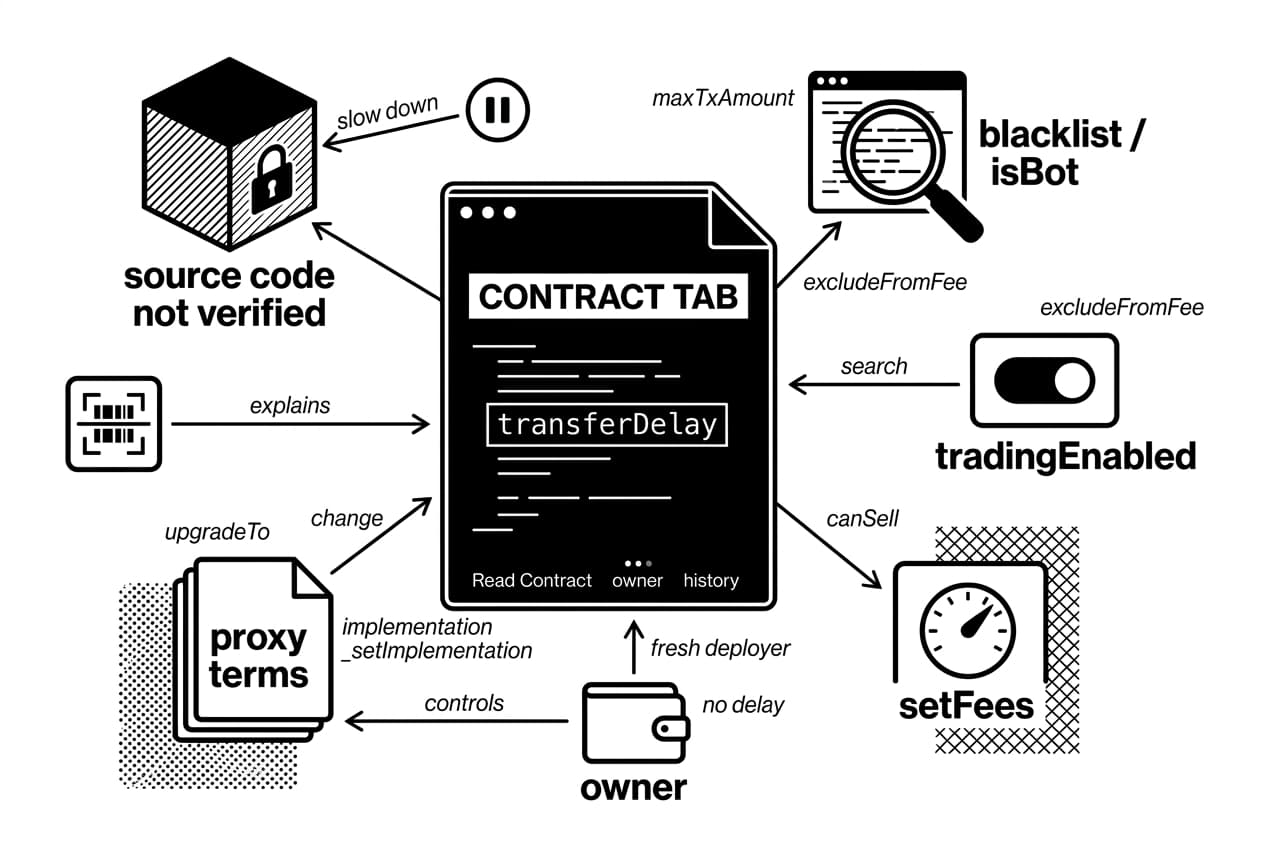
Open the contract page on the block explorer and click the Contract tab. If the source code is not verified, you are dealing with a black box. That alone is a reason to slow down.
If you want to understand the lower-level data you see on contract pages, our guide to how Solidity contract data is encoded explains function inputs and outputs in more depth.
Search for blacklist, whitelist, and trading controls
In the code tab, use your browser search for these terms: blacklist, isBot, tradingEnabled, maxTxAmount, excludeFromFee, setFees, canSell, and transferDelay.
One term is not always fatal. For example, a maximum transaction rule can appear in legitimate anti-whale designs. The bigger danger is a cluster of owner-only controls with no delay, vote, or clear limit.
Check ownership and upgradeability
Open the Read Contract tab and look for the owner field. Copy that wallet address and review its transaction history. A fresh deployer wallet with no reputation is a warning sign.
Next, search for proxy terms such as upgradeTo, implementation, and _setImplementation. A proxy contract can change its logic after launch. If the owner controls upgrades, a sellable token today can become a honeypot tomorrow.
Understand common honeypot mechanisms
Mechanism | What to look for | Risk level |
|---|---|---|
Hidden sell fee | setFees or a tax variable that the owner can raise after launch | High |
Blacklist trap | blacklist(address) or bot flags controlled by the owner | High |
Trading toggle | A trading flag the owner can turn off after buyers enter | High |
Privileged seller logic | Transfer logic that treats the owner or approved wallets differently | High |
Fake router setting | A changeable router address that can redirect swaps | High |
Unlocked pool tokens | Liquidity tokens held by the deployer with no visible lock | Medium to high |
Transfer delay | Cooldown rules that stop timely selling during fast price moves | Medium |
Do not read this table as a single yes-or-no test. The risk grows when several mechanisms appear together, especially when one wallet can change them at any time.
Step 4: Review liquidity, trading, and holder behavior
A honeypot token can look healthy on a chart because buys keep pushing the price up while sells are blocked or drained. This step teaches you to check whether real holders can exit.
Check whether real sells are happening
Open the token's pair page and review recent trades. You are looking for sell transactions from multiple unrelated wallets, not just the deployer, router, or a small set of privileged addresses.
Click a few seller wallets and inspect them on the block explorer. Healthy trading has independent buyers and sellers. If only approved wallets can sell, ordinary buyers may be trapped.
This pattern overlaps with broader rug pull warning signs, especially when concentrated holders and weak liquidity appear together.
Assess liquidity quality
Check total pooled liquidity on the trading pair. As a practical retail filter, treat pools below $50,000 as fragile because one modest sell can cause severe slippage. This is a rule of thumb, not a guarantee.
Next, check whether liquidity tokens are locked with a public expiry date. Unlocked liquidity means the deployer may be able to pull pool funds at any time. If you want the mechanics, read our explainer on how liquidity pools work.
Compare buy tax and sell tax
A token with a 1% buy tax and a 45% sell tax is still dangerous, even if selling technically works. Scammers do not always need to block sells. A fee high enough to erase profit can create the same outcome.
Check whether the contract owner can raise fees after launch. If the owner can set a sell tax to 99%, the current low tax may be temporary.
Red flag | What it may mean | What to do next |
|---|---|---|
Blocked sells | Non-approved wallets cannot sell at all | Do not buy, and do not add funds if you already bought |
High sell tax | Fees make exits uneconomic for ordinary holders | Simulate a sale and compare the expected output before buying |
Unlocked liquidity | The deployer may be able to remove pool funds | Check lock status and expiry before trading |
Concentrated holders | A few wallets can move price or dump supply | Review the holder tab on the block explorer |
Owner-only fee changes | The deployer can change trading terms after buyers enter | Search the contract for fee update functions |
Fake social hype | Bots may be inflating perceived demand | Trust on-chain evidence before follower counts |
The strongest signal is not one red flag. It is the combination of blocked sells, owner controls, weak liquidity, and concentrated supply on the same token.
Step 5: Test safely before you commit funds
Even after every check, a token can still hide a delayed rule. Your final defense is to keep the first trade small and your wallet isolated.
Use a small test buy and test sell
Start with the smallest amount that makes sense after gas costs, often $5 to $10 on lower-fee chains. Buy the token, then immediately try to sell it back.
If the sell fails, you have your answer. If it succeeds, stay cautious. Some contracts block only larger trades or activate restrictions after a delay.
Limit approvals and use a separate wallet
Use a dedicated wallet for unknown tokens, separate from any wallet that holds meaningful funds. Fund it only with the amount you are prepared to test.
When a token asks for approval, avoid unlimited approvals. Set a custom spend limit for the exact transaction amount, then revoke the approval after the test. If you are comparing wallet protections, review our DeFi wallet safety features guide before you trade.
- Buy a tiny test amount and attempt a sale right away.
- Use a fresh wallet funded only for the test.
- Set a custom approval limit instead of unlimited spending.
- Revoke approvals after the interaction.
- Walk away if the sell fails, the output is far lower than expected, or the contract asks for unusual permissions.
Pro Tip: A successful test trade lowers risk, but it does not remove risk. Treat the result as one input, not permission to ignore the earlier checks.
What to do if you encounter a honeypot crypto scam
If you bought a honeypot token, stop interacting with the contract. Do not send more money to open up, unstake, activate, validate, or release anything. Those requests are usually a second scam.
Recovery scams are common after crypto losses. The FBI warned that crypto investment fraud produced $3.96 billion in reported losses in 2023 (FBI IC3, March 2024). Treat anyone promising guaranteed recovery as high risk.
Secure your wallet first
Open an approval manager and revoke any approvals connected to the suspicious token or trading site. If the wallet also holds valuable assets, move those assets to a fresh wallet after revoking risky approvals.
For long-term storage, consider a setup based on hardware wallet safety best practices. The goal is to separate trading risk from savings.
Warning: Never share your seed phrase with a helper, recovery agent, moderator, or support account. Legitimate tools do not need it.
Report and document the scam
Save evidence before posts, chats, and pages disappear. Capture the transaction hash, token contract, deployer address, pool link, and screenshots of promotional posts or fake support messages.
Then report the address to your wallet provider, the DEX interface you used, the relevant block explorer, and community reporting sites such as chainabuse.com. If the loss is significant, file a report with your local cybercrime or financial authority.
You may not recover the funds, but a fast report can get the contract flagged for the next person who searches that address.
Frequently Asked Questions
- What is a honeypot in crypto?
- A honeypot is a token or smart contract designed to attract buyers or deposits while preventing them from selling or withdrawing funds. The trap is usually built into the contract using sell blocks, extreme sell taxes, blacklists, whitelists, or hidden owner controls that only the deployer can operate.
- What are honeypot tokens?
- Honeypot tokens are crypto assets that look fully tradable but are coded to trap holders. They typically appear on decentralized exchanges with climbing price charts, social media hype, fake liquidity, or copied branding from legitimate projects — but once you buy, you cannot sell or exit your position.
- Can a honeypot be detected?
- Yes, many honeypots can be spotted using a honeypot checker, block explorer review, verified source code inspection, and transaction history analysis. Detection is not foolproof, though. Scammers increasingly use delayed restrictions, proxy upgrades, whitelists, or owner-controlled functions that only activate after enough buyers are trapped.
- How to check if a token is real or fake?
- Start by confirming the contract address from the project's official website or verified social channels. Then inspect it on a block explorer, review the verified source code, check holder distribution and liquidity depth, run it through a honeypot checker, and confirm that multiple unrelated wallets have successfully sold the token.
- How do you identify a token correctly?
- The contract address is the only reliable identifier — not the ticker symbol, logo, or token name, all of which can be copied easily. Always cross-reference the address across the official website, social media channels, the DEX trading pair, and a block explorer before making any trade or sending funds.
- Are honeypots illegal?
- Malicious honeypot scams can violate fraud, securities, market manipulation, or consumer protection laws depending on the jurisdiction and specific facts involved. That said, the word "honeypot" also has a legitimate meaning in cybersecurity, where it describes a defensive decoy system — entirely separate from scam tokens in crypto markets.
- What is the difference between a honeypot and a honeytoken?
- A crypto honeypot token is a financial scam that traps buyers by preventing them from selling. A honeytoken, by contrast, is a cybersecurity tool — typically a decoy credential, file, API key, or wallet — planted by security teams to detect unauthorized access or data breaches. The two concepts are fundamentally different in purpose and context.
- What does "malicious token detected" mean?
- This warning from a wallet, scanner, or security tool means the contract shows behavior associated with scams or exploits. Common triggers include blocked transfer functions, suspicious approval requests, blacklist logic, phishing-linked addresses, extreme buy or sell fees, or contract addresses already flagged in known scam databases.
Sources
Author

Crypto analyst and blockchain educator with over 8 years of experience in the digital asset space. Former fintech consultant at a major Wall Street firm turned full-time crypto journalist. Specializes in DeFi, tokenomics, and blockchain technology. His writing breaks down complex cryptocurrency concepts into actionable insights for both beginners and seasoned investors.