Crypto Phishing Attacks: How They Work and Stay Safe in 2026
What you’ll learn about crypto phishing and what you’ll need
By the end of this guide, you’ll know how crypto phishing attacks steal wallet access, how to spot a phishing crypto scam before it costs you anything, and what to do if you clicked, connected, or signed something suspicious. You do not need security training. You only need a habit of pausing before you approve anything.
As of March 2026, the highest-risk moment is often not the email or social post. Those are delivery channels. The real damage usually happens when you approve a token spend, sign a permit, install a fake wallet, or reveal a seed phrase. Chainalysis reported that approval phishing scammers stole at least $1 billion since May 2021 (Chainalysis, Dec. 2023). That is why this guide treats crypto phishing as a wallet-signing problem first.
Prerequisites: tools and habits before you start
Set up these basics before you interact with a new exchange, wallet, bridge, mint, or airdrop. The goal is to reduce the damage if one link or prompt turns out to be hostile.
- Password manager: Use a dedicated manager so you do not reuse exchange or email passwords.
- Authenticator app or hardware security key: Avoid SMS codes for exchange accounts when you can.
- Official wallet source: Download wallet software only from the wallet project’s verified domain, then follow its own install link.
- Block explorer: Use Etherscan for Ethereum or the equivalent explorer for your chain to verify addresses and transactions.
- Approval checker: Use Revoke.cash or a wallet approval manager to revoke permissions you no longer need.
- Hardware wallet: Use one for funds you would not be comfortable losing overnight.
- Burner wallet: Keep a fresh, low-balance wallet for airdrops, new dapps, mints, and anything you have not verified.
Do not use your main wallet to test a random claim page. A burner wallet limits the blast radius if the site is malicious.
Warning: your wallet address is public, your signature is powerful
Your public wallet address is safe to share when you need to receive funds. It does not let someone move your crypto.
Your signature is different. When you sign a transaction, token approval, or permit, you may be giving a contract permission to move assets from your wallet. Andreas Antonopoulos, an author and bitcoin educator, has repeatedly taught that self-custody requires understanding what your wallet asks you to sign because a blockchain will execute the transaction exactly as submitted.
Three actions put funds at immediate risk:
- Signing a malicious token approval, permit, or swap transaction.
- Typing your seed phrase into any website, chat, form, file, or support page.
- Installing a fake wallet app, desktop program, or browser extension.
If someone only has your wallet address, they can send you tokens or watch public activity. They cannot take your funds without your key, seed phrase, or a dangerous approval.
The 2026 prompt-risk ladder
Use this original framework in every wallet session: link risk, site risk, connection risk, prompt risk, custody risk. A phishing attempt becomes more dangerous as it moves up the ladder. Clicking a link is lower risk than signing an approval. Sharing a seed phrase is the highest risk because the wallet is compromised permanently.
This ladder is the article’s decision model. At each step below, you will learn how to stop the attack before it reaches the next level.
Step 1: Understand how crypto phishing attacks work
Crypto phishing is a scam where attackers use fake websites, social engineering, wallet signatures, seed phrase traps, and malicious approvals to steal crypto access. The message may arrive by email, search ad, direct message, or fake support chat, but the loss usually happens when you connect a wallet, approve spending, sign a permit, or reveal your recovery phrase.
That distinction matters. A fake login page steals a password. A malicious wallet prompt can grant token-moving rights without ever asking for your exchange password.
The standard attack chain
Most crypto phishing attacks follow a repeatable pattern. When you can name the stage, you can stop before the transaction prompt appears.
- Lure: You see a fake airdrop, urgent migration notice, account alert, or exclusive mint.
- Impersonation: The scammer copies a project, exchange, wallet provider, or support account.
- Fake interface: The site looks familiar but the domain, contract, or download source is controlled by the attacker.
- Wallet connection: The page asks you to connect. Connection alone is usually read-only, but it confirms your address and sets up the next prompt.
- Malicious signature: Your wallet asks you to approve, permit, sign, swap, or send. The wording may look routine.
- Fund movement: A drainer script moves tokens as soon as the signature or approval can be used.
- Cash-out: Funds may move through swaps, bridges, mixers, or exchange deposit addresses to make recovery harder.
The IC3 reported $9.3 billion in cryptocurrency-related losses in 2024 (IC3, Apr. 2025). Not all of that was phishing, but it shows the scale of crypto-enabled fraud and why a single rushed signature deserves your full attention.
Common delivery channels: email, text, social, dns, and ads
Attackers go where your attention already is. The delivery channel changes, but the goal is the same: get you to a fake page or a dangerous wallet prompt.
Channel | How it is used | Warning sign |
|---|---|---|
Fake exchange alerts, account suspension notices, and receipts with phishing links. | The sender domain does not match the official service. | |
Text message | Fake wallet or exchange alerts with urgent links. | Shortened links or threats that your account will close. |
Discord or Telegram | Fake admins, fake support, and fake mint announcements. | Unsolicited direct messages. Real teams should not need your seed phrase. |
Search ads | Paid results that rank above the real project and lead to cloned sites. | The displayed domain differs from the project’s official domain. |
Dns compromise | A legitimate-looking domain serves a malicious front end after infrastructure is changed. | A familiar site suddenly asks for unusual wallet permissions. |
Browser pop-up | A malicious extension or injected script triggers a fake or unexpected prompt. | The prompt appears outside your normal wallet flow. |
Fake support accounts are especially common after you post publicly about a wallet problem. If someone replies within minutes and asks you to validate, synchronize, or recover your wallet through a link, treat it as hostile.
Why crypto phishing is different from bank phishing
Bank fraud may involve chargebacks, account freezes, and dispute teams. Crypto self-custody works differently. A confirmed blockchain transaction is usually final.
Three differences make crypto phishing especially damaging:
- Finality: Once a valid on-chain transaction confirms, there is no chargeback button.
- Approvals: You can authorize a contract to spend tokens later, sometimes with no second prompt.
- Seed phrase exposure: If someone sees your 12 or 24-word recovery phrase, they can recreate the wallet and move assets on every supported chain.
Lyn Alden, founder of an independent investment research firm, often frames digital assets through tradeoffs: removing intermediaries also removes many of the consumer protections people expect from intermediaries. For phishing defense, that means you must verify before you sign, not after funds move.
Step 2: Spot the red flags before you click
Your best defense is catching the scam before your wallet opens. Slow down whenever a link, message, pop-up, or offer pushes you to act immediately.
Common crypto phishing red flags
- Lookalike domain: The address uses swapped letters, extra hyphens, unusual endings, or characters that resemble normal letters.
- Urgent verification: The message says your wallet, funds, or account will be locked unless you act now.
- Surprise airdrop: You did not apply for it, but a page says you can claim tokens by connecting a wallet.
- Guaranteed return: The offer promises fixed profit, risk-free yield, or doubled crypto.
- Exclusive presale: A direct message says you received private access even though you never joined an official list.
- Seed phrase request: Any form, support agent, wallet page, or document asking for your recovery phrase is a scam.
- Shortened link: A link hides the final destination. Use a link expander such as CheckShortURL before visiting.
- Unsolicited direct message: Fake moderators and support accounts often contact you first.
- Paid search result: A sponsored result appears above the real project and uses similar branding.
- Token migration panic: A message says you must migrate before a deadline or lose funds.
Check the sender, handle, and domain
Read the domain character by character. A fake site may add a word, swap a letter, or use a different ending. Do not rely on logos or page design.
Open the official website directly from a bookmark or by typing the domain. Then compare the link in the email, post, or direct message against that official source.
Chainalysis reported that approval phishing losses reached at least $1 billion from May 2021 through late 2023 (Chainalysis, Dec. 2023). That figure shows how effective simple visual deception becomes once it leads to a dangerous approval.
Read the offer like a skeptic
Urgency and scarcity are the engines of many phishing crypto scam messages. Phrases such as limited claim, final migration, exclusive mint, and instant profit are designed to make you move faster than your verification habit.
Pause when an offer makes you excited. Copy the domain into a note, check it against the project’s official website, and search for announcements from channels you already trust.
Pro tip: bookmark official sites
Bookmark every exchange, wallet, bridge, and protocol you use. Then use the bookmark instead of clicking links from email, ads, or social posts.
Search ads are a frequent trap. If you search for a wallet or exchange name and click the first sponsored result, you may land on a cloned page before you notice the domain is wrong.
Step 3: Verify the website, app, or airdrop
Spotting a red flag is useful only if you stop and verify. Use this repeatable process before any wallet connection.
Verify a crypto website in 60 seconds
- Type the address yourself. Avoid links from email, ads, and direct messages.
- Check https, then keep checking. A padlock is basic hygiene, not proof that the site is real.
- Spell the domain carefully. Look for extra words, swapped letters, and wrong endings.
- Cross-check official docs. Many projects publish their canonical site and contract addresses in their documentation.
- Check verified social profiles. The domain in a project profile should match the page you opened.
- Search a warning database. Check ChainAbuse or ScamAdviser before you connect.
Warning: Do not treat a single social post as proof. Project accounts can be compromised. Look for matching announcements across the official site, documentation, and community channels before trusting a claim page.
Avoid fake apps and browser extensions
Only install wallet software from the wallet provider’s official domain. From there, follow the provider’s own install link. Do not search inside a mobile marketplace or browser extension directory and assume the top result is safe.
Before installing, check the publisher, user count, reviews, permissions, and age of the listing. A brand-new wallet extension with few installs and broad permissions should make you stop.
Pro tip: Audit your extensions monthly. Remove anything you do not recognize or no longer use. A compromised extension can read pages, inject scripts, or trigger fake prompts.
Check airdrops before claiming
Fake airdrops are efficient because free tokens create urgency without looking like an investment pitch. The dangerous moment is usually the approval or permit request on the claim page.
- Verify the contract address on Etherscan or the relevant explorer. Compare it with the address published by the project.
- Use a burner wallet with no meaningful balance for experimental claims.
- Never enter your seed phrase to claim tokens. No legitimate airdrop needs it.
- Reject unusual permissions. If a claim asks for unlimited spending or access to unrelated tokens, close the tab. Our guide on how to spot fake crypto airdrops walks through this in more detail.
Some fake airdrops send tokens directly to your wallet to lure you into visiting a malicious site. These may be honeypot crypto scam tokens. If an unexpected token appears, do not trade, approve, or visit its linked site until you verify it.
Step 4: Inspect every wallet prompt before you sign
This is the most important step in the guide. You may have checked the site and still face a malicious wallet prompt. Before you click confirm, read what the prompt is asking your wallet to do.
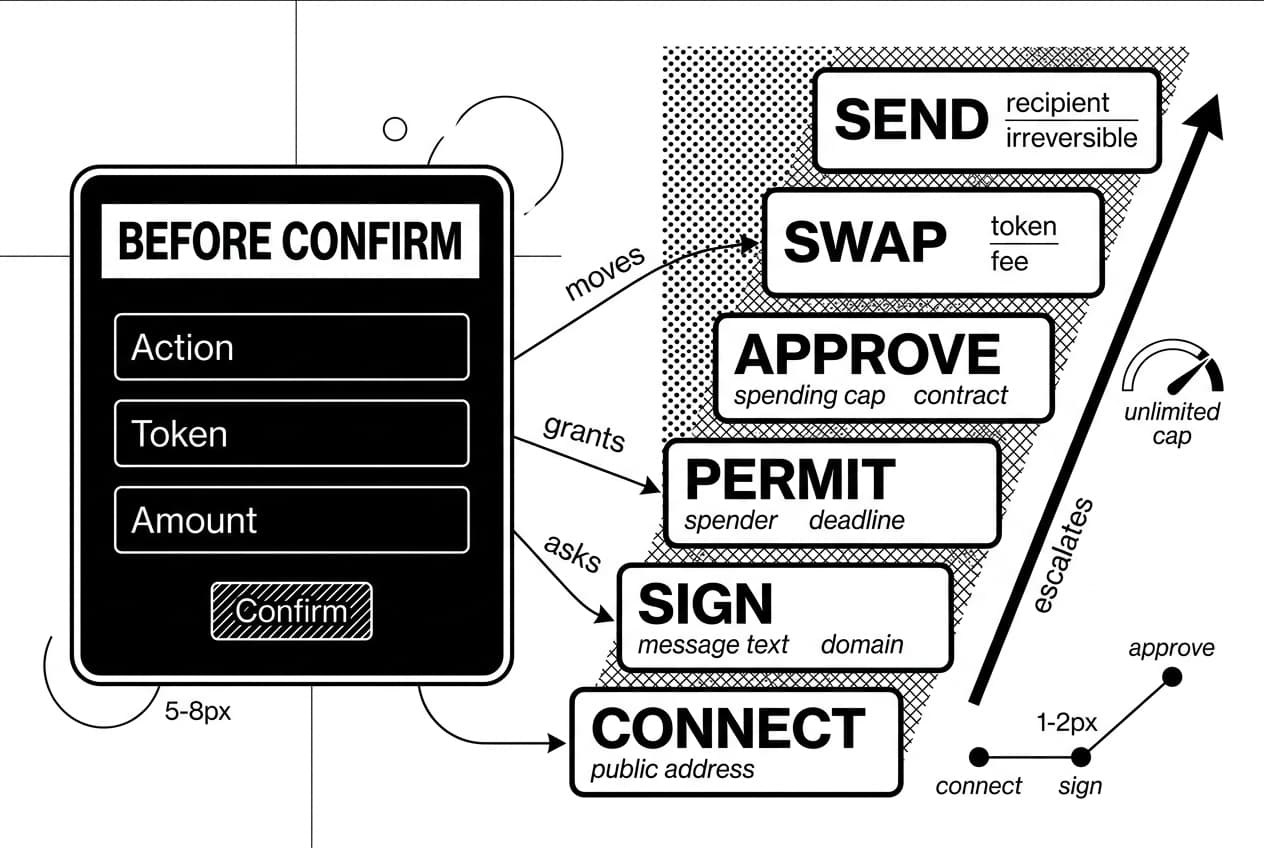
Use the prompt-risk ladder here: connection risk becomes prompt risk when the site asks for a signature, approval, permit, swap, or transfer.
Look for the action: send, approve, sign, permit, connect, or swap
Every wallet prompt has an action type. The type tells you whether funds move now, permissions are granted for later, or the site is only reading your public address.
Prompt type | What it means | Main risk | What to check before confirming |
|---|---|---|---|
Send | Transfers tokens or native coin to an address immediately. | Funds leave your wallet and the transaction is usually irreversible. | Recipient address, token, exact amount, fee, and network. |
Approve | Gives a contract permission to spend a token from your wallet. | A large or unlimited cap can let a bad contract drain tokens later. | Spending cap, token name, spender contract, and whether you need that amount. |
Sign | Signs a message. It may be off-chain and may not require gas. | Some messages authorize orders, permits, or login sessions you did not intend. | Full message text, requesting domain, expiry, and any hidden order language. |
Permit | Uses a signature to approve token spending without a separate approval transaction. | It can grant spending rights while feeling safer because no gas is paid. | Spender address, token, amount, nonce, deadline, and chain. |
Connect | Lets a site read your public address and request later actions. | Low by itself, but it starts a phishing flow and reveals your address to the site. | Domain shown in the wallet and whether you intended to connect there. |
Swap | Trades one token for another through a router or aggregator. | A fake router, bad slippage, or wrong output token can steal value. | Input token, output token, minimum received, router address, and slippage. |
Check the asset, amount, contract, and network
Four fields matter most: asset, amount, contract, and network. A phishing prompt often shows a familiar token while hiding a maximum spending cap or a wrong contract address.
Copy the contract or recipient address into Etherscan. Check whether it is verified, whether it has a normal transaction history, and whether it matches the address published by the protocol.
Confirm the network. If you expected a test network but the prompt is on mainnet, decline. If you expected one layer-2 network and see another, decline and verify.
Warning: unlimited approvals are a common trap
Many dapps ask for unlimited approval because it reduces future clicks. That convenience creates long-lived risk. If the contract is malicious, compromised, or upgraded into harmful behavior, the approval may let it move your tokens later.
When your wallet allows a custom spending limit, approve only what the current transaction needs. After the transaction, use Revoke.cash or your wallet approval screen to remove permissions you no longer need.
Wallet-prompt evidence pattern: In real phishing flows, the visible button often says sign, claim, verify, or approve. The dangerous field is usually the spender, amount, permit deadline, or message body. Your job is to read those fields before you confirm.
Use transaction simulation when available
Some wallets and security tools can simulate a transaction before you sign. A simulation estimates which assets leave your wallet, which assets arrive, and which contracts are called.
If your wallet offers simulation, turn it on. If a prompt claims to be a harmless signature but the simulation shows tokens leaving, decline immediately.
You do not need to understand every low-level call. Ask one practical question: does the simulated result match what I intended to do? If not, stop.
Step 5: Secure your wallet, browser, and devices
Good setup makes safe behavior easier. Your goal is to separate high-value storage from risky experimentation and reduce the number of places a phisher can reach you.
Create wallet separation: cold, hot, and burner
- Cold wallet: Long-term storage on a hardware device. Sign rarely and avoid unfamiliar dapps. Read our guide on how to use a hardware wallet safely before you set one up.
- Hot wallet: Everyday wallet for trusted protocols, swaps, and small balances.
- Burner wallet: Disposable wallet for new mints, airdrops, test transactions, and sites you are still checking.
This three-wallet model is one of the clearest defenses against crypto phishing attacks. If the burner signs a bad approval, your cold storage remains separate. You can also explore MPC wallet security for teams or larger balances that need shared control.
Andreas Antonopoulos teaches self-custody as a set of responsibilities, not a single product. Wallet separation puts that idea into practice by matching each wallet to the risk of the activity.
Protect your seed phrase and private keys
There are no exceptions: no legitimate exchange, wallet, support agent, airdrop, or recovery service needs your seed phrase. If anyone asks for it, the request is the scam.
Write your seed phrase on paper or metal and store it offline. Do not photograph it, paste it into a note, save it to cloud storage, send it to yourself, or type it into a website.
Warning: A seed phrase is not a password reset code. It is full wallet control. Whoever has it can recreate the wallet without your device.
Harden your browser
- Use a dedicated crypto browser profile. Keep wallet extensions in one profile used only for wallet activity.
- Limit extensions. Remove anything you do not use. Each extension adds attack surface.
- Clear old wallet connections. Open your wallet settings, click connected sites, and remove sites you no longer use.
- Keep the browser updated. Updates patch known vulnerabilities.
- Avoid unknown downloads. Do not open claim files, token tools, zip files, or invoices from strangers.
Use a password manager and app-based two-factor authentication for exchange accounts. If an exchange supports hardware security keys, use one for accounts with meaningful balances.
Step 6: Avoid investment, support, and recovery scams
Not every crypto phishing attack begins with a link. Some start with trust: a friendly message, a fake job, a romance approach, a trading group, or a support chat. By the time the link appears, the scammer wants you to feel comfortable.
Investment opportunity scams
Any promise of guaranteed crypto profit is a warning sign. Real markets do not offer risk-free returns, and legitimate platforms do not need secrecy, urgency, or personal direct messages to bring you in.
A common version is long-con relationship fraud, sometimes called pig butchering. The scammer builds trust, shows a fake trading dashboard, then blocks withdrawals until you pay taxes, fees, or larger deposits. The IC3 reported $3.96 billion in investment fraud losses involving cryptocurrency in 2023 (IC3, Mar. 2024).
If someone says your funds are almost ready but you must send more crypto first, stop. Check our guide to rug pull warning signs for overlapping patterns.
Fake support and recovery scams
Real support will not ask for your seed phrase, private key, remote desktop access, or an upfront fee to recover funds. If a support account asks for any of those, block it.
Recovery scams target people who already lost money. The scammer claims they can retrieve funds for a fee, but on-chain transfers cannot be reversed by a private recovery agent.
Warning: If you post publicly that you were scammed, expect fake recovery accounts to contact you. Do not pay them, and do not share more wallet information.
Social engineering scripts to recognize
In our review of common types of crypto scams, these lines appear repeatedly across phishing crypto scam reports:
- Verify your wallet before it gets suspended. A self-custody wallet does not get suspended by a protocol.
- Migrate before the deadline or lose your funds. Check official sources before any migration.
- Claim your compensation or airdrop. A real claim should not require seed phrase entry or unlimited approval.
- Join the presale now because spots are limited. Scarcity is often manufactured.
- Fix your failed transaction by approving this. Unknown approvals can drain wallets.
- Open up your account by confirming details in chat. Exchanges handle account actions inside official apps and websites.
If a message matches one of these scripts, do not debate. Close the chat, report the account, and verify through official channels if needed.
Step 7: Act fast if you clicked, connected, or signed
Speed matters after a phishing incident. The first 10 to 30 minutes may decide whether you save remaining funds. Stay calm and follow the severity order below.
Do not send more crypto to recover lost funds. That request is almost always a second scam.
- You clicked a link. Close the tab. Do not enter information. If a file downloaded, do not open it. Run a malware scan, then reach the real site by typing the URL or using a bookmark.
- You entered credentials. Go to the real platform, change your password, revoke active sessions, and reset two-factor authentication if a code may have been captured. Check withdrawal addresses and email rules for changes.
- You installed an app or extension. Uninstall it immediately. Run a full malware scan. Assume any password or seed phrase typed while it was active may be compromised.
- You connected a wallet. Open wallet settings, click connected sites, and remove the suspicious site. Connection alone is usually read-only, but you should still inspect recent prompts and transactions.
- You signed an approval, permit, swap, or transaction. Open Revoke.cash, revoke suspicious approvals, and check transaction history on Etherscan. Move remaining assets to a clean wallet while you audit.
- You shared a seed phrase. Treat the wallet as fully compromised. On a clean device, create a brand-new wallet and move every remaining asset as fast as possible. Never reuse the exposed seed phrase.
Document everything calmly
Before you close every window, capture evidence. Save the phishing URL, screenshots, transaction hashes, wallet addresses, usernames, chat logs, and exact times.
The IC3’s 2024 report recorded $9.3 billion in cryptocurrency-related losses (IC3, Apr. 2025). Good documentation gives exchanges, investigators, and reporting platforms the best chance to flag attacker infrastructure.
Report phishing pages to Google’s phishing report form and to the platform being impersonated. Reporting may not recover your money, but it can protect the next person.
What recovery actually looks like
On-chain transfers are usually irreversible. Your immediate goal is to stop further loss, not to chase what has already moved.
If funds reached a centralized exchange, contact the exchange at once and include transaction hashes and destination addresses. If funds moved to a private wallet, recovery usually requires law enforcement, exchange cooperation, or both.
Step 8: Report the scam and understand tracing limits
Reporting creates a record that may help law enforcement, exchanges, domain hosts, and other users. It also helps you avoid recovery scammers because you will know which official channels you already used.
Collect evidence before it disappears
- Urls: Copy the exact phishing address from your browser or message history.
- Screenshots: Capture the fake site, wallet prompt, social post, or chat.
- Transaction hashes: Save hashes from your wallet activity or block explorer.
- Wallet addresses: Save your address and the scammer’s receiving address. You can also use crypto address screening tools to see whether an address is already flagged.
- Messages: Export or screenshot emails, usernames, direct messages, and chat logs.
- Timestamps: Record date, time, time zone, and the order of events.
A blockchain can show where funds moved, but it does not automatically reveal the person behind an address. Attribution often depends on exchange records, subpoenas, and cross-border cooperation.
Where to report
- Your exchange: If funds moved to or from an exchange, contact support and include hashes and addresses.
- Your wallet provider: Report the malicious site or contract through the wallet’s abuse channel.
- The domain host or registrar: Use a domain lookup service and submit an abuse report.
- The social platform: Report the post, account, group, or direct message that delivered the link.
- Government portals: If you are in the U.S., report through the FTC fraud portal (FTC, 2026) and IC3.
Can you get your crypto back?
Recovery is rare, but not impossible. Your odds improve when stolen funds reach a centralized exchange and you report quickly with clear evidence.
- If funds reached an exchange: Contact the exchange immediately and ask whether the destination account can be frozen.
- If funds moved only through private wallets: Recovery is unlikely without law enforcement involvement.
- If a third party promises recovery for a fee: Treat it as a second scam.
Transparency helps tracing, but tracing is not the same as recovery. A visible wallet path still has to connect to a real-world account before funds can be frozen or seized.
Summary and next steps: your 2026 crypto phishing checklist
You now have a wallet-first process for avoiding crypto phishing attacks. The core habit is simple: verify the source, inspect the prompt, limit permissions, and separate wallets before you experiment.
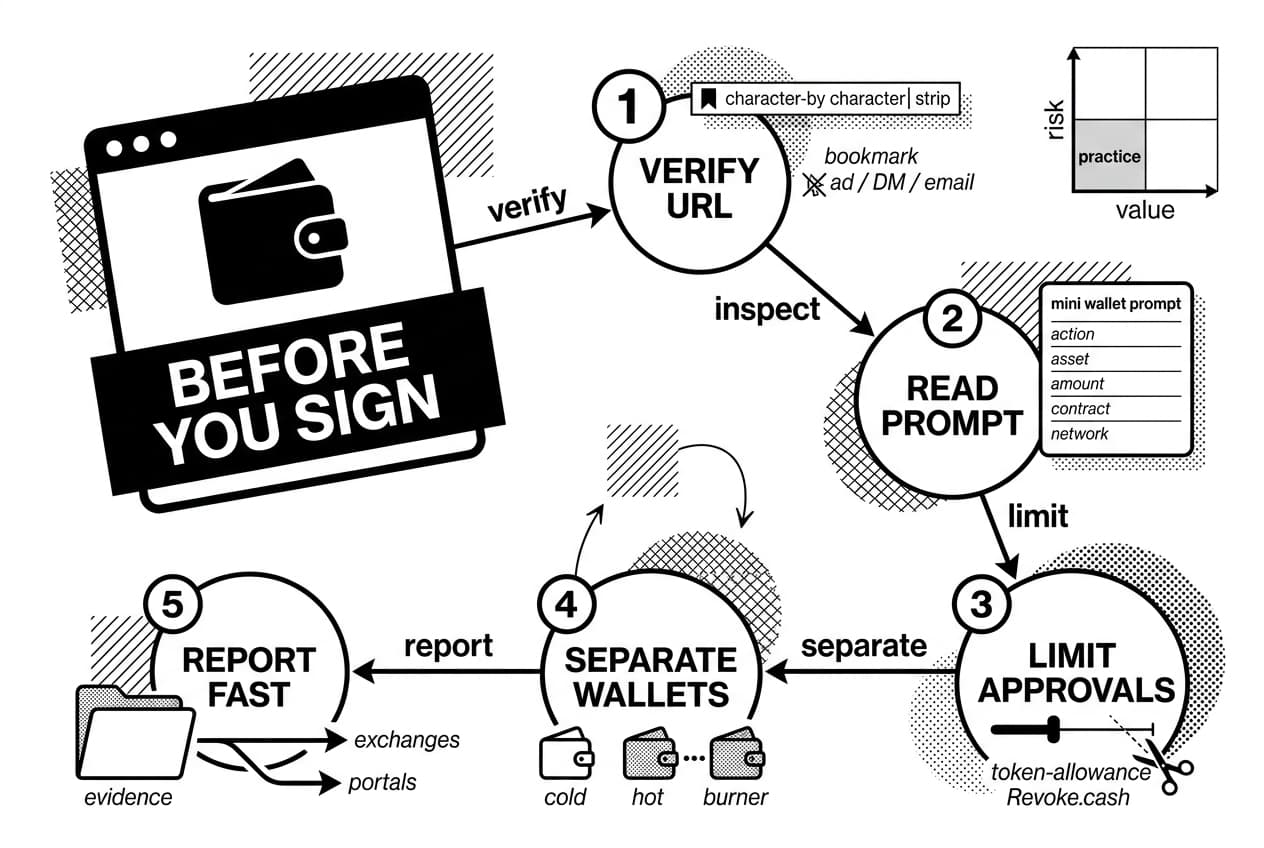
Your before-you-sign checklist
- Verify the URL. Check the domain character by character.
- Check how you arrived. If you clicked from an ad, direct message, or email, close the tab and use a bookmark.
- Question urgency. Countdown timers and last-chance messages are pressure tools.
- Read the wallet prompt. Confirm the action, asset, amount, contract, and network.
- Limit approvals. Use exact spending amounts when possible, then revoke old approvals.
- Simulate when available. If the simulation shows unexpected outgoing assets, decline.
- Never type your seed phrase. No legitimate support agent, airdrop, or wallet page needs it.
- Use wallet separation. Keep cold storage separate from hot and burner activity.
- Report fast. Save evidence and notify exchanges, platforms, and official reporting portals.
Next steps
- Create wallet separation today. Move long-term holdings to cold storage and keep only session funds in hot wallets.
- Audit approvals. Visit Revoke.cash and remove token approvals you do not recognize.
- Bookmark official sites. Do it before you are rushed.
- Practice with a burner wallet. Learn how prompts look when little value is at risk.
- Keep learning the broader scam pattern. Phishing overlaps with fake airdrops, rug pulls, recovery scams, and investment fraud.
Stay skeptical and move slowly when a wallet prompt appears. A few extra seconds of checking can protect months or years of savings.
Frequently Asked Questions
- Can a crypto scammer be traced?
- Blockchain transactions are publicly recorded, so wallet addresses and transaction hashes can often be traced using analytics tools. However, identifying the real person behind a wallet is much harder. Successful recovery typically depends on fast reporting, cooperation from centralized exchanges, and active law enforcement involvement.
- How can you tell if someone is a crypto scammer?
- Watch for guaranteed profits, artificial urgency, unsolicited DMs, fake customer support accounts, and requests for your seed phrase. Pressure to use a specific link or demands for additional deposits before you can withdraw are serious warning signs. Always verify identities through official websites rather than trusting screenshots or social profiles.
- Can someone steal your money if they have your crypto wallet address?
- A public wallet address alone is not enough to steal your funds. The real danger comes from exposing your private key or seed phrase, signing a malicious transaction, approving unlimited token spending, or interacting with a fake wallet app or compromised smart contract. Guard those credentials above everything else.
- Should I worry if a scammer has my email address?
- Your email alone cannot access your wallet, but it opens the door to targeted phishing emails, fake login alerts, SIM-swap attempts, and password reset attacks. Change any reused passwords immediately, switch to app-based two-factor authentication, and never click wallet-related links that arrive through email.
- Can you get your money back if you get scammed on crypto?
- Crypto transfers are generally irreversible, so recovery is never guaranteed. If stolen funds reach a centralized exchange, reporting quickly may lead to a freeze. Gather all evidence, file reports with relevant authorities, and steer clear of so-called recovery agents who demand upfront fees — they are almost always scams themselves.
- What is a common red flag of a crypto phishing scam?
- The biggest red flag is any request to enter your seed phrase or urgently connect your wallet to claim, verify, or unlock funds. Other warning signs include misspelled URLs, unexpected airdrop notifications, fake support messages, requests to approve unlimited token spending, and promises of guaranteed investment returns.
Author

Crypto analyst and blockchain educator with over 8 years of experience in the digital asset space. Former fintech consultant at a major Wall Street firm turned full-time crypto journalist. Specializes in DeFi, tokenomics, and blockchain technology. His writing breaks down complex cryptocurrency concepts into actionable insights for both beginners and seasoned investors.