Tangem vs Ledger: Card Wallet vs Hardware Wallet Guide 2026
Tangem vs Ledger: card wallet vs hardware wallet guide 2026
This guide compares Tangem and Ledger as two different cold-wallet designs: a card-based NFC wallet and a traditional screen-based hardware wallet. The practical question is not which brand is better. It is which design reduces the risks you are most likely to face: seed-phrase loss, blind signing, phone compromise, DeFi approvals, travel loss, recovery failure, or long-term inheritance problems.
Tangem vs Ledger: quick verdict and comparison table
The tangem vs ledger decision comes down to your custody behavior. Tangem removes the default seed phrase and uses backup cards, which can be safer for buy-and-hold users who might mishandle recovery words. Ledger adds an on-device screen and a deeper app ecosystem, which matters more for DeFi users who sign smart-contract approvals often.
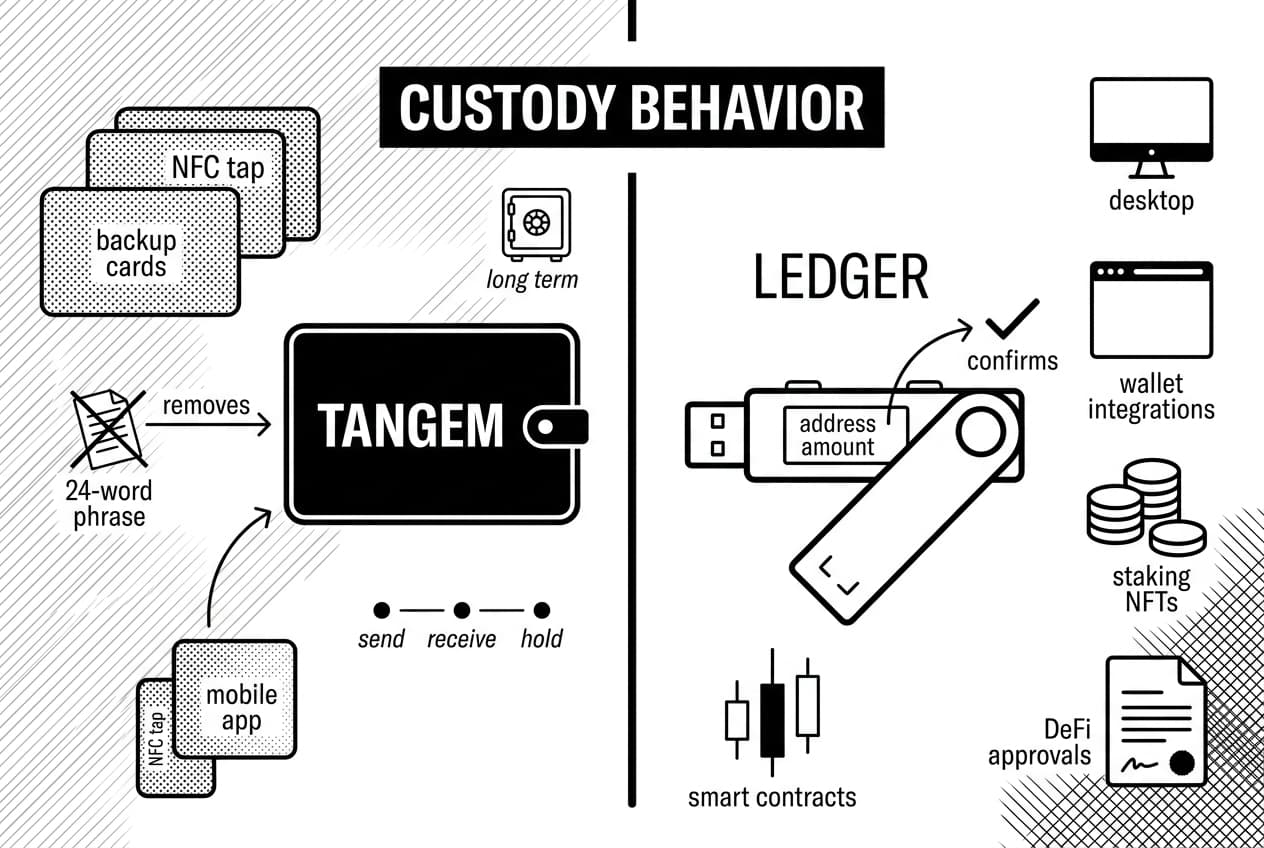
Quick answer: Tangem fits mobile-first holders who want simple cold storage and do not want to manage a recovery phrase. Ledger fits users who need desktop support, wide third-party wallet compatibility, and on-device transaction review before signing.
At a glance recommendation
- Choose Tangem if you hold assets long term, want zero seed-phrase exposure by default, and mainly send or receive on familiar networks.
- Choose Tangem if your main fear is losing, photographing, mistyping, or exposing a 24-word recovery phrase.
- Choose Ledger if you use DeFi protocols and want to confirm addresses or amounts on a trusted device screen.
- Choose Ledger if you need desktop workflows, staking, NFTs, browser-wallet integrations, and broad multi-chain support.
Tangem wallet vs ledger nano side-by-side comparison
Criteria | Tangem | Ledger, nano x and nano s plus |
|---|---|---|
Form factor | Credit-card sized NFC card set | USB hardware wallet with buttons and screen |
Connection type | NFC tap to phone | USB-C; bluetooth on nano x |
Screen | None | Yes, device display for verification |
Signing method | Transaction shown in mobile app, card signs by tap | Transaction shown on device, user confirms on hardware |
Seed phrase | Optional; seedless setup is the default model | 24-word recovery phrase is part of setup |
Backup method | Two or three backup cards paired at setup | Seed phrase; optional paid recovery service |
Secure element claim | EAL6+ secure element claim, check Tangem, January 2026 | EAL5+ secure element claim, check Ledger academy, January 2026 |
Supported assets | 6,000+ coins and tokens reported by Tangem, January 2026 | 5,500+ coins and tokens listed by Ledger, January 2026 |
App ecosystem | Mobile app on iOS and Android | ledger live on desktop and mobile plus many third-party wallets |
DeFi use | Works through mobile app and wallet connections, but no hardware screen | Better suited to contract signing because transaction review happens on device where supported |
Official device price | Three-card set commonly listed around $54 to $69, verify at Tangem, January 2026 | nano s plus around $79 and nano x around $149, verify at Ledger, January 2026 |
Ideal user | Mobile-first long-term holder, seed-phrase averse user | Active DeFi user, desktop user, multi-chain manager |
Source-check log and custody risk fit matrix
To avoid a generic ledger vs tangem verdict, this review uses a dated source-check log and a five-factor Custody risk fit matrix. The matrix scores each wallet against real failure modes rather than against abstract brand reputation.
Evidence point checked | Tangem finding | Ledger finding | Why it matters |
|---|---|---|---|
Launch and product maturity | First card wallet described in Tangem documentation, 2019 | Long-running hardware-wallet line with current devices listed at Ledger, January 2026 | Longer public exposure usually means more user testing and scrutiny. |
Known ecosystem incident | No equivalent incident found in this review scope | The connect kit supply-chain incident led to about $600,000 in losses, per Ledger, December 2023 | Adjacent software can create risk even when device keys are not extracted. |
Customer data exposure | No comparable breach used in this comparison | Ledger confirmed a customer data breach in July 2020 | Phishing and physical-address exposure can raise user risk without breaking a device. |
Recovery burden | Two or three physical backup cards | 24-word recovery phrase | Most user losses come from operational failure, not chip extraction. |
Transaction verification | Phone screen only | Device screen | DeFi approvals and address substitution are easier to catch on a trusted display. |
Risk model | Better fit | Reason |
|---|---|---|
Seed-phrase mishandling | Tangem | Seedless default removes a common backup failure point. |
Complex DeFi approvals | Ledger | Screen-based review gives the user a second verification surface. |
Mobile-only spending | Tangem | NFC card workflow is faster and needs no cable. |
Desktop portfolio management | Ledger | ledger live and browser-wallet support fit laptop-based workflows. |
Long-term inheritance planning | Depends | Backup cards are intuitive; seed phrases are more portable across wallets but dangerous if exposed. |
What are Tangem and Ledger?
Both wallets keep private keys away from normal internet-connected software, but they make different design bets. Tangem treats the wallet as a physical card that signs through a phone. Ledger treats the wallet as a dedicated signing device with its own screen, buttons, firmware, and app ecosystem.
Tangem overview
Tangem is an NFC smart-card wallet used with a mobile app. During setup, the private key is generated inside the card secure element and copied only to the backup cards paired in the same setup session. The main appeal is that a user can avoid writing down a seed phrase. That design reduces one familiar self-custody hazard: a recovery phrase stored in a cloud note, photographed, thrown away, or discovered by someone else.
The tradeoff is that the card has no screen. Transaction details are rendered by the phone app, while the card signs the request it receives. For simple transfers, that feels fast and clean. For unfamiliar smart-contract approvals, the user has less independent information than with a device that displays signing details on hardware.
Ledger overview
Ledger makes screen-based hardware wallets such as the nano s plus and nano x. If you need the full setup workflow, see our guide on how to set up a Ledger wallet. Ledger devices generate a 24-word recovery phrase during setup, store keys in a secure element, and ask the user to confirm transactions on the hardware screen.
Andreas Antonopoulos, author and educator, has long taught that self-custody depends on controlling keys and verifying what you sign. Ledger is built around that second habit: address and amount review on a separate display. The cost is more setup work, more firmware management, and more responsibility for seed-phrase storage.
Hardware design and daily usability
Daily usability matters because a cold wallet that is too annoying to use can push users back toward hot wallets or exchanges. Tangem is easier to carry and quicker to tap. Ledger is less pocket-flat, but it offers a trusted display, desktop support, and richer account management.
Design factor | Tangem card | Ledger device |
|---|---|---|
Physical size | Card form factor, about 0.8 mm thick | Small hardware device, USB-style body on nano models |
Battery | None, NFC powered | Battery on nano x and touch models; none for some USB workflows |
Phone use | Primary workflow | Supported through mobile app |
Desktop use | Not the main workflow | Supported on macOS, Windows, and Linux |
Firmware work | Minimal user maintenance | Periodic firmware and app updates |
Transaction review | Phone app display | Hardware screen display |
Tangem strengths in daily use
Tangem is easy to carry, has no charging habit, and avoids the first-session stress of writing recovery words. A typical transfer is simple: open the app, review the request, tap the card, and sign. That makes it a practical wallet for people who mostly hold BTC, ETH, stablecoins, and common tokens and who rarely interact with complex contracts.
Tangem weaknesses in daily use
The same simplicity creates limits. You need a working NFC phone, the official app, and a safe mobile environment. There is no desktop-first workflow, and there is no hardware display to compare against the phone screen. If your phone is compromised or a malicious approval is presented convincingly, the card cannot visually warn you.
Ledger strengths in daily use
Ledger provides more control. Desktop and mobile support make it easier to manage accounts across chains, stake assets, interact with browser wallets, and view NFTs. The screen slows signing down, but that friction is useful when money is at risk because the user must confirm details on the device rather than only in connected software.
Ledger weaknesses in daily use
Ledger requires more maintenance. Users must store a seed phrase, install device apps, update firmware, and understand approval prompts. For a careful user, those steps are manageable. For a casual holder, they can become new failure points. The best traditional hardware wallet still depends on the user storing recovery material correctly.
Security architecture: secure element, screen, and blind signing
The strongest security distinction is not the chip rating alone. It is the full signing path. Both vendors claim certified secure elements, but only Ledger shows transaction details on hardware. Tangem reduces seed exposure, but its signing approval depends on what the mobile app and phone display present.
Secure chips and key isolation
Tangem and Ledger both generate and store private keys in secure hardware. Tangem states an EAL6+ secure element claim on its official materials, checked at Tangem, January 2026. Ledger describes secure-element use and EAL5+ certification in its security materials, checked at Ledger academy, January 2026. Certification labels matter, but they do not remove phishing, malicious approvals, or backup mistakes.
Security factor | Tangem | Ledger |
|---|---|---|
Private key storage | Generated and held on card secure element | Generated and held in device secure element |
Display trust | Phone screen | Hardware screen |
Approval action | NFC tap | Button or touchscreen confirmation |
Recovery secret exposure | No seed phrase by default | Seed phrase must be written and stored |
Patch model | Less user firmware work | More active firmware and app updates |
Blind signing exposure | Higher for complex approvals | Lower when clear transaction details are shown on device |
Screen verification versus tap approval
Ledger has the stronger signing-verification model for active DeFi because the device screen can show details independent of the browser or phone. A compromised computer can mislead a web page, but it cannot silently alter what the hardware screen displays if the device firmware and app are behaving correctly.
Tangem signs through the card, but the human-readable review happens on the phone. That is acceptable for routine transfers to known addresses, especially when users verify addresses carefully. It is weaker for contract approvals, token permissions, NFT listings, and unfamiliar dApps where the exact message matters.
For DeFi context, Hayden Adams, founder of Uniswap, and Stani Kulechov, founder and CEO at Aave, are useful references because their protocols show why wallet approvals, permissions, and contract interactions are central to non-custodial finance. The wallet is only one part of the safety model; the approval the user signs is often the real risk.
Firmware, app trust, and known risk categories
Ledger has more moving software around the device. That adds features, but it also adds trust assumptions. In December 2023, Ledger reported that a compromised connect kit library contributed to about $600,000 in user losses. Device private keys were not extracted, yet the incident showed how wallet-adjacent software can harm users.
Tangem has less visible maintenance, which reduces update fatigue. The tradeoff is that users rely heavily on the mobile app and phone environment. In both cases, the likely real-world risks are phishing pages, fake wallet apps, malicious approvals, address poisoning, and rushed signing. If you suspect something is wrong, review the warning signs your crypto wallet is compromised.
Recovery and backup: seed phrase vs backup cards
Recovery is the most practical difference in the tangem wallet vs ledger nano debate. Tangem treats physical backup cards as the recovery system. Ledger uses the standard 24-word seed phrase. Both can work well, and both can fail permanently if the user plans badly.
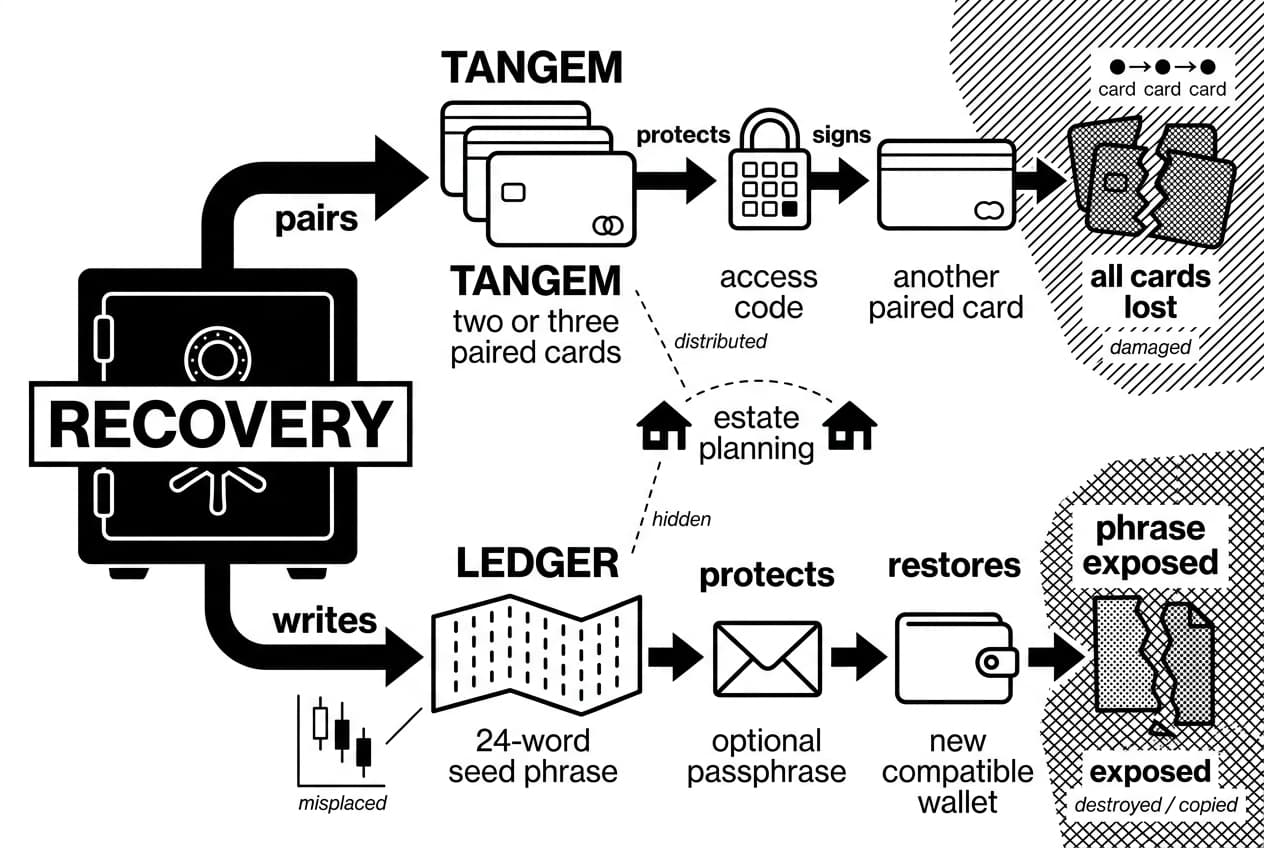
Recovery factor | Tangem | Ledger |
|---|---|---|
Primary backup | Two or three paired cards | 24-word seed phrase |
What must be protected | Cards and access code | Recovery phrase and optional passphrase |
Device loss | Use another paired card | Restore on a new compatible wallet with the phrase |
Main failure mode | All cards lost or damaged, access code forgotten | Phrase exposed, destroyed, copied, or misplaced |
Estate planning | Physical cards can be distributed with instructions | Phrase can be documented but must be hidden from attackers |
Tangem recovery model
Tangem's default seedless setup is easier for non-technical users because there is no phrase to transcribe. During initial setup, users pair backup cards. If one card is lost, another paired card can sign. A sound plan stores cards in separate secure locations, not in the same purse, desk drawer, or travel bag.
The weakness is finality. If every paired card is lost, destroyed, or inaccessible and the user cannot use the access code, there is no universal phrase to restore elsewhere. Tangem's optional seed mode can solve that for users who want standard recovery, but it also reintroduces the same seed-management risk Tangem is designed to avoid.
Ledger recovery model
Ledger's 24-word recovery phrase is portable across compatible wallets. If the device breaks, the phrase can restore funds on a replacement. That portability is powerful, but it also means the phrase is the wallet. Anyone who finds it can take the funds without needing the device.
Andreas Antonopoulos, author and educator, has often emphasized that controlling keys means controlling the recovery material. For Ledger users, that usually means writing the phrase offline, never photographing it, never storing it in cloud notes, and considering a fire-resistant metal backup for long-term storage.
Coins, apps, DeFi, NFTs, and ecosystem support
Asset support changes often, so users should verify their exact chain before buying. Broadly, Tangem covers common mobile holding needs, while Ledger has the stronger ecosystem for desktop, NFTs, staking, and DeFi.
Feature | Tangem | Ledger |
|---|---|---|
Main interface | Mobile app | ledger live on desktop and mobile |
Asset count | 6,000+ reported by Tangem, January 2026 | 5,500+ listed by Ledger, January 2026 |
Browser-wallet use | More limited and mobile-centered | Strong third-party wallet support |
NFT workflow | Basic mobile viewing | Gallery and marketplace workflows through supported apps |
Staking | Available through partners where supported | Available in ledger live for selected assets |
DeFi approvals | Possible, but screenless | Better for review when transaction details are shown on device |
Tangem app and mobile ecosystem
The Tangem app is clean and quick for portfolio viewing, transfers, swaps through integrated providers, and supported dApp connections. It is strongest when the user lives on mobile and does not need a laptop-centered trading setup. For occasional EVM activity, it can be enough.
The constraint is depth. Tangem does not give the same native desktop, NFT, and browser-extension experience. Users who connect to dApps should periodically review and revoke old permissions. Our guide on how to revoke risky token approvals explains that workflow.
Ledger live and third-party wallets
Ledger's app ecosystem is wider. Desktop support helps users who manage multiple accounts, stake from a laptop, connect to MetaMask-style wallets, or use NFT marketplaces. For users who sign many approvals, the combination of browser access and device confirmation is the main benefit.
The downside is that more integrations create more prompts, updates, and decisions. A Ledger user who clicks through contract messages without reading them can still lose funds. The screen is a defense only when the user uses it.
Tangem wallet vs ledger nano: pros and cons
This section applies the same criteria to both wallets: setup burden, recovery risk, signing transparency, app ecosystem, portability, and user-error exposure. The goal is not to crown one winner. It is to identify which weaknesses you can live with.
Tangem strengths
- Fast mobile setup with no seed phrase by default.
- Card form factor is easy to carry and needs no charging.
- Backup-card model is intuitive for users who dislike recovery words.
- Good fit for long-term holders who rarely sign complex approvals.
- Lower maintenance because there are fewer device-management steps.
Tangem weaknesses
- No built-in screen for independent transaction verification.
- Depends on a compatible NFC phone and the official app.
- Less suitable for desktop-first users and heavy DeFi activity.
- All backup cards must be protected from loss, damage, and theft.
- Optional seed mode can confuse users who do not understand the tradeoff.
Ledger strengths
- Hardware screen supports address and amount review before signing.
- Strong desktop and mobile ecosystem through ledger live.
- Broad third-party wallet, staking, NFT, and DeFi compatibility.
- Recovery phrase is portable across compatible wallets.
- Better fit for users who interact with smart contracts often.
Ledger weaknesses
- Seed phrase creates a high-stakes backup burden.
- Setup and firmware updates require more user attention.
- Device-app management can confuse beginners.
- Higher model prices than many card-wallet setups, based on Ledger, January 2026.
- Past company and ecosystem incidents, including the July 2020 customer data breach, increase phishing awareness needs.
Key differences that matter most
The main differences are concrete, not philosophical. They affect how you sign, recover, connect, and manage assets.
- Screen: Ledger shows transaction details on a hardware display, while Tangem shows them on the phone. This matters most for DeFi approvals, large transfers, and unfamiliar addresses.
- Recovery: Ledger relies on a 24-word phrase. Tangem relies on paired backup cards unless the user chooses optional seed mode. Ledger is more portable across wallets; Tangem reduces phrase-handling mistakes.
- Connectivity: Tangem is NFC and mobile-first. Ledger supports USB-C, desktop workflows, and bluetooth on selected models. Phone-only users may prefer Tangem, while laptop users usually benefit from Ledger.
- Ecosystem: Ledger has wider support for third-party wallets, NFTs, staking, and DeFi. Tangem covers common holding and transfer needs but is narrower for complex on-chain activity.
- Ideal user: Tangem fits a seed-phrase averse long-term holder. Ledger fits an active DeFi or multi-chain user who will actually read the device screen before signing.
Security difference
The biggest security gap is transaction verification. Ledger gives the user an independent display. Tangem gives the user a simpler recovery model. If your largest risk is signing a malicious approval, Ledger has the advantage. If your largest risk is losing or exposing a seed phrase, Tangem may be safer in practice.
Convenience difference
Tangem removes setup steps. Ledger adds steps that can either protect the user or confuse the user. The right answer depends on habits. A careful Ledger user gets stronger signing review. A careless Ledger user can still approve a bad contract. A careful Tangem user gets simple storage with fewer recovery-word mistakes.
Which should you choose in 2026?
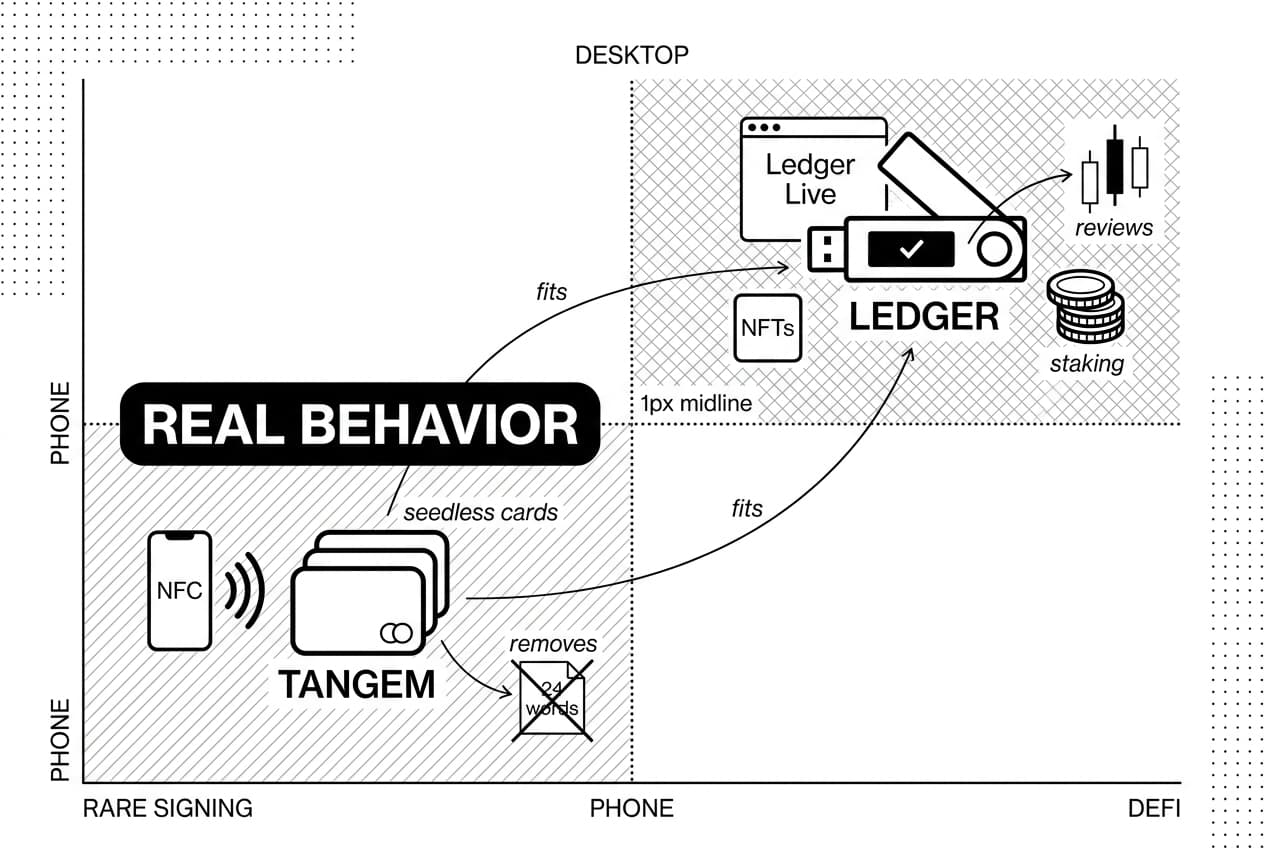
Choose Tangem if you want mobile-first cold storage, seedless backup cards, and simple long-term holding. Choose Ledger if you use DeFi, NFTs, staking, desktop wallets, or want hardware-screen confirmation before signing. The best choice is use-case based: reduce the mistake you are most likely to make.
Choose Tangem if...
- You are a buy-and-hold user. Tangem works well when you rarely sign complex transactions and mostly store assets.
- You fear seed-phrase mistakes. Backup cards remove the default need to write, hide, and protect 24 words.
- You use your phone for everything. NFC signing is quick and does not require a cable or laptop.
- You want lower maintenance. Fewer updates and fewer device apps mean fewer operational steps.
Choose Ledger if...
- You use DeFi often. Smart-contract approvals deserve careful review on a hardware screen where supported.
- You work from a desktop. ledger live and third-party browser wallets fit laptop-based portfolio management.
- You hold NFTs or many chains. Ledger has broader app and marketplace support.
- You understand seed custody. If you can store a recovery phrase safely, Ledger's recovery portability is useful.
If you want another screen-based option with a different design philosophy, see our guide on how to set up a Trezor wallet. Trezor, Coldcard, Keystone, Tangem, and Ledger all serve different users; the safest wallet is the one matched to the owner's real behavior.
Frequently Asked Questions
- What are the disadvantages of Tangem?
- Tangem has no built-in screen, so transaction details display on your smartphone — raising blind-signing concerns if your phone is compromised. Its NFC workflow requires a working device and the official app. That said, the card-based design removes seed phrase exposure, and backup cards make long-term storage straightforward for mobile-first holders.
- Can I lose my crypto on Tangem Wallet?
- Your crypto lives on the blockchain, not inside the card. However, you lose access if all backup cards are physically lost, your access code is forgotten, or you unknowingly sign a malicious transaction. Storing backup cards in separate secure locations and avoiding suspicious transaction approvals significantly reduces these risks.
- What are the top 5 cold wallets?
- Well-regarded options include Ledger, Trezor, Tangem, Coldcard, and Keystone. The right choice depends on your priorities — Coldcard suits Bitcoin-only security, Tangem fits mobile simplicity, Ledger covers broad asset support, Trezor appeals to open-source advocates, and Keystone offers air-gapped QR signing. Budget and recovery preferences also matter.
- Can Tangem be trusted?
- Tangem uses a certified secure element, and private keys are generated and stored on-chip without leaving the card. The company has undergone independent security evaluations. That said, no wallet is risk-free. Always purchase from official channels, verify the app source, and understand that trust ultimately requires your own due diligence.
- What's better than Ledger?
- There's no single answer — it depends on your needs. Tangem suits simple mobile-first storage without seed phrases. Trezor appeals to users who prioritize open-source firmware. Coldcard is preferred by serious Bitcoin-only users. Ledger still leads for broad ecosystem and DeFi support. Define your use case before choosing a replacement.
- What is the most trusted crypto cold wallet?
- Trust depends on your threat model, recovery preferences, and technical comfort. Ledger and Trezor carry long track records and wide community scrutiny. Tangem is increasingly trusted for card-based, seed-free custody. No single wallet fits every user — audits, secure element design, open-source expectations, and operational habits all factor into real-world trustworthiness.
- Is Tangem more secure than Ledger?
- Neither is categorically more secure for every user. Tangem reduces seed-phrase exposure risk, which is a common attack vector. Ledger's built-in screen allows on-device transaction verification, which is valuable for DeFi users. For straightforward long-term holding, Tangem may be operationally safer; for active on-chain activity, Ledger's confirmation display offers meaningful protection.
- Do Tangem wallets get hacked?
- Physically compromising a Tangem card is extremely difficult, but most real-world losses come from phishing, malicious transaction approvals, fake apps, or compromised smartphones rather than direct card attacks. Always buy from official sources, verify app authenticity, and never approve unfamiliar transactions — these habits matter far more than the hardware itself.
Sources
Author

Crypto analyst and blockchain educator with over 8 years of experience in the digital asset space. Former fintech consultant at a major Wall Street firm turned full-time crypto journalist. Specializes in DeFi, tokenomics, and blockchain technology. His writing breaks down complex cryptocurrency concepts into actionable insights for both beginners and seasoned investors.