How to Revoke Token Approvals: 2026 Step-by-Step Guide Safely
How to revoke token approvals: 2026 step-by-step guide safely
By the end of this guide, you will know how to revoke token approvals, check whether the revocation worked, and decide which permissions are worth removing first. The goal is practical wallet hygiene, not panic-clicking every button and wasting gas.
This is a beginner-friendly workflow for using Revoke.cash, Etherscan, BscScan, and PolygonScan. It also explains when revocation helps, when it does not, and what to do if the wallet itself may be compromised.
What token approvals are and what you’ll accomplish
Token approvals are on-chain permissions that let a smart contract spend a specific token from your wallet up to a set allowance. Revoking a token approval sends a new transaction that changes that allowance to zero, so the contract can no longer move that token for future actions.
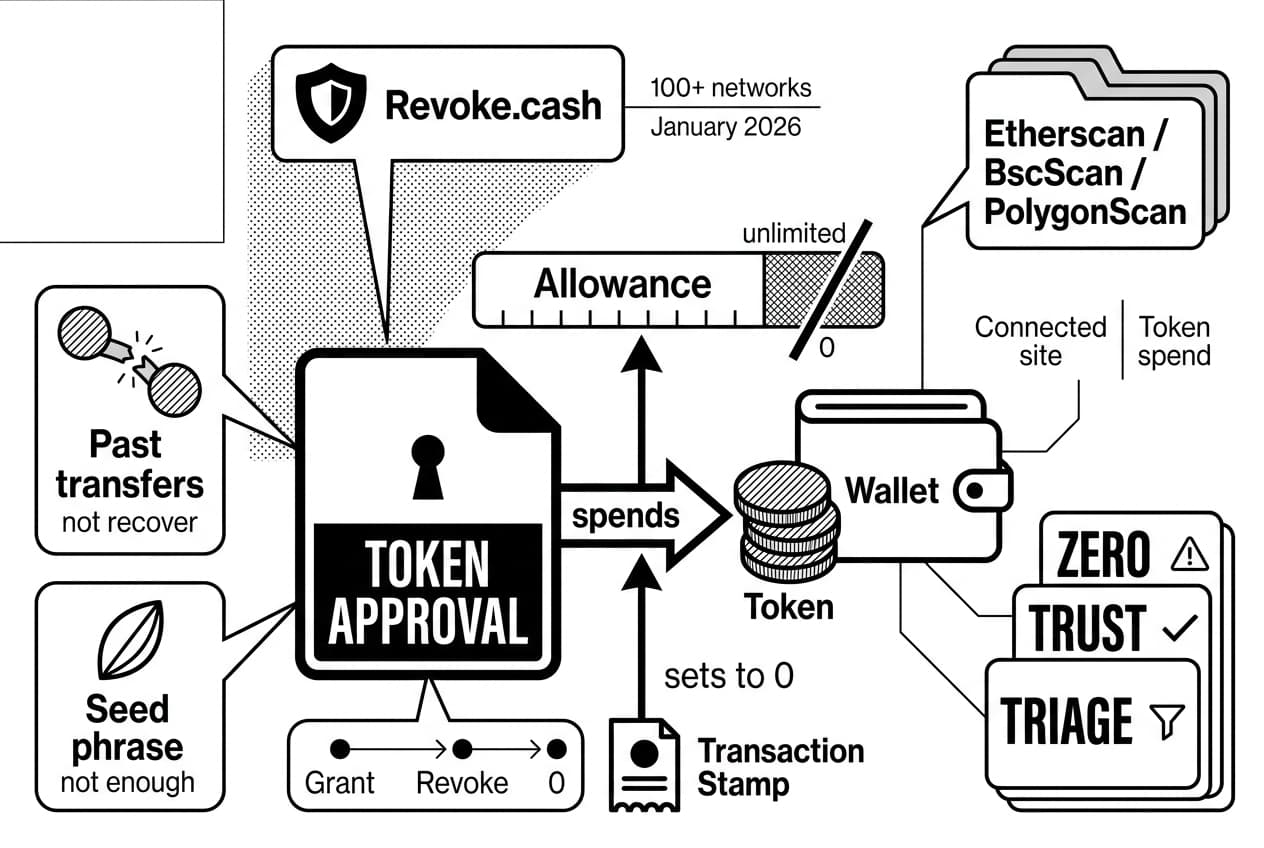
If you have used a decentralized exchange, NFT market, bridge, lending app, or airdrop claim page, you have probably granted approvals. This guide shows you how to revoke token permissions with Revoke.cash and with block explorers such as Etherscan, BscScan, and PolygonScan.
One limit matters before you start: revoking an approval stops future spending only. It does not recover tokens that already left your wallet, and it does not protect you if someone has your seed phrase or private key.
Use the zero-trust approval triage framework while you work:
- Zero: set risky allowances to zero when the spender is unknown, stale, or no longer needed.
- Trust: keep only approvals tied to protocols you still use and can identify.
- Triage: remove unlimited, high-value, and old approvals before low-value ones.
For freshness, this guide reflects the workflow available as of January 2026. Revoke.cash lists support for 100+ networks (Revoke.cash, January 2026), which is why it is the fastest starting point for most EVM wallet checks.
Token approvals vs. wallet connection
Disconnecting a site from your wallet is not the same as revoking an approval. The connected-sites menu in a wallet only stops a website from automatically reading your address through the browser.
The token approval remains on the blockchain until you send a transaction that changes the allowance. That is why a spender contract can still use an old allowance even after you remove the website from your wallet’s connected-site list.
What revoking an approval actually changes
When you revoke token permissions, your wallet sends a transaction to the token contract. That transaction sets the approved amount for a specific spender contract to zero.
The common advice is to revoke everything on a regular schedule. A better beginner workflow is targeted: remove unlimited approvals, approvals older than your current use case, and approvals for contracts you cannot identify. If you suspect seed-phrase exposure, skip revocation as the main response and move your assets to a fresh wallet instead.
Andreas Antonopoulos, author and educator, has long taught that self-custody depends on understanding what you authorize before you sign. Token revocation applies that principle after the fact, but only for future spending permissions.
What you’ll need before you revoke token permissions
Before you connect your wallet to any tool, get the basics ready. Most mistakes happen when users rush, choose the wrong network, or click a fake search result.
Required wallet, network, and gas
Revoking an approval is a real blockchain transaction. You need the wallet that owns the approval, the correct network, and enough native token to pay gas.
- A self-custody wallet: use a browser or mobile wallet you control. If you are unsure whether your wallet is self-custody, read our guide to custodial vs non-custodial wallets.
- Native gas token: use ETH on Ethereum, BNB on bnb chain, POL on Polygon, and the relevant gas token on other networks.
- The correct chain selected: an approval on Arbitrum will not appear when your wallet is set to Ethereum mainnet.
- A trusted checker: Revoke.cash is the main multi-chain option. Block explorers are useful when you want a read-only second check.
Gas fees change constantly. As a practical benchmark, revoking one approval often costs a few cents on many lower-fee EVM networks, while Ethereum mainnet revocations can rise above $20 during congestion according to the Etherscan gas tracker (checked January 2026).
Security checks before connecting
Fake revocation websites are dangerous because they look helpful and ask you to connect a wallet at the exact moment you feel worried. Treat approval checkers the same way you treat exchanges and hardware-wallet software: type the address yourself or use a saved bookmark.
- Type the URL manually. The real address is revoke.cash. Do not use links from direct messages, emails, social posts, or search ads.
- Skip sponsored results. If a search result is marked as an ad, do not use it for wallet security tasks.
- Close unrelated tabs. Reduce the chance that a malicious page interferes with wallet pop-ups.
- Never enter your recovery words. Wallet recovery phrases are commonly 12 or 24 words (MetaMask support, January 2026). No real revocation tool needs them.
- Check HTTPS and the exact domain. Look for the browser padlock and verify every character in the domain.
Warning: If a page asks you to verify, restore, or sync your wallet by typing recovery words, close it immediately. That is a phishing attempt, not a revocation step.
Step 1: open a trusted approval checker
Start with a tool that can read the allowances attached to your public wallet address. You have two safe categories: a multi-chain approval dashboard or a chain-specific block explorer.
Warning: Search ads for fake wallet tools can imitate real security pages. Always type the official address or use a bookmark. If you want to understand why these pages are so effective, read our guide on how wallet drainers steal crypto.
revoke.cash how to use it safely
Go directly to revoke.cash. Do not add extra words, hyphens, or browser extensions unless you intentionally installed an official tool from a verified source.
Revoke.cash is useful because it can show approvals across Ethereum, Arbitrum, Base, Optimism, Polygon, bnb chain, and other EVM networks from one interface. As of January 2026 (Revoke.cash), the site states support for more than 100 networks.
Use block explorers for chain-specific checks
If you only care about one chain, or you want a read-only confirmation, use the official explorer for that chain. You can paste your public address without connecting your wallet.
- Ethereum: use etherscan.io, search your address, then use the token-approval area.
- bnb chain: use bscscan.com, search your address, then check token approvals.
- Polygon: use polygonscan.com, search your address, then check ERC-20 approvals.
A block explorer is safer when you are on a device you do not fully trust, because viewing allowances does not require wallet connection. You only need to connect when you are ready to send the revocation transaction.
Step 2: connect the correct wallet and network
Once the checker is open, pause before clicking connect. Your first job is to confirm that the tool is looking at the wallet and chain you actually want to audit.
Pro tip: Revoke.cash lets you paste a public address into the search bar before connecting. Use that read-only preview first if you only want to inspect your exposure.
Confirm the wallet address
After you connect, compare the address shown in the approval tool with the address inside your wallet app. Match at least the first six and last four characters.
If the characters do not match, disconnect and select the correct account. This is common when you have several accounts in one wallet or multiple wallet extensions installed.
Switch to the right chain
Approvals are chain-specific. An approval granted on Ethereum does not exist on Polygon, and revoking on Polygon does not remove an Ethereum allowance.
Use the network selector near the top of Revoke.cash and choose the chain where the approval lives. Wait for the list to reload before you make any decision.
Andreas Antonopoulos, author and educator, has often emphasized that users must understand what system they are interacting with before signing. In this context, that means checking each network separately.
Step 3: review allowances and spot risky approvals
When the dashboard loads, you will see the token, spender contract, allowance amount, and sometimes the last approval date. Do not revoke everything immediately. Sort the list by risk.
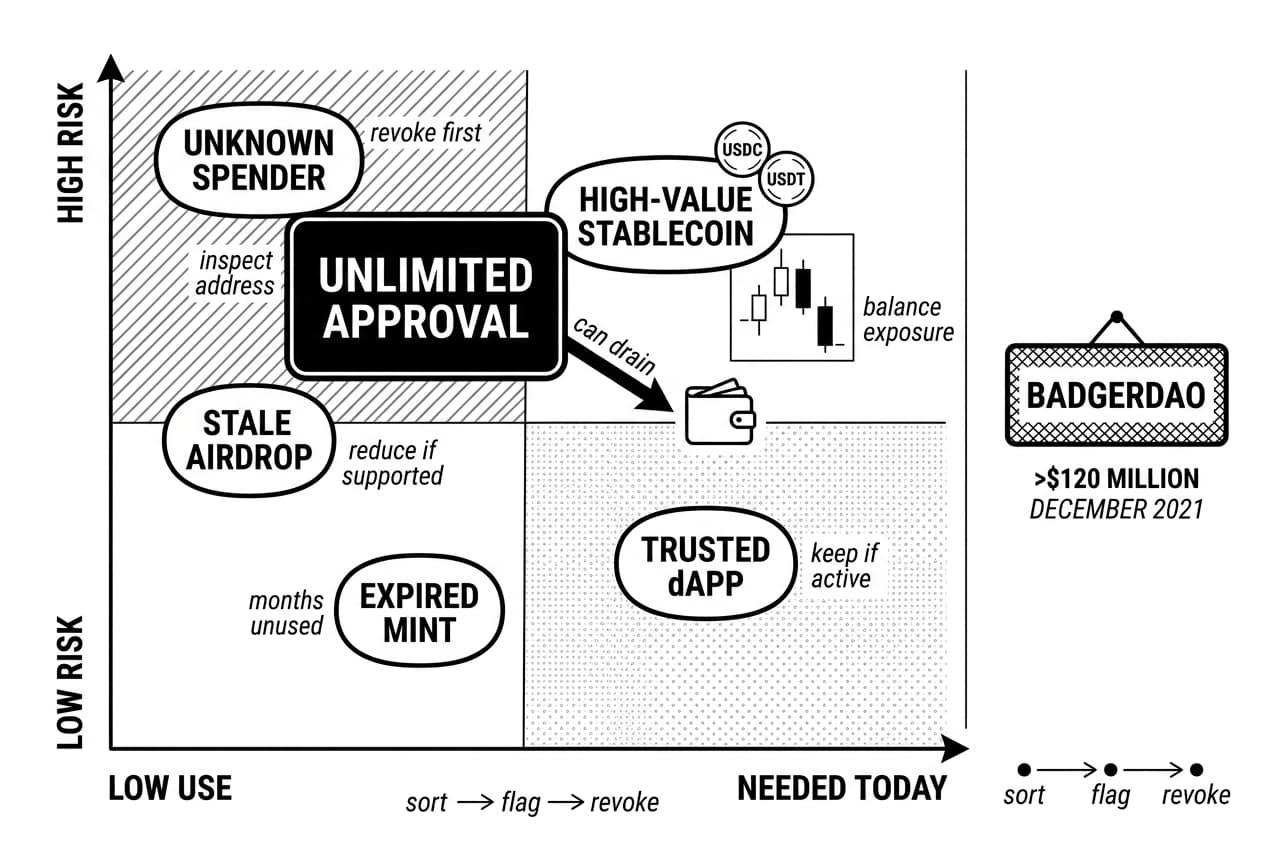
Use this compact triage table before you spend gas:
Approval type | Risk level | What to do |
|---|---|---|
unlimited approval | high | revoke first if the spender is not needed today. |
unknown spender | high | revoke, then inspect the contract address on the explorer. |
trusted active dApp | low | keep if you still use it, or reduce the allowance if supported. |
stale airdrop site | medium to high | revoke because the claim or mint is over. |
high-value stablecoin approval | high | revoke or limit to the exact amount needed. |
Prioritize unlimited and high-value allowances
An unlimited approval lets the spender contract move up to your full balance of that token. If the contract is malicious or later compromised, the allowance can become a direct path to your funds.
Stablecoin approvals deserve extra attention because users often keep meaningful balances in USDC or USDT. A real historical warning is the BadgerDAO incident, where attackers drained more than $120 million (rekt.news, December 2021) after users had previously granted permissions.
Identify contracts you no longer use
Flag anything connected to old mints, expired airdrops, abandoned bridges, or protocols you have not used for months. If you cannot explain why a contract still needs access, treat it as unnecessary.
Do not rely only on token names. Scammers can use familiar-looking labels. Always inspect the spender address and compare it with the official protocol documentation when you are unsure.
Keep useful approvals only when you understand them
People who use DeFi often have approvals. Swaps, lending, liquidity positions, and vault deposits often require a contract to move a token when you submit a transaction.
Your goal is not a perfectly empty list. Your goal is a list where every remaining approval has a clear purpose, a known spender, and a current use.
Step 4: revoke token approvals and confirm the transaction
- Open a trusted approval checker such as Revoke.cash.
- Connect the wallet that owns the approvals you want to remove.
- Select the correct network, such as Ethereum, Arbitrum, Polygon, or bnb chain.
- Review each allowance and choose the risky one to remove.
- Click the revoke button next to the target approval.
- Check the gas fee, network, and contract details in your wallet pop-up.
- Confirm the transaction and wait for it to be included in a block.
- Verify the result on the matching block explorer.
Use the revoke action next to the approval
In Revoke.cash, each approval row has an action button on the right side. Depending on the tool, the button may say revoke, edit, or set allowance to zero.
All of these actions aim to send a transaction that changes the allowance to zero. Click the action only for the approval you have chosen, then read the wallet pop-up before confirming.
Warning: A real revocation will never ask for your recovery phrase. If the page asks for recovery words, close the tab and do not sign anything.
Review gas and transaction details
The wallet pop-up should show the network, gas estimate, and contract interaction. Confirm that the chain matches the chain where the approval exists.
If the Ethereum fee is high, you can wait and try again later. The Etherscan gas tracker (January 2026) is the simplest live reference for whether mainnet is expensive at that moment. On many lower-fee EVM networks, the same approval change is often much cheaper, but always check the wallet quote before signing.
Revoke multiple approvals one at a time unless you fully understand a batch tool. Separate transactions are slower, but they are easier for a beginner to verify.
Wait for confirmation
After you confirm, your wallet broadcasts the transaction. Many lower-fee networks confirm quickly, while Ethereum timing depends on congestion and the gas settings you accepted.
Copy the transaction hash from your wallet activity and paste it into the matching explorer. A success status means the revocation was processed. A pending status means wait. A failed status means the allowance probably did not change.
A useful receipt pattern is: status success, method or input showing an approval change, spender address matching the one you selected, and token address matching the token row. Treat the explorer as the final check, not the approval dashboard alone.
Andreas Antonopoulos, author and educator, teaches users to verify rather than trust a single interface. That habit is useful here: let the block explorer confirm the state change.
Step 5: verify revocation on Etherscan, BscScan, or PolygonScan
Submitting the transaction is not the end. You need to confirm that the allowance is gone on-chain and that the approval checker no longer lists the spender.
Check the transaction hash
Copy the transaction hash from Revoke.cash or from your wallet activity. Paste it into Etherscan for Ethereum, BscScan for bnb chain, or PolygonScan for Polygon.
Look for a success status. If the transaction failed, the revocation did not complete and you need to resubmit with suitable gas settings. If you want more practice reading explorer pages, see our guide on how to verify a contract on Etherscan.
You can also use the Etherscan token approval checker (accessed January 2026) to view ERC-20 allowances directly. This gives you a second read on whether the spender still has permission.
Refresh the approval list
Return to Revoke.cash after the explorer shows success. If the old approval still appears, hard-refresh the page or disconnect and reconnect the wallet.
Also check the network selector. Looking at the wrong chain is one of the most common reasons users think a revoke did not work.
- Pending transaction: wait 1 to 2 minutes, then refresh the explorer.
- Failed transaction: resubmit with updated gas settings.
- Approval still visible: hard-refresh, then check that the selected network is correct.
- Hash not found: use the explorer for the chain where you sent the transaction.
Once the explorer shows success and the allowance row is gone or set to zero, that spender can no longer move that token from your wallet.
When not to revoke everything: costs, tradeoffs, and edge cases
Do not revoke all approvals blindly when gas is expensive, when an approval supports an active DeFi position, or when your real problem is private-key compromise. Revocation reduces allowance risk, but it costs gas and does not stop an attacker who already controls your wallet. Prioritize risky permissions first.
Revoking does not recover stolen funds
Revocation blocks future use of an allowance. It cannot reverse a swap, bridge, transfer, or drain that already happened.
If funds are already gone, use the transaction history to understand what happened, then secure remaining assets. Do not spend all your gas revoking old approvals if the seed phrase itself may be exposed.
Some active DeFi positions may need permissions
If you supply liquidity, use a lending market, or run an automated strategy, the protocol may need an active approval. Removing that approval may force you to approve again before you can withdraw, rebalance, or close the position.
That does not mean you should keep unlimited approvals forever. It means you should understand the position first, then revoke or reduce the allowance when the position no longer needs it.
If your seed phrase is compromised, stop and move assets
If someone has your seed phrase or private key, they do not need a token approval. They can import the wallet and transfer assets directly.
In that situation, first check whether your wallet is compromised, then move remaining assets to a freshly generated wallet that has never shared the same recovery phrase. Revoking approvals on the old wallet may help only after you have protected funds that can still be moved.
Best practices for staying secure after revoking approvals
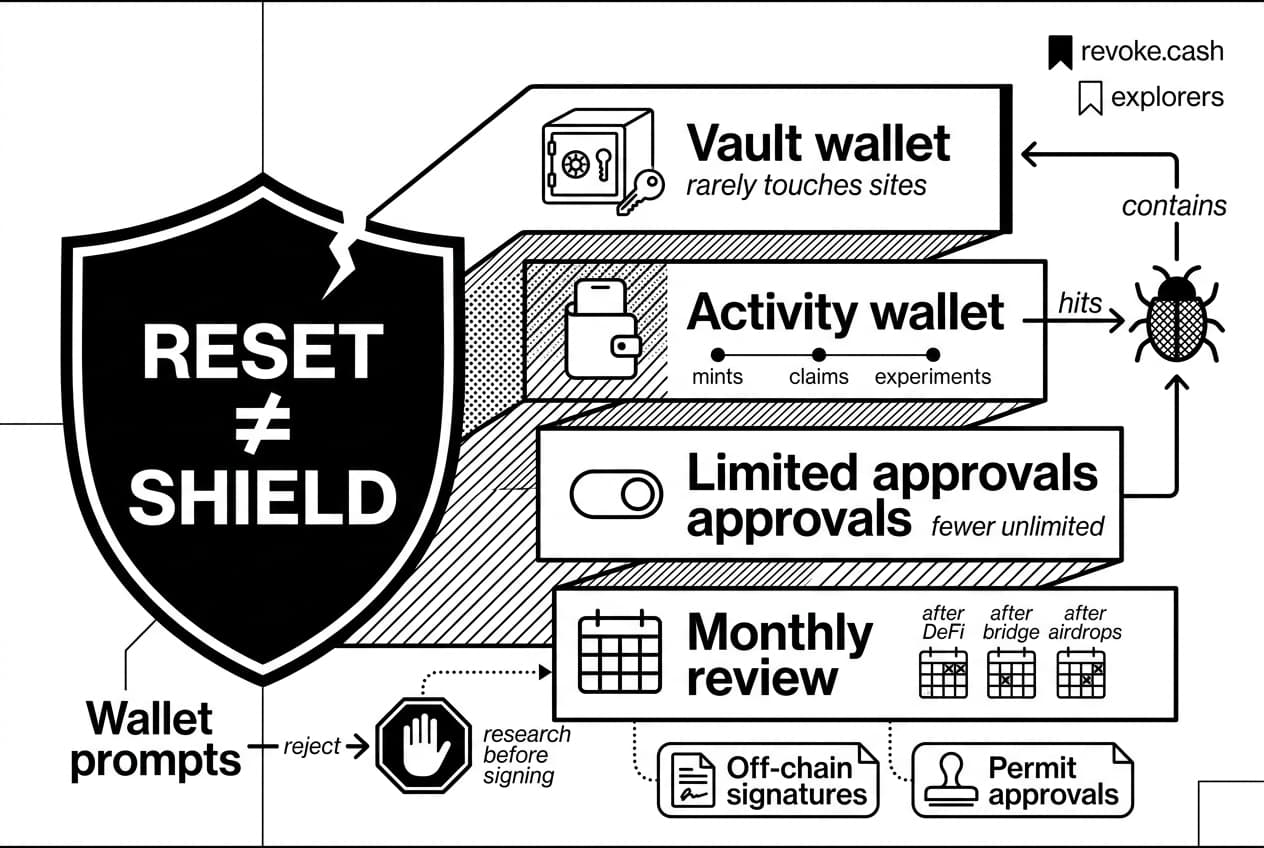
Revoking old permissions is a reset, not a permanent shield. Your long-term safety comes from smaller balances in hot wallets, fewer unlimited approvals, and a habit of reading wallet prompts.
Use separate wallets for different risk levels
Keep long-term holdings in a vault wallet, ideally hardware-backed, that rarely touches new sites. Use a separate activity wallet for mints, claims, new protocols, and experiments.
If the activity wallet hits a bad contract, your main holdings are less exposed. This habit also reduces your exposure to common smart contract risks before they reach your highest-value address.
Review approvals on a schedule
Check approvals after major DeFi activity, NFT mints, bridge use, and airdrop claims. At minimum, scan your active wallets monthly across every chain you use.
- Set a monthly calendar reminder for your active wallets.
- Review immediately after using a new protocol.
- Bookmark revoke.cash and your main explorers.
- Keep only spending money in hot wallets.
- Choose limited approvals when a protocol offers them.
Pro tip: Some risks do not appear in token-approval tools. Off-chain signatures, permit-style approvals, and malicious transaction requests may need different checks. If you do not understand a wallet prompt, reject it and research before signing.
Frequently Asked Questions
- What is revoke approval?
- Revoke approval is an on-chain action that removes a smart contract's permission to spend a specific token from your wallet. It only affects future access — it does not undo previous swaps, completed transfers, or funds already stolen by a malicious contract.
- What is a revoked access token?
- A revoked access token is a permission that has been invalidated so it can no longer authorize future actions. In Web3, this means removing a smart contract's spending allowance. In traditional software, it means disabling an authentication credential so it can no longer grant access to an account or API.
- Can you revoke an access token?
- Yes, but the process differs by context. In crypto wallets, you revoke token permissions by sending a blockchain transaction that sets the allowance to zero. In apps or APIs, access-token revocation typically happens inside account settings or a developer dashboard, with no blockchain transaction required.
- How to revoke token approval?
- Open a trusted approval checker like Revoke.cash or Etherscan, connect your wallet and select the correct chain, locate the approval you want to remove, click Revoke or manually set the allowance to zero, confirm the transaction in your wallet, and verify the on-chain confirmation in the block explorer.
- How to revoke token approvals on Etherscan?
- Go to Etherscan's Token Approval Checker, connect your wallet or enter your public address, then browse your ERC-20 or NFT approvals. Click Revoke next to the spender you want to remove, confirm the transaction in your wallet, and wait for on-chain confirmation before considering it complete.
- What does revoking token allowance do?
- Revoking a token allowance prevents a previously approved smart contract from spending that token from your wallet going forward. It does not disconnect your wallet from a website, cancel permissions across other chains, or recover any funds that were already moved before the revocation was submitted.
- Should you revoke all token approvals?
- Not necessarily. Focus on unlimited approvals, unrecognized spenders, outdated dApps, risky airdrop sites, and high-value token permissions. Revoking every approval costs gas fees and may force you to re-approve trusted protocols later, which adds unnecessary expense without meaningfully improving your security.
Sources
Author

Crypto analyst and blockchain educator with over 8 years of experience in the digital asset space. Former fintech consultant at a major Wall Street firm turned full-time crypto journalist. Specializes in DeFi, tokenomics, and blockchain technology. His writing breaks down complex cryptocurrency concepts into actionable insights for both beginners and seasoned investors.