Rent GPU Crypto: Contribute GPU Power to AI Networks 2026

rent gpu crypto: contribute GPU power to AI networks in 2026
Introduction: what you'll accomplish
As of March 2026, this guide shows you how to contribute GPU power to decentralized AI networks, estimate realistic returns, and avoid the setup mistakes that quietly erase profit. You will audit your hardware, choose a provider marketplace, secure the host, list your card, and track whether the work is worth keeping online.
The usual advice says to chase the highest listed hourly rate. That is incomplete. For a provider, rent gpu crypto income depends more on uptime, VRAM fit, electricity cost, verification rules, and idle time. We call this the five-variable profitability test, and you will use it before you risk hardware or capital.
This is an owner-side guide, not a buyer price comparison. If you already own a gaming card, a workstation card, or old mining rigs, you will learn how to treat them as small compute inventory. If you are thinking about buying new cards for gpu mining ai, you will learn how to test the numbers before you spend.
Who this guide is for
You belong here if you own one or more GPUs that sit idle for part of the day. That includes gamers, former proof-of-work miners, small studios, researchers, and builders running local AI experiments.
You do not need machine learning experience. You do need a stable internet connection, basic comfort with a terminal, and enough discipline to track power, downtime, fees, and taxes.
What success looks like
By the end, you should have a secure host, current drivers, a working container runtime, one chosen marketplace, and a price based on actual cost inputs. You should also have alerts for downtime and a simple payout log.
The end state is not just having a GPU listed somewhere. It is a small, measurable compute operation you can check in five minutes a day.
What you'll need before you rent gpu crypto compute
Before you connect your machine to a decentralized AI network, take inventory. AI compute buyers care about VRAM, driver support, uptime, bandwidth, storage speed, and whether your machine can run containerized jobs without breaking.
Use this short checklist before you register:
- GPU with enough VRAM for target jobs, with 24 GB preferred for many AI inference tasks
- Stable power supply with wattage headroom and safe cabling
- Linux machine, with Ubuntu 22.04 LTS widely supported (Ubuntu release notes, April 2022)
- Current GPU drivers, CUDA for nvidia cards, or ROCm where supported
- Docker plus the nvidia container toolkit for GPU pass-through (NVIDIA docs, accessed March 2026)
- Wallet or payout account that is separate from your long-term savings wallet
- Broadband internet with stable upload, low packet loss, and no hidden data cap
- Monitoring for temperature, uptime, fan speed, disk space, and job failures
- Tax records for every payout, fee, and token conversion
Hardware requirements: GPU, VRAM, RAM, and storage
Your GPU tier decides which jobs you can attract. A consumer card with 8 GB or 12 GB of VRAM may run smaller inference or image jobs. A 24 GB card can serve more demanding workloads. Data-center cards with 40 GB to 80 GB can qualify for larger training and batch inference jobs.
gpu model | vram | best fit | demand signal |
|---|---|---|---|
nvidia RTX 3060 or 4060 | 8 GB to 12 GB | small inference, image tasks, testing | lower and price-sensitive |
nvidia RTX 3090 | 24 GB | LLM inference, image generation, small fine-tuning | steady when priced well |
nvidia RTX 4090 | 24 GB, per official specs (NVIDIA specs, September 2022) | fast inference, image generation, model serving | high for consumer hardware |
nvidia A100 or H100 | 40 GB to 80 GB; H100 SXM includes 80 GB options (NVIDIA H100 page, March 2022) | larger training, batch inference, research jobs | highest but costly to buy |
Pair the GPU with at least 32 GB of system RAM and a fast SSD. Model weights and containers are large. A slow disk can cause timeouts even when the GPU itself is strong.
Software requirements: drivers, CUDA, Docker, and monitoring
Linux is the practical choice because most provider clients and container images are built for it. Install the latest stable driver recommended by your chosen platform, then confirm the GPU appears with nvidia-smi.
Install Docker and confirm that containers can see the GPU. For monitoring, start with nvtop, nvidia-smi, system logs, and your platform dashboard. Add alerting before you leave the machine unattended.
Warning: Never store seed phrases, private keys, browser wallets, exchange sessions, or personal documents on a machine you expose to renters. Treat the provider host as semi-public infrastructure.
Cost inputs to gather first
Profit in gpu mining ai compute is not the hourly rate alone. Write down your electricity price per kWh, expected online hours, realistic utilization, platform fee, cooling cost, internet limits, and hardware depreciation.
Here is the small dataset you will build for your own machine before listing. It is not a market forecast. It is a provider-side worksheet you can update weekly with your own observed numbers.
input | example value | why it matters | where to find it |
|---|---|---|---|
hourly rate | $0.35 per hour | sets the gross revenue ceiling | live listings for your GPU model |
utilization | 30%, 60%, and 90% scenarios | shows billed hours rather than online hours | provider dashboard after launch |
electricity cost | $0.12 per kWh times 350 W equals about $0.042 per hour | often your largest running cost | utility bill or smart plug |
platform fee | use the exact fee shown in the platform dashboard | reduces payout before you receive it | fee page, listing screen, or payout receipt |
cooling | add 10% to 15% to power in a warm room | fans and air conditioning change margin | room meter or power meter |
depreciation | purchase price divided over 3 to 5 years | hardware wears out and resale value falls | receipt and resale listings |
Run the worksheet at low, medium, and high utilization. If the low case does not cover electricity, wait before buying more hardware.
How decentralized AI GPU networks work
Decentralized AI GPU networks are marketplaces where individual owners supply compute from their own machines, AI developers rent it for inference, training, or rendering, and payments settle through platform balances, tokens, stablecoins, or fiat rails. When you rent gpu crypto capacity as a provider, you are running a micro-datacenter rather than holding a passive asset.
Cloud GPUs vs decentralized GPU marketplaces
A cloud GPU is hosted by a centralized provider and billed by time. You usually get managed regions, predictable support, and stronger service commitments. The tradeoff is price and less flexibility for small providers.
For a pricing reference, DigitalOcean lists hosted H100 GPU droplets at $2.99 per GPU-hour on its public pricing page (DigitalOcean pricing, accessed March 2026). Decentralized marketplaces may list lower prices for similar chips, but reliability depends on the individual host.
feature | centralized cloud | decentralized marketplace |
|---|---|---|
pricing | vendor rate card | host-set or market-based |
uptime | service commitment from provider | host reputation and monitoring |
storage | managed volumes | varies by host |
regions | provider-owned regions | wherever hosts operate |
payment | card, invoice, or cloud credits | platform balance, token, stablecoin, or fiat payout |
Why AI renters care about real-time infrastructure
AI renters are not buying raw hashrate. They want jobs to start, finish, and return results without interruption. Low uptime, slow storage, blocked ports, or a mismatched driver can waste the renter's session.
Persistent storage also matters. If a renter has to download large model weights every session, your node becomes less attractive. Good hosts win by being boring: stable, cool, reachable, and honest about specs.
Where crypto enters the process
Crypto rails help networks pay many global providers without a bank account in every country. Some systems use tokens for settlement, incentives, staking, or reputation. Others use crypto only in the payout layer while scheduling jobs on conventional servers.
It is worth understanding how AI tokens differ from crypto tokens, because a compute reward token can behave differently from a governance token. The purchasing-power lens used by investors such as Lyn Alden is useful here: measure what your payouts buy after fees, volatility, and waiting periods.
Step 1: audit your GPU, power costs, and AI fit
Before you list a card, spend 30 minutes auditing the machine. The action is simple: confirm what the GPU can run, what it costs per hour, and whether the expected demand fits your VRAM tier.
Check VRAM and workload match
VRAM decides job eligibility. A 12 GB card can handle small inference and image jobs. A 24 GB card can handle larger inference and more useful fine-tuning. An 80 GB data-center card can serve workloads that consumer cards cannot load.
This is where gpu mining ai differs from proof-of-work mining. Old mining tuned for memory bandwidth and watt efficiency. AI compute adds driver support, CUDA compatibility, model size, and container stability.
gpu tier | vram | fits these jobs | provider note |
|---|---|---|---|
entry consumer | 8 GB to 12 GB | small inference, image jobs, tests | price low and expect idle time |
upper consumer | 24 GB | LLM inference, image generation, smaller fine-tuning | best starting point for many owners |
data-center | 40 GB to 80 GB | batch jobs, training, larger model serving | higher demand, higher capital risk |
Calculate break-even before you list
Use this formula for each scenario: (hourly rate times hours online times utilization) minus electricity, cooling, depreciation, and platform fees equals net daily income.
Model 30%, 60%, and 90% utilization. A new host should not assume full-time rental. Reputation, region, pricing, and verification can all delay demand.
Pro tip: Start with the 30% case. If that case still covers power and depreciation, you have room to learn without losing money. If it fails badly, fix the cost structure or wait for better demand.
Step 2: choose a decentralized AI network or marketplace
Now choose where your GPU should run. The action is to compare provider requirements before installing any agent, wallet connector, or command-line tool.
Compare provider requirements
Each platform has its own rules. Some accept open provider signups. Others require hardware verification, application review, staking, a minimum storage tier, or a waitlist.
- GPU support: confirm your exact model is accepted.
- Minimum VRAM: check whether the floor is 8 GB, 16 GB, 24 GB, or higher.
- Operating system: confirm Linux version and kernel support.
- Setup method: note whether you need a CLI, docker image, or custom installer.
- Storage: confirm SSD or NVMe requirements before registering.
- Bandwidth: test upload speed and packet loss, not just download speed.
- Payout: check currency, lockup, withdrawal minimum, and fee.
selection factor | what to check | why it matters |
|---|---|---|
provider support | whether new hosts can join now | some buyer dashboards do not accept public providers |
GPU demand | live rentals for your exact model | similar hourly rates can hide very different idle time |
payout type | fiat, stablecoin, or native token | token volatility can change real income |
fees | provider fee shown before payout | gross revenue is not your profit |
verification | benchmark, proof, KYC, or staking | failed verification delays earnings |
storage | minimum free SSD space | large model files can fill a small disk |
regions | where demand is strongest | latency and buyer location affect rentals |
reputation | rating, uptime score, or on-chain history | new hosts often need time to build trust |
Check demand before buying hardware
Watch live listings for at least a week. Record the number of available cards like yours, the median price, and how many are actually rented. A one-day spike is not enough evidence to buy more GPUs.
Warning: Do not buy multiple cards only because a dashboard shows a temporary high rate. By the time hardware arrives, demand may have moved, verification may still be pending, and your capital may sit idle.
Understand token and payment risk
A high token-denominated reward can shrink before you withdraw it. Check lockups, withdrawal minimums, liquidity, tax reporting, and whether emissions are declining over time.
Early network participation can also create optional upside. Some providers track AI crypto airdrop opportunities, but you should never count unannounced rewards as profit. Treat them as possible upside after the machine already works on ordinary economics.
Step 3: prepare and secure your machine
With a marketplace selected, prepare the host. The action is to install drivers, test GPU access inside containers, and remove anything sensitive before renters can touch the machine.
Install drivers and test the GPU
Start with a clean Linux install. Update the system, install the driver recommended by your platform, reboot, and run nvidia-smi. It should show the card, driver version, memory, temperature, and power draw.
Then test a small containerized AI job. Do not list the GPU until a container can see the GPU and complete a short workload without errors.
$ nvidia-smi --query-gpu=name,memory.total,temperature.gpu --format=csv
name, memory.total [MiB], temperature.gpu
NVIDIA RTX 4090, 24564 MiB, 41
$ docker run --gpus all --rm nvidia/cuda:12.4.1-base-ubuntu22.04 nvidia-smiGPU detected inside container: yes
This transcript is the evidence pattern you want from your own machine. If the host sees the card but Docker does not, fix container pass-through before you register the node.
Harden access before renters connect
Disable password SSH and use key-only login. Create a dedicated non-root account for provider software. Open only the ports required by the platform and keep the firewall on.
Never mix your payout wallet, browser wallet, or personal files with a rental host. If you think an old wallet may already be exposed, pause and check whether your wallet is compromised before you go live.
Plan storage and bandwidth
Use a fast local SSD with enough free space for containers and model files. For many hosts, 500 GB free is a practical starting point, especially if renters pull large models repeatedly.
Upload speed matters. Run speed tests at the same time of day your node will be rented. If your internet service throttles sustained upload, price the node lower or choose a platform where lighter jobs are common.
Use the three-layer readiness check: compute, security, and throughput. Compute means driver and container tests pass. Security means clean host and locked-down access. Throughput means disk and network can keep up.
Step 4: list, price, and launch your GPU
Your host is ready. The action now is to create the provider listing, set a price based on comparable live inventory, and run one test job before accepting public work.
The usual flow is: create an account, add a payout method, register the machine, install the provider client, allocate storage, set the hourly price, then click the platform's list, deploy, or start button.
Set a competitive hourly price
Filter the marketplace by your GPU model, VRAM, region, RAM, storage, and uptime. Start slightly below similar new listings until you build a review history. Once your uptime score improves, raise the rate in small steps.
Do not copy a rate from a blog post, including this one. Use live marketplace data because prices change with model demand, token incentives, and regional supply.
Create a renter-ready profile
Fill in every field you can: GPU model, available VRAM, CUDA version, system RAM, vCPU count, SSD size, region, bandwidth, uptime target, and maintenance window. Renters filter by these details.
Pro tip: Be conservative with available VRAM. If the host OS and display reserve memory, list the usable amount. One failed job from overstated specs can damage your rating faster than a low price can repair it.
Run a test job before going public
Run a small image generation, benchmark, or LLM prompt before you accept renters. Watch temperature, job logs, disk usage, and whether the payout counter increments.
Keep sustained GPU temperature below your card's safe operating range. If you use an overclock from old mining days, reduce it first. AI jobs can run longer and steadier than proof-of-work workloads.
Step 5: monitor profit, uptime, and common errors
Listing the GPU is only the start. The action is to manage it like a small service business: track income, fix failures quickly, and decide whether to scale, pause, or exit.
Track the metrics that matter
- Utilization rate: rented hours divided by online hours.
- Net revenue after power: payout minus electricity, cooling, and fees.
- Average rental duration: very short jobs can signal failures or poor fit.
- Failed jobs: review container logs daily during the first week.
- GPU temperature: watch sustained load, not idle temperature.
- Memory errors: check error counters if your card supports them.
- Payout value: record token or fiat value at receipt.
- Depreciation: subtract a monthly hardware cost from profit.
Set uptime alerts. A cheap alert that catches a node outage in five minutes can save more money than a slightly higher hourly listing price.
Troubleshoot common beginner mistakes
- CUDA not detected: reinstall the nvidia container toolkit and confirm
nvidia-smiworks inside Docker before relisting. - Driver mismatch: pin the driver version supported by the platform rather than blindly installing the newest release.
- Full disk: prune unused containers and logs. Use
docker system prune -fcarefully after confirming no active job needs those files. - Overheating: clean dust, improve airflow, reduce power limit, and review safe GPU overclocking and stability testing.
- Blocked ports: compare your router and firewall rules with the platform's required ports.
- Unstable overclock: test overnight at AI-style sustained load, not just a 10-minute mining benchmark.
- Failed verification: re-run the benchmark, check wallet linking, and allow 24 to 48 hours if manual review is required.
Know when to scale or exit
Run one machine for 30 days before buying another. If utilization stays above 60% and net income beats power plus depreciation, adding a second card may make sense. If utilization stays below 30%, adjust price or try a different platform before blaming the hardware.
Keep a weekly spreadsheet with date, payout amount, token or fiat value at receipt, platform fee, and electricity estimate. A crypto tax accountant will need that record if payouts are taxable in your jurisdiction.
Set exit rules in advance. Pause if temperature trends upward, failed jobs rise, provider rewards are cut, or utilization stays below 20% for two straight months after price changes. Protecting resale value is part of profitability.
Summary and next steps
You have covered the full path: audit the card, choose a marketplace, secure the host, list the GPU, and measure real returns. The rule is simple: start with one machine, track 30 days of data, and scale only after net returns stay positive.
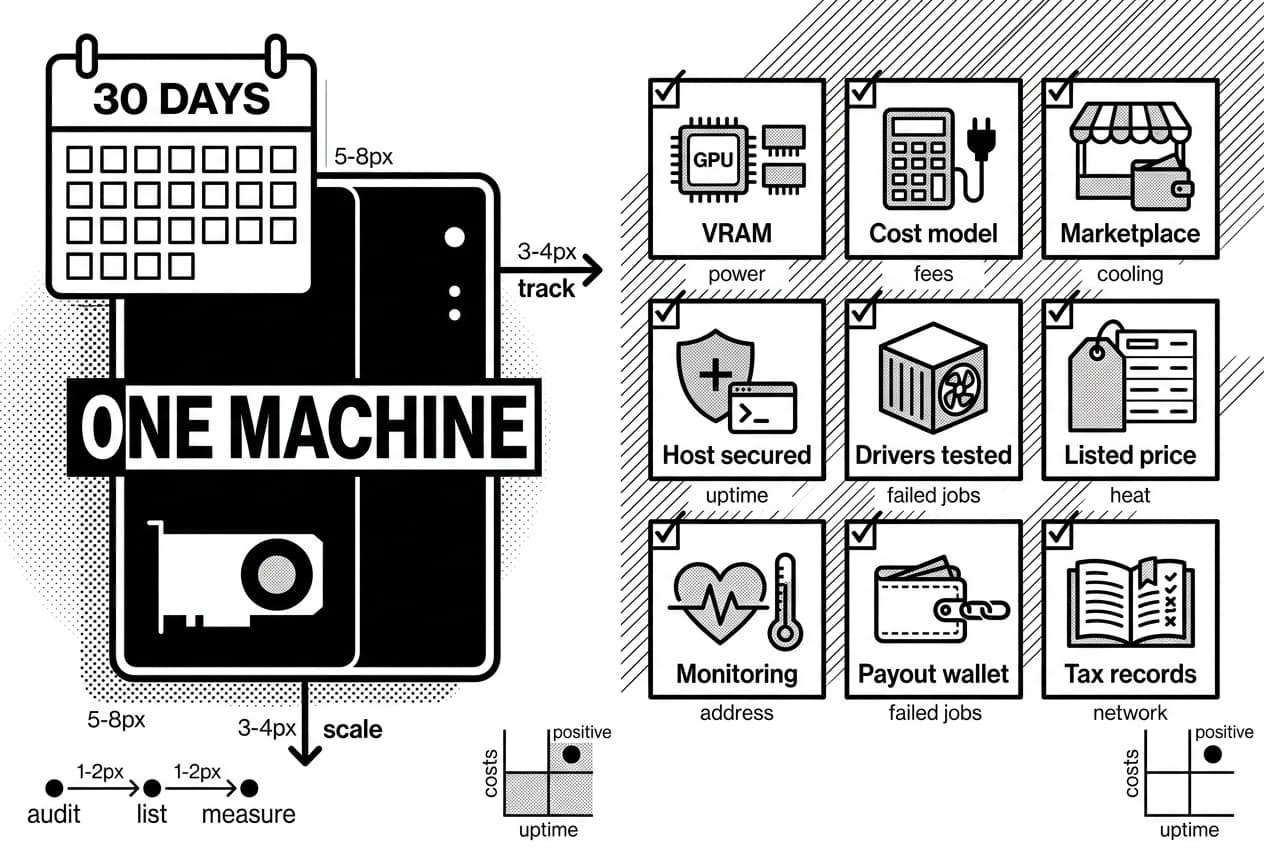
Your 2026 GPU contribution checklist
- Compatible GPU confirmed: VRAM meets the platform minimum.
- Cost model complete: power, utilization, fees, cooling, and depreciation are included.
- Marketplace chosen: provider account, payout method, and verification path are clear.
- Host secured: firewall, SSH keys, non-root user, and clean storage are ready.
- Drivers tested: the GPU is visible inside containers.
- Listed price set: based on live comparable listings.
- Monitoring active: uptime, heat, disk, and failed jobs are tracked.
- Payout wallet verified: the address and network are correct.
- Tax records started: every payout and fee is logged.
The practical opportunity is not magic income. It is converting idle hardware into paid compute when your costs, uptime, and hardware fit are strong enough.
What to learn next
Once your GPU earns steadily, learn what your compute can power. You can build an AI agent that uses crypto infrastructure and see the buyer side of the market. You can also study zkML and private machine learning on blockchain if verified compute interests you.
For a broader public argument about owning digital infrastructure, see Balaji Srinivasan. Whether or not you share his view, the useful habit is the same: know what your hardware earns, what it costs, and when to turn it off.
Frequently Asked Questions
- Is renting out GPU profitable?
- It can be, but profitability depends on your hourly rate, actual utilization, local electricity price, platform fees, cooling costs, hardware depreciation, and token volatility. The advertised rental rate is misleading — what matters is net income after accounting for downtime and all ongoing expenses.
- Is it possible to rent a GPU?
- Yes, from both sides. Users can rent cloud GPUs for AI training and inference, while hardware owners can rent idle GPUs through centralized marketplaces or decentralized compute networks. Provider eligibility depends on platform rules, hardware compatibility, and minimum performance requirements.
- How much is GPU rent per hour?
- Hourly prices vary widely based on GPU model, VRAM capacity, region, uptime guarantees, attached storage, and live market demand. Rather than relying on any fixed price, compare current listings for similar RTX, A100, or H100 configurations directly on the platforms you plan to use.
- How much does it cost to rent a GPU?
- Total cost includes hourly or per-second compute charges plus storage, data transfer fees, platform commissions, and minimum billing periods where applicable. Decentralized marketplaces often undercut centralized cloud providers on price, but reliability and uptime can vary more significantly between individual providers.
- Can mining GPUs be used for AI?
- Yes. Many former mining GPUs handle AI workloads well, provided they have sufficient VRAM, stable memory, supported drivers, and compatible CUDA or ROCm implementation. Cards tuned for hashrate may require more conservative clock settings and improved cooling to sustain the longer, steadier loads that AI jobs demand.
- Is AI mining profitable?
- AI mining — earning rewards by supplying GPU compute to AI networks — differs from proof-of-work mining entirely. Profitability depends on demand for your specific GPU, your uptime consistency, token value, power costs, and whether the network maintains enough paying buyers to sustain competitive reward rates over time.
- Is GPU mining dead in 2026?
- Classic proof-of-work GPU mining is far less dominant than it once was, but GPUs themselves remain economically useful. AI inference, rendering, scientific computing, and decentralized infrastructure have absorbed much of that hardware. The opportunity simply shifted from competing on hashrate to supplying useful, verifiable compute.
- Is GPU mining still profitable?
- Niche GPU mining can still be profitable under very cheap power and favorable coin prices, but most owners should compare it directly against AI compute rental income. Use net earnings after electricity, hardware wear, fees, and asset liquidity as your real decision metric — not gross token rewards alone.
Sources
Author

Crypto analyst and blockchain educator with over 8 years of experience in the digital asset space. Former fintech consultant at a major Wall Street firm turned full-time crypto journalist. Specializes in DeFi, tokenomics, and blockchain technology. His writing breaks down complex cryptocurrency concepts into actionable insights for both beginners and seasoned investors.