How to Check If Wallet Is Compromised: 9 Urgent Warning Signs
How to Check If Wallet Is Compromised: 9 Urgent Warning Signs
What you’ll accomplish before you touch your funds
If something feels off with your wallet, pause before you click anything. This guide shows you how to check if wallet is compromised, identify the most likely cause, and decide whether to revoke approvals, move funds, or both.
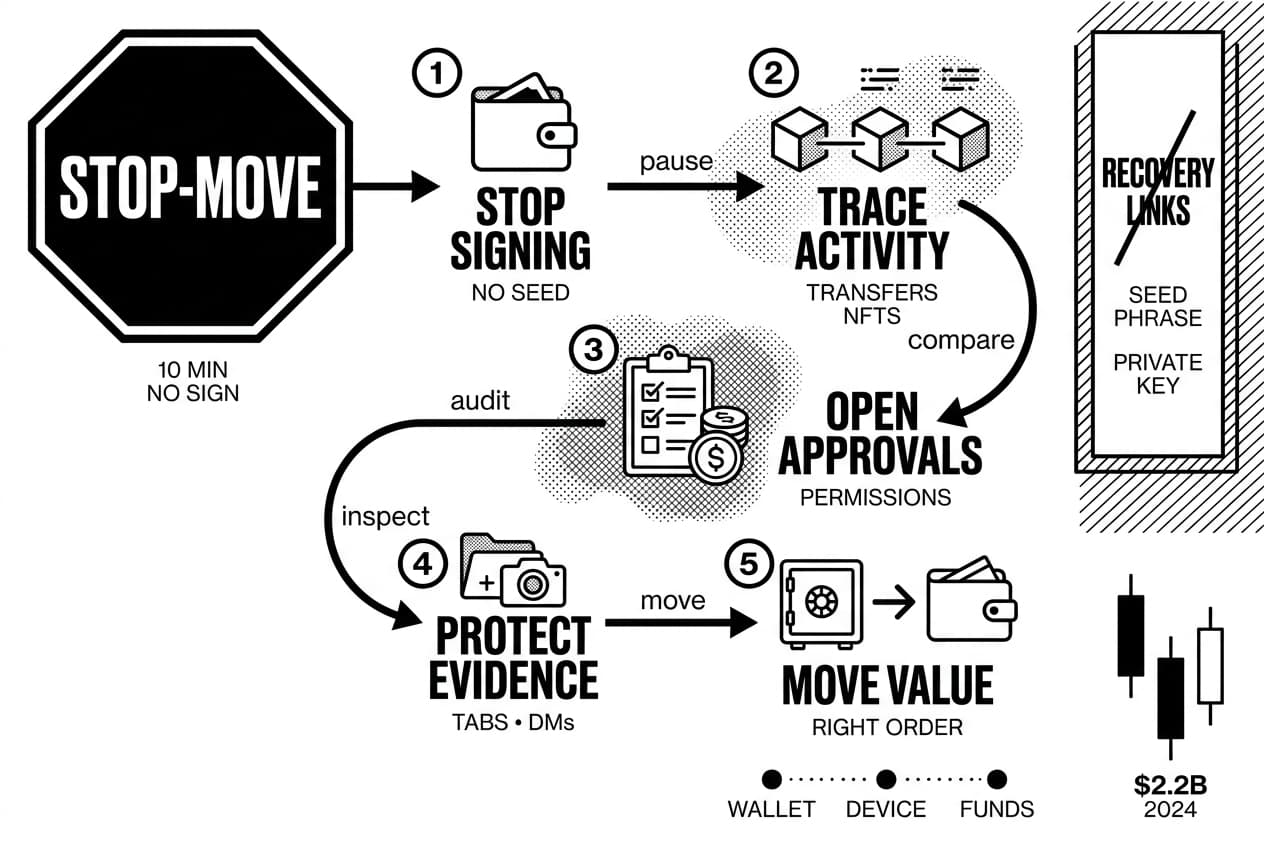
As of May 2026, the safest beginner workflow is not just checking your balance. You need to compare on-chain activity, review token and NFT transfers, audit permissions, inspect connected sites, check your device, and then move funds only when you know the right order.
This guide uses the STOP-MOVE framework: Stop signing, Trace on-chain activity, Open approval records, Protect evidence, then Move value safely. It helps you avoid the common mistake of rushing into a second scam while trying to escape the first one.
Start with the 10-minute triage rule
For the next 10 minutes, do not sign transactions, do not connect to new sites, and do not enter your seed phrase anywhere. Close unfamiliar browser tabs, ignore direct messages, and do not follow links from anyone claiming to be wallet support.
The reason is simple: attackers move fast. Chainalysis reported $2.2 billion stolen from crypto platforms in 2024 (Chainalysis, Feb. 2025). Panic-clicking through recovery links can turn a partial incident into a full drain.
Warning: A real wallet recovery process never asks for your seed phrase in a website, chat window, browser extension, or form. If a prompt asks for your seed phrase, private key, or wallet password, close it.
Wallet compromise vs dapp exploit vs exchange hack
These incidents can look similar, but the fix changes depending on who controls the keys and what you signed.
Incident type | What happened | Who can move funds | Immediate response |
|---|---|---|---|
Exposed seed phrase | Someone may have your 12 or 24-word recovery phrase | You and the attacker | Create a new wallet on a clean device and migrate assets |
Malicious approval | You gave a contract spending rights over a token | You, plus the approved contract | Revoke approval from a clean device |
Bad signature | You signed a permit or unreadable message | The attacker may use that signature later | Revoke if possible, then move high-value assets |
Compromised device | Malware, a rogue extension, or clipboard theft may be active | You for now, but the device is unsafe | Stop using the device for wallet actions |
Exchange account takeover | A custodial account was accessed with stolen credentials | The exchange controls custody | Freeze withdrawals and contact support |
Andreas Antonopoulos, author and educator at Independent, has long taught that self-custody puts key security in the holder’s hands. For a broader custody-risk view, Lyn Alden, founder of Lyn Alden Investment Strategy, regularly frames custody choice as part of an investor’s threat model, not just a product preference.
If your assets are on a centralized exchange such as coinbase.com or binance.com, use the exchange account recovery path instead. For the difference, see our guide to custodial vs non-custodial wallet security.
What you’ll need before you check
Gather the right tools before opening your wallet app. This reduces the chance that you expose sensitive information while you are stressed.
- Your public wallet address, such as an address beginning with 0x on EVM networks
- A clean browser or separate device if you suspect malware
- The correct block explorer for the network you use
- An approval checker such as revoke.cash
- A notes file for transaction hashes and timestamps
Your public address is safe to paste into block explorers. It lets anyone view public activity, but it cannot authorize a transfer by itself.
Safe tools to use
Choose the explorer for the chain where your assets sit:
- Ethereum: etherscan.io
- Polygon: polygonscan.com
- Arbitrum: arbiscan.io
- Solana: solscan.io
- Multi-chain search: blockchair.com
For approval audits, open revoke.cash by typing the address directly into your browser. On Ethereum, you can also use the token approval checker inside etherscan.io. Avoid search ads and links from social media, email, or chat apps.
Approval phishing has caused large losses. Chainalysis estimated $374.6 million stolen through approval phishing in 2023 (Chainalysis, Dec. 2023), which is why approval review gets its own step in this guide.
Information you should never enter
Legitimate tools need only your public wallet address, a transaction hash, or a wallet confirmation for a transaction you chose. They do not need your seed phrase, private key, wallet password, screen-share access, or cloud backup login.
Warning: Never type a seed phrase into an AI chatbot, a support ticket, a spreadsheet, a form, or any page labeled wallet validation, recovery, or synchronization. Those phrases are common scam language.
If you ever stored a seed phrase in email, photos, notes, or cloud storage, treat that wallet as unsafe. A seed phrase copied into any digital system should be considered exposed.
Step 1: Review balances and recent transactions to learn how to check if wallet is compromised
To check if your crypto wallet is compromised, compare your wallet balance with block explorer activity. Review token transfers, NFT transfers, internal transactions, approvals, and signatures. Confirm whether any movement or permission was created without your consent before you revoke, reconnect, or move funds.
Your wallet app may not show every event. Smart contract transfers, NFT movements, and token approvals can appear in explorer tabs that are hidden from the main wallet screen.
In MetaMask, click the account name at the top of the extension to copy your address. Open etherscan.io, paste the address into the search bar, and review the public wallet page.
Check native coins, tokens, NFTs, and internal transfers
On etherscan.io, inspect the tabs for transactions, token transfers, NFT transfers, and internal transactions. A blank main transaction tab does not prove that the wallet is safe. A contract can move approved tokens while the main tab looks quiet.
Use the matching explorer for each network you use. If you hold assets across many chains, our guide to using a block explorer to review wallet activity explains multi-chain lookups in more detail.
Compare timestamps with your own activity
Scan for outgoing transfers, swaps, bridges, listings, failed transactions, and approvals you do not remember. Explorer timestamps may display in UTC or local browser time, so check the time setting before you decide that an event happened while you were asleep.
A single unfamiliar approval can be the first sign that a crypto wallet hacked incident is developing. The funds may still be present because the attacker has not used the approval yet.
Pro tip: save evidence before you change anything
Before revoking or moving funds, capture evidence. Take screenshots, copy suspicious transaction hashes, note the date and time, and export CSV history if the explorer offers it.
This evidence helps when reporting to an exchange, analytics firm, insurer, or law enforcement. The United States FBI logged $5.6 billion in cryptocurrency-related fraud complaints in 2023 (FBI IC3, Sept. 2024), and clear transaction records make reports easier to process.
Step 2: Look for signs wallet is compromised
After reviewing activity, sort what you found into confirmed danger, suspicious behavior, and likely false alarms. Missing funds are not the only signal. Risky approvals, malicious signatures, exposed seed phrases, and device issues can appear before assets are drained.
Signs your crypto wallet is compromised
- Unauthorized transfers to unknown addresses
- Missing NFTs you never sold
- Unknown approvals for token spending
- Suspicious signatures you do not recall
- Exposed seed phrase or private key
- Unexpected wallet pop-ups
- Unfamiliar connected sites
- Tokens swapped without consent
- Failed transactions you never sent
- Seed phrase stored in cloud storage
High-confidence warning signs
These signs mean you should stop using the wallet for normal activity and prepare to migrate value.
- Assets sent to unknown addresses. Outgoing transfers you did not approve are the clearest sign of compromise.
- NFTs transferred away. Many drainer sites request one signature that can move several NFTs.
- Tokens swapped without permission. Check swap logs and token transfer tabs on the relevant explorer.
- Unlimited approvals created. A contract with unlimited spend rights can drain that token balance later.
- Seed phrase exposed. If you typed, photographed, pasted, or uploaded it, treat the wallet as compromised.
Andreas Antonopoulos, author and educator at Independent, describes recovery phrases as the master key to a wallet. Once that key is copied outside your control, revoking approvals cannot make the old wallet safe again.
Medium-confidence warning signs
These signs do not prove theft, but they deserve investigation before you connect or sign again.
- Wallet opens without your action. A page or extension may be triggering requests.
- Browser redirects to strange domains. You may be hitting a fake wallet or dapp page.
- Unknown browser extensions appeared. Remove anything you did not install on purpose.
- Device behavior changed. Slowness, strange mouse movement, or clipboard changes can signal malware.
- Repeated failed transactions appear. A bot may be trying to use known permissions or keys.
- Connected sites look unfamiliar. Disconnect domains you do not recognize.
False alarms that look like hacks
Some scary symptoms are not theft. Rule these out before you assume the worst.
What you see | Likely explanation | How to confirm |
|---|---|---|
Token balance shows zero | Wrong network selected | Switch networks and recheck the explorer |
Bridge funds are missing | Bridge withdrawal delay | Check the bridge status page |
Random NFT appeared | Spam or dusting | Do not interact with it |
Token price looks wrong | Price feed or liquidity display issue | Cross-check on a market data site |
Wallet balance is stale | RPC endpoint issue | Refresh or switch RPC endpoint |
Small unknown token arrived | Dusting attempt | Leave it untouched |
If you still see unexplained outgoing movement after this check, continue to the approval audit.
Step 3: Check token approvals, permissions, and connected sites
Balances show what already moved. Approvals show what could move next. Many wallet drainer attacks rely on permissions rather than seed phrase theft.
Open revoke.cash on a clean browser. Paste your public address, choose the correct network, and review spender contracts, token names, and approval amounts.
Check approvals on a block explorer or revoke tool
Look for unlimited approvals, very large approval numbers, unknown spenders, and approvals created near the time of suspicious activity. You can verify a smart contract on Etherscan before deciding whether a spender is legitimate.
To revoke, click the revoke button next to the risky entry and confirm the transaction in your wallet. Fees vary by network and congestion. Check the confirmation screen before you sign, because a compromised browser can show misleading prompts.
Warning: If you suspect malware, do not revoke from the infected device. Use a fresh browser profile, a clean computer, or a trusted phone that has not touched the suspicious site.
Disconnect connected sites in MetaMask
Open MetaMask, click the three-dot menu, and choose connected sites. Review each domain. Click disconnect next to anything unfamiliar or no longer needed.
Disconnecting a site only stops that site from requesting actions through the wallet interface. It does not remove on-chain token approvals. You need both steps: disconnect the domain and revoke risky token permissions.
Understand signatures: approve, permit, permit2, and blind signing
An approve transaction grants a contract spending rights over a token. A permit signature can grant similar rights off-chain. Permit2, published by Uniswap in November 2022 (Uniswap Labs, Nov. 2022), can make permissions easier for apps but also harder for beginners to reason about.
Blind signing is different. Your hardware wallet may show an unreadable hash rather than clear transaction details. If you confirm something you cannot read, the device protects the private key but cannot protect you from a bad approval decision.
Risk | Where to check | What it means | What to do next |
|---|---|---|---|
Unlimited approval | revoke.cash or explorer approval checker | A contract can move the full approved token balance | Revoke from a clean device |
Unknown spender | Approval checker and contract page | An unrecognized contract has spending rights | Verify the contract, then revoke if unsure |
Connected site | MetaMask menu under connected sites | A domain can read your address and request signatures | Disconnect domains you do not trust |
Permit signature | Explorer activity and protocol account pages | Spending rights may exist without a normal approval entry | Revoke where possible or move funds |
Blind signing | Hardware wallet confirmation history and memory | You approved data you could not read | Audit approvals and migrate valuable assets |
Once risky permissions are revoked, keep going. A compromised device can create the same problem again.
Step 4: Inspect your device, browser, and seed phrase exposure
Revoking approvals will not help if your browser, phone, or computer is leaking data. This step checks whether the wallet problem started outside the wallet.
Audit browser extensions and downloads
Open your browser extension manager. In chrome-based browsers, enter chrome://extensions. In firefox-based browsers, open about:addons. Remove extensions you do not recognize, including coupon tools, PDF tools, screen recorders, and wallet lookalikes.
Then update the browser and run a full malware scan. Pay special attention to clipboard hijackers, which replace copied wallet addresses at paste time. Always compare the first six and last six characters of any receiving address before clicking send.
Check mobile wallet and cloud backup risks
On mobile, remove apps you did not intentionally install and update the operating system. Check whether your wallet app came from the official app store listing or the wallet’s official website.
Cloud backups are a quiet risk. If your recovery phrase was ever saved in photos, notes, documents, email, or cloud storage, assume it could be exposed. Move funds to a new wallet instead of trying to repair the old one.
Also check for SIM-swap signs. If your phone lost service unexpectedly or you received carrier messages about number changes, contact the carrier and lock the account. This matters especially for exchange accounts that still use SMS-based authentication.
Confirm whether your seed phrase was exposed
Answer these questions honestly:
- Did you type your seed phrase into any website?
- Did you save it in email, notes, photos, or documents?
- Did you paste it into chat or a support ticket?
- Did you import it into an app from an unofficial source?
- Did you show it during a screen share?
If any answer is yes, approval revocation is not enough. Create a new wallet on a clean device and move remaining assets there.
Lyn Alden, founder of Lyn Alden Investment Strategy, often stresses that custody choices should match the risk a holder can actually manage. If your current setup led to seed phrase exposure, the safer move is a simpler setup, not a more complicated one.
Step 5: Move funds to a new wallet safely
If you found unauthorized transfers, suspicious approvals, or possible seed phrase exposure, prepare a clean migration. Do not send new funds into the suspect wallet. If an attacker has the seed phrase, they can monitor deposits and drain them quickly.
Create a clean wallet on a clean device
Use a device you trust. If your current computer may be infected, clean it first or use a separate phone or computer.
For meaningful balances, set up a hardware wallet for safer storage. Write the new recovery phrase on paper or metal backup material. Do not photograph it, upload it, or type it into any app.
Before moving large value, send a small test transfer to the new address. Confirm it on the correct explorer, then move the rest in batches.
Transfer assets in the right order
- Prepare gas on the destination wallet. Each network needs its native coin for fees.
- Move highest-value liquid tokens first. Confirm each transaction on the explorer before sending the next one.
- Move NFTs next. Check the receiving address carefully before each transfer.
- Move smaller known balances. Do not waste time on spam tokens.
- Leave suspicious tokens behind. Interacting with them can trigger another malicious approval.
Recovery mistakes are common because victims are under stress. Slow down, verify the destination address twice, and avoid any helper who asks to screen-share or receive a seed phrase.
Warning: do not interact with suspicious tokens
Warning: Scam tokens and NFTs often contain website names that promise refunds, claims, or recovery. Do not visit those sites. Do not approve their transactions. Do not transfer those tokens.
If you receive messages on social media or chat apps offering recovery, ignore them. You can learn more about bait campaigns in our guide to avoid risky airdrop claim scams.
Once your real assets are confirmed in the new wallet, retire the old wallet. Do not use it for future deposits.
Next steps: revoke, report, monitor, and prevent repeat hacks
After migration, close the loop. Revoke remaining approvals on the old address, report attacker addresses, and set up monitoring on both old and new wallets.
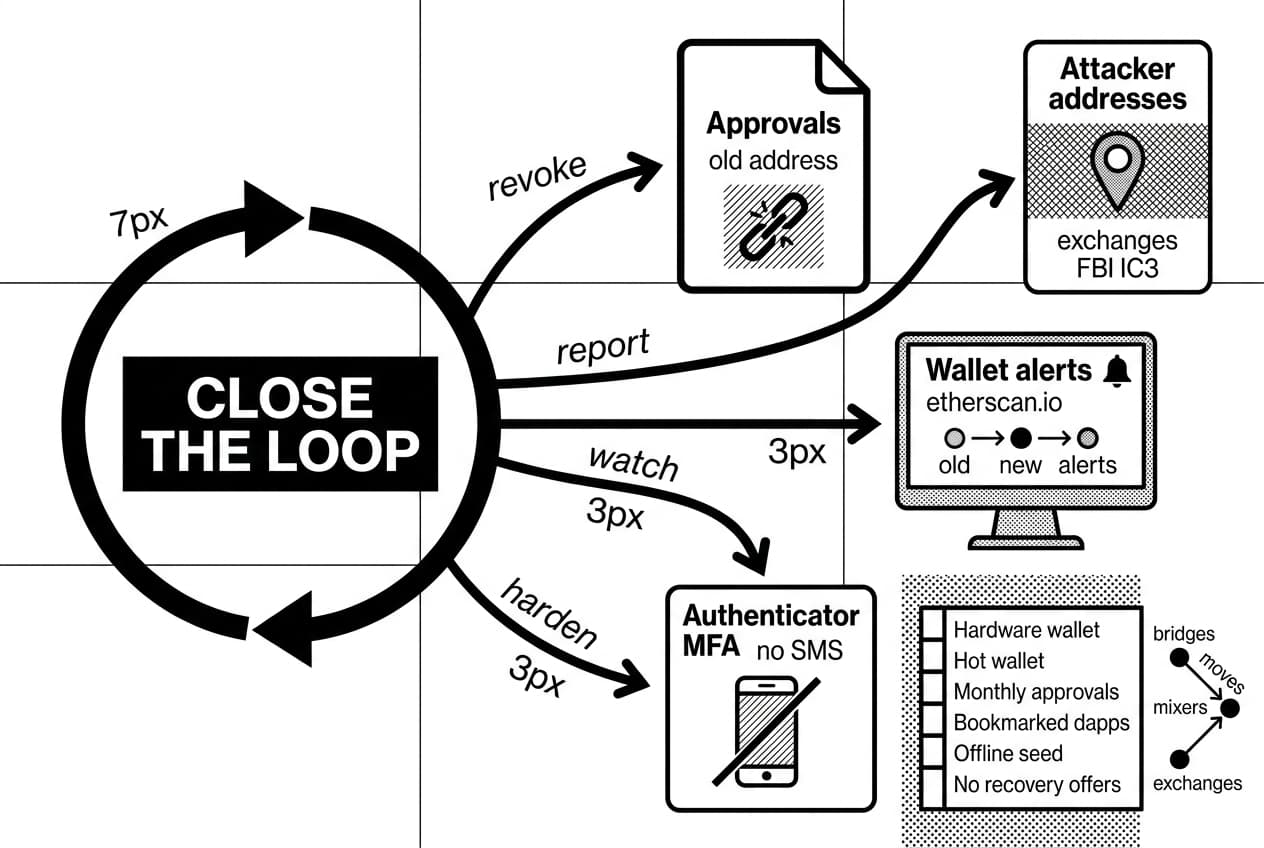
Submit attacker addresses to relevant exchanges if funds passed through them. For major losses, file a report with your national cybercrime authority. In the United States, that is FBI IC3.
Set up wallet alerts through etherscan.io address watch or a similar explorer tool. Enable authenticator-app MFA on exchange accounts and remove SMS fallback where possible.
Can you recover stolen crypto?
Recovery is possible but rare. Blockchain transfers are normally final, and stolen funds often move through bridges, mixers, or exchanges. Reports can still help if funds reach a compliant exchange or become part of an investigation.
Avoid anyone promising guaranteed recovery. Those services often target victims a second time.
Your ongoing wallet security checklist
- Use a hardware wallet for long-term holdings.
- Keep a small hot wallet for dapp activity.
- Review token approvals monthly.
- Bookmark dapps instead of using search ads.
- Avoid blind signing whenever possible.
- Use authenticator-app MFA on exchange accounts.
- Store seed phrases offline only.
- Ignore unsolicited recovery offers.
Pro tip: Store your new recovery phrase in two separate physical places. A seed phrase lost to fire, flood, or misplacement is just as final as one stolen by an attacker.
Frequently Asked Questions
- How do you know if your wallet is compromised?
- The clearest signs are unauthorized outgoing transfers, missing tokens or NFTs, unknown token approvals, suspicious signatures, and unfamiliar connected sites. Check your transaction history directly in the wallet app and verify it on a block explorer like Etherscan. Exposure of your seed phrase or private key is an immediate red flag.
- Can my wallet be hacked with my wallet address?
- A public wallet address alone cannot authorize transactions or drain your funds. However, attackers can use it to send scam tokens, study your holdings, craft targeted phishing messages, or impersonate support staff. Sharing your address is safe, but stay alert to any unsolicited contact that follows.
- Can your mobile wallet be hacked?
- Yes, though the attack usually targets the phone rather than the wallet itself. Common entry points include cloud backups containing your seed phrase, fake wallet apps, malicious links, and weak device security. Keep your OS updated, remove suspicious apps, disable risky backups, and move funds immediately if your seed phrase was exposed.
- Can your crypto wallet be hacked?
- Crypto wallets can be compromised through stolen seed phrases, exposed private keys, malicious token approvals, wallet drainers, malware, phishing sites, and fake browser extensions. Reputable wallet software is generally well-built — most successful attacks exploit user behavior, such as signing unknown transactions or entering a seed phrase on a fraudulent site.
- Is it possible to recover stolen crypto?
- On-chain transactions are irreversible, so recovery is not guaranteed. Stolen funds can sometimes be traced, reported to exchanges, and frozen if they reach a compliant platform, or flagged in a law enforcement investigation. Avoid paid recovery services — they are almost always scams targeting victims a second time.
- What happens if my crypto account gets hacked?
- The right response depends on account type. For a centralized exchange, contact support immediately, freeze withdrawals if the option exists, reset your password, and rotate MFA credentials. For a self-custody wallet, move remaining funds to a fresh wallet address right away and revoke any active token approvals connected to the compromised wallet.
- What are the first signs of being hacked?
- Early warning signs include unexpected wallet pop-ups, unfamiliar connected sites, unauthorized approvals, browser redirects, login alerts, and unprompted password reset emails. Changes in device behavior or failed transactions you did not initiate are also worth investigating. Actual missing funds often appear after these initial warning signs go unnoticed.
- How to protect your wallet from hackers?
- Store long-term holdings on a hardware wallet and use a separate hot wallet for dApps. Always verify URLs before connecting, avoid blind signing, and regularly review token approvals. Keep devices updated, use strong MFA on exchange accounts, and write your seed phrase down on paper — never store it digitally or in cloud storage.
Sources
Author

Crypto analyst and blockchain educator with over 8 years of experience in the digital asset space. Former fintech consultant at a major Wall Street firm turned full-time crypto journalist. Specializes in DeFi, tokenomics, and blockchain technology. His writing breaks down complex cryptocurrency concepts into actionable insights for both beginners and seasoned investors.