Smart Contract Access Control: Ownable & Roles Guide 2026
Smart contract access control: openzeppelin ownable and roles guide 2026
By the end of this guide, you will have a practical workflow for protecting privileged Solidity functions with Ownable, role-based permissions, multisigs, timelocks, deployment checks, and monitoring. The goal is not to memorize modifiers. The goal is to design permissions that still make sense after launch, during an incident, and after your team changes.
What you'll build and why smart contract access control fails
What smart contract access control actually is
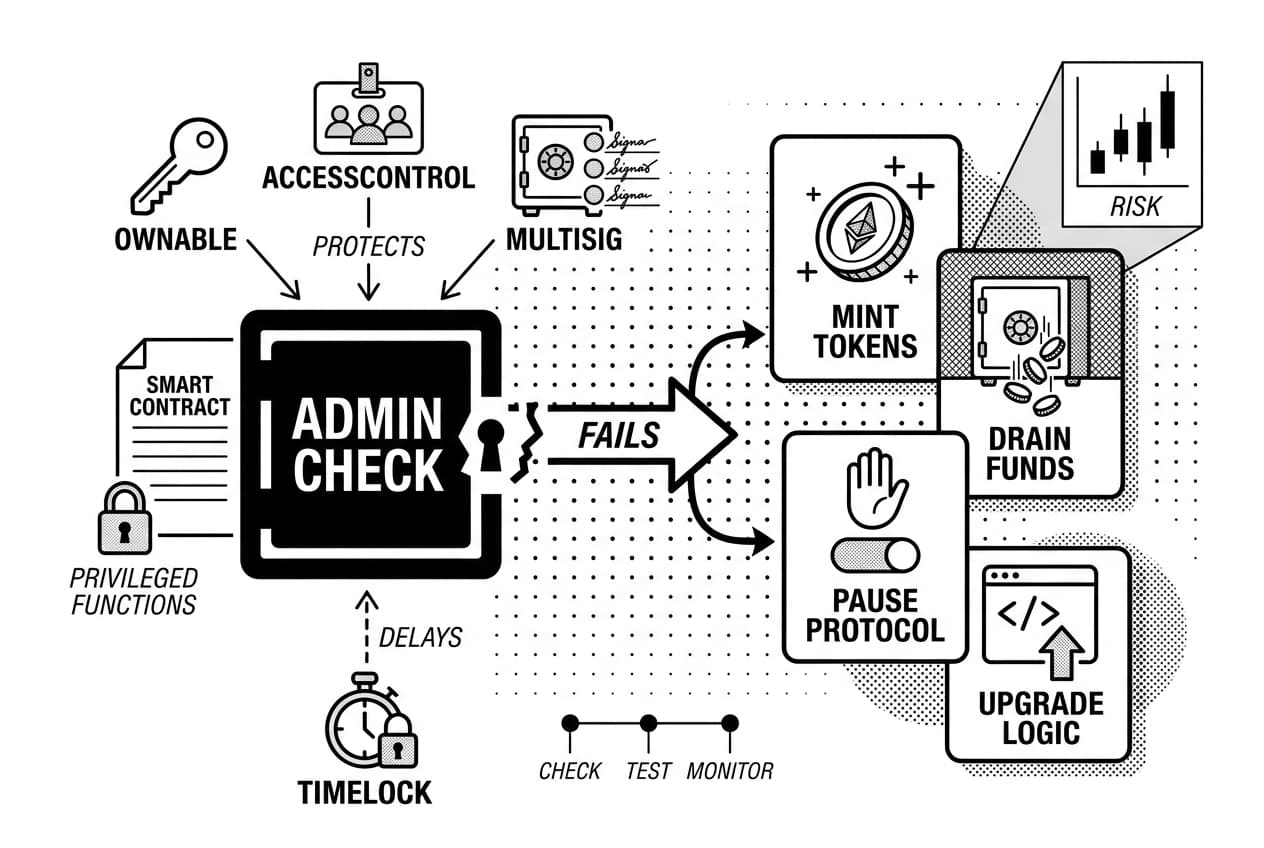
Smart contract access control is the rule set that decides who can call protected functions, which privileged operations they may run, and when those calls should fail. It protects minting, pausing, upgrades, treasury withdrawals, and role changes, so one missing check can become a full protocol takeover.
As of March 2026, this is still one of the most expensive failure areas in Web3 security. Chainalysis reported that crypto platforms lost about $2.2 billion to hacks in 2024 (Chainalysis, Feb. 2025). The report also notes that compromised private keys were a major driver of stolen value, which is exactly why admin design matters.
This guide uses a generated seven-function permission dataset based on the sample contract you will build below. It is small enough for a beginner to inspect, but it includes the same categories production teams review: minting, pausing, upgrades, treasury withdrawals, role grants, metadata updates, and fee changes.
It is also worth thinking about how you revoke token approvals safely alongside access control. Orphaned approvals can become entry points even when your admin functions are locked down correctly.
Common privileged actions worth protecting
- Minting ERC20 or ERC721 tokens: an open mint can create unlimited supply.
- Pausing or unpausing transfers: a bad pause key can freeze users.
- Changing protocol fees: one call can change user economics.
- Upgrading proxy implementations: this can replace the whole contract logic.
- Assigning or revoking roles: this can hand an attacker every permission.
- Withdrawing treasury funds: this is the obvious drain target.
- Setting oracle parameters: bad settings can distort prices.
The common framing is that role-based access control is the mature upgrade from Ownable. The safer view is more conditional: role-based permissions help only when the admin graph is tested and documented. An openzeppelin ownable setup behind a multisig and timelock can be lower risk than a messy role graph nobody audits.
Vitalik Buterin, Ethereum co-founder, has repeatedly argued for minimizing trusted control in on-chain systems. Sergey Nazarov, Chainlink Labs co-founder, has also emphasized that reliable smart contract systems depend on reducing single points of failure. Those principles point to the same design rule: never let one hot wallet control the whole protocol.
Prerequisites: what you'll need before you start
Before writing access-control code, get your environment in order. You need basic Solidity knowledge, a working EVM development setup, and a list of the accounts that will interact with your contract.
This guide focuses on Solidity and EVM-level permissions. Frontend wallet UI, such as connecting MetaMask to a React app, is outside the scope. Gas fees vary by chain and congestion, so simulate transactions instead of trusting a fixed estimate.
Install OpenZeppelin contracts
Install the current v5.x package so the constructor and role examples match this guide. OpenZeppelin contracts v5.0.0 was released on Oct. 5, 2023 (OpenZeppelin GitHub, Oct. 2023), and v5 changed how Ownable is initialized.
If you use npm with Hardhat, run:
npm install @openzeppelin/contracts
If you use Foundry, run:
forge install OpenZeppelin/openzeppelin-contracts
Start every Solidity file with an SPDX license header and compiler version:
// SPDX-License-Identifier: MITpragma solidity ^0.8.20;
Know the accounts involved
Access control depends on the caller. Define every account type before you deploy so you do not mistake a temporary deployer for a long-term admin.
account | what it is | typical permission role |
|---|---|---|
externally owned account | a normal wallet controlled by a private key | temporary deployer or test role holder |
multisig | a contract wallet that requires several signers | recommended production owner or admin |
dao contract | governance contract controlled by votes | long-term owner for mature protocols |
deployer | the address that sends the deployment transaction | temporary setup account only |
admin | address with permission to manage roles | grants and revokes permissions |
role holder | address granted one named role | calls functions gated by that role |
contract caller | another smart contract calling your contract | common in DeFi integrations |
Warning: msg.sender is not always the human user
In Solidity, msg.sender is the immediate caller. If a multisig, proxy, forwarder, or relayer calls your contract, msg.sender is that contract address, not the human who clicked the wallet button.
Proxy patterns, how meta-transactions affect msg.sender, account abstraction systems, and relayer networks can all insert another address between the user and your contract.
Warning: If your rule assumes
msg.senderis always a human wallet, a proxy or relayer can break that assumption. Before finalizing a permission check, ask: who is actually calling this function at the EVM level?
Step 1: map every privileged action
Before you write a modifier, write down every function that should not be public. This prevents the common pattern where developers add onlyOwner reactively after the architecture is already set.
Create a permissions table
Use this generated permission map as your starting dataset. Replace the caller addresses with your real multisig, timelock, or test wallet addresses before deployment.
function | permission required | caller | risk level | timelock needed | test required |
|---|---|---|---|---|---|
setBaseURI() | METADATA_ROLE | metadata wallet | low | no | yes |
setFee() | FEE_ROLE | finance multisig | medium | 24 hours | yes |
mint() | MINTER_ROLE | treasury multisig | high | no | yes |
pause() | PAUSER_ROLE | operations multisig | medium | no | yes |
upgradeTo() | UPGRADER_ROLE | timelock contract | critical | 48 hours | yes |
withdrawTreasury() | owner or multisig | finance multisig | critical | 24 hours | yes |
grantRole() | DEFAULT_ADMIN_ROLE | admin timelock | critical | 48 hours | yes |
Filling out this table forces you to name the real caller, not just a vague admin. If you plan to build a token vesting contract in Solidity, use the same table for beneficiary updates, revocation settings, and release triggers.
Separate routine actions from dangerous actions
Not every restricted function has the same blast radius. Metadata updates and feature flags are usually reversible. Minting, upgrades, treasury withdrawals, and role grants can permanently change the system.
Use the blast-radius classification framework: ask what the worst-case outcome is if that caller is compromised. Low blast radius can use a narrow role. High blast radius needs a multisig, a delay, monitoring, and a revocation path.
Pro tip: design for compromise, not trust
Pro tip: Assume an admin key can be phished. Your design goal is not perfect prevention. Your design goal is to make sure one compromised key cannot cause irreversible damage before you detect it.
High-risk functions should have timelocks. No single private-key wallet should control funds or upgrades. Every role assignment should have a documented revoke path.
The Ronin bridge attack in March 2022 resulted in about $625 million stolen (Chainalysis, March 2022). The lesson for this guide is direct: when validator or admin authority has no limit, one compromise can become a system-wide loss.
Step 2: implement openzeppelin ownable for simple admin control
With your permission map ready, you can protect simple admin functions. OpenZeppelin's Ownable gives one owner address and a modifier called onlyOwner. Any protected function reverts if the caller is not the owner.
The design choice is not only the modifier. The real choice is what address sits in the owner slot. For production, a multisig or governance contract is safer than a personal wallet.
Add onlyOwner to privileged functions
Start with a small contract. Pass the intended initial owner into the constructor because Ownable v5 requires it.
// SPDX-License-Identifier: MIT
pragma solidity ^0.8.20;
import '@openzeppelin/contracts/access/Ownable.sol';
contract MyProtocol is Ownable {
uint256 public fee;
bool public paused;
constructor(address initialOwner) Ownable(initialOwner) {}
function setFee(uint256 newFee) external onlyOwner {
fee = newFee;
}
function pause() external onlyOwner {
paused = true;
}
function mint(address to, uint256 amount) external onlyOwner {
// mint logic goes here
}}
The modifier checks that msg.sender == owner(). If not, the call reverts with OwnableUnauthorizedAccount.
Transfer ownership safely after deployment
- Deploy with a temporary deployer wallet.
- Verify the contract source on the block explorer.
- Call
transferOwnership(multisigAddress)from the deployer wallet. - Open the block explorer, click the Read Contract tab, and confirm
owner()returns the multisig address. - Open the Events tab and confirm
OwnershipTransferredshows the deployer as the old owner and the multisig as the new owner.
This sequence keeps your hot deployer key from holding long-term power over a live contract.
Warning: renounceOwnership can brick admin functions
Warning: Calling
renounceOwnership()sets the owner to the zero address. EveryonlyOwnerfunction becomes uncallable unless you built a separate recovery path.
Only renounce ownership when immutability is a public product decision. If you want decentralization without losing recovery options, transfer ownership to a governance contract or timelocked multisig instead.
Step 3: design role-based accesscontrol when one owner is not enough
Use role-based access when one owner address becomes too broad. OpenZeppelin's AccessControl lets you define multiple named roles, grant them independently, and protect each function with onlyRole.
Create roles for jobs, not people
Name roles after capabilities, not teammates. MINTER_ROLE, PAUSER_ROLE, and UPGRADER_ROLE survive staff changes because they describe what the holder can do.
bytes32 public constant MINTER_ROLE = keccak256('MINTER_ROLE');
Keep names consistent across contracts, deployment scripts, and tests. Auditors should be able to trace each role without guessing.
Use grantRole, revokeRole, and onlyRole carefully
grantRole(MINTER_ROLE, account) adds a holder. revokeRole(MINTER_ROLE, account) removes one. Both actions require the caller to hold that role's admin role, which defaults to DEFAULT_ADMIN_ROLE.
Every privileged entry point needs its own explicit guard. Do not use one catch-all role for unrelated actions such as minting, pausing, and upgrades.
Warning: A common mistake is granting
DEFAULT_ADMIN_ROLEto a hot wallet during setup and forgetting to remove it before launch. Treat that role like a root key.
Protect DEFAULT_ADMIN_ROLE like a root key
DEFAULT_ADMIN_ROLE can grant and revoke other roles by default. If an attacker controls it, they can usually control the whole contract.
OpenZeppelin's v5 access-control docs describe AccessControlDefaultAdminRules, which adds a delayed transfer process for the default admin (OpenZeppelin docs, accessed March 2026). Use it when the default admin role exists in production.
The practical 2026 setup is simple: put the default admin role behind a multisig, route high-impact changes through a timelock, and remove the deployer immediately after setup.
Ownable vs accesscontrol: comparison table
dimension | ownable | accesscontrol |
|---|---|---|
best use case | single admin, simple contracts, prototypes | multiple permission groups, protocol operations, governance |
admin model | one owner address controls protected functions | roles can have separate admin roles |
complexity | low | medium, because the role graph must be planned |
gas overhead | lower, because ownership is one address check | higher, because role membership is checked |
common mistakes | owner remains the deployer wallet | default admin remains on a hot wallet |
recommended 2026 setup | Ownable2Step with multisig owner and timelock for dangerous calls | AccessControlDefaultAdminRules with multisig admin and timelock |
Do not choose based only on gas. Choose based on how many distinct permission groups your contract truly needs, then harden the admin path.
Step 4: harden admin powers with timelocks, multisigs, and delays
Access control does not end with Solidity. Many large losses start with key compromise, not a missing require. This step adds operational controls around your code.
Route high-risk actions through a multisig
A multisig requires several signers before a transaction executes. A 2-of-3 setup requires two approvals. A 3-of-5 setup is common for small production teams that manage treasury funds or upgrade rights.
Safe reports more than $100 billion in digital assets stored through its smart accounts (Safe website, accessed March 2026). If you use a Safe account, assign the owner or admin role to the Safe contract address, not to a personal wallet.
Warning: A multisig is only as safe as its signer setup. Put keys on different devices, with different people, and with recovery procedures written down.
Add a timelock for upgrades and parameter changes
A timelock creates a delay between scheduling and execution. For example, a 48-hour delay lets users, monitors, and governance participants react before a sensitive change takes effect.
OpenZeppelin's TimelockController implements this pattern. Grant the timelock permission to execute high-risk functions, then require admin changes to pass through it.
Use the schedule, delay, execute framework: every dangerous action is scheduled on-chain, visible during the waiting period, and cancellable before execution.
Use emergency powers sparingly
Pause roles can limit damage during an active exploit. OpenZeppelin's Pausable module works well with either Ownable or AccessControl.
The tradeoff is trust. A pause key controlled by one wallet is a centralized kill switch. A safer setup gives PAUSER_ROLE to a multisig, documents when it may be used, and sets a review window such as 72 hours.
Step 5: test and review access rules before deployment
Your access rules are only as strong as the tests that prove them. Before mainnet, confirm that authorized callers succeed, unauthorized callers revert, and every handoff behaves exactly as designed.
Write tests for allowed and rejected callers
Each protected function needs at least two tests. One test calls from the authorized account and confirms the expected state change. The second calls from an unauthorized account and checks the exact custom error.
For Ownable, expect OwnableUnauthorizedAccount. For AccessControl, expect AccessControlUnauthorizedAccount. Matching the exact selector helps prevent false passes.
- Authorized caller succeeds and state changes as expected.
- Unauthorized caller reverts with the correct error selector.
- Role grant works and the grantee can call protected functions.
- Role revoke works and the former grantee is blocked.
- Ownership transfer works and the old owner loses access.
- Deployer permissions are removed after setup.
- Upgrade paths are protected and revert for non-admin callers.
Test role handoffs and revocations
Write dedicated tests for grantRole, revokeRole, transferOwnership, and renounceOwnership. If you use Ownable2Step, test that the pending owner must call acceptOwnership before the transfer completes.
Also test the bad path. What happens if the last admin renounces a role? Can the contract recover, or is it intentionally locked? You should know before deployment.
Review common access-control bugs
- Missing modifiers: a protected function has no
onlyOwneroronlyRoleguard. - Public initializers: an upgradeable contract has an unprotected
initialize(). - Wrong caller assumption: the code expects a wallet, but a multisig or proxy is the caller.
- Role admin cycles: a role's admin setup makes revocation difficult.
- Unprotected upgrades:
upgradeToorupgradeToAndCalllacks a role check. - Forgotten deployment rights: the deployer keeps temporary admin access.
Access-control failures remain visible in public incident reports. Chainalysis reported that 2024 saw about $2.2 billion in stolen crypto assets (Chainalysis, Feb. 2025), and compromised keys were a major pattern. That is a testable risk, not a vague warning.
Pro tip: Include every privileged function in your audit scope. List the expected caller, role, timelock, and test file. Do not make reviewers infer which paths are meant to be restricted.
Step 6: deploy and verify the final permission setup
Deployment is a sequence, not one transaction. Use the deploy, assign, transfer, revoke sequence: deploy the contract, assign roles, transfer ownership or admin rights, then revoke temporary deployer permissions.
Simulate every transaction on a fork before mainnet. Gas depends on chain state, current base fee, calldata, and the exact role setup.
Run a dry run on a fork or testnet
With Hardhat, use a mainnet fork. With Foundry, run anvil --fork-url with your RPC endpoint. Then execute the same script you plan to use for production.
- Deploy the contract and save its address.
- Call initializer functions if the contract is upgradeable.
- Grant each role to its intended multisig, timelock, or operations wallet.
- Transfer ownership to the multisig if Ownable is used.
- Revoke
DEFAULT_ADMIN_ROLEfrom the deployer if AccessControl is used. - Assert that
owner()andhasRole()return the final expected values.
Here is the kind of verification transcript you want from your script before mainnet:
owner() == 0xMultisig... PASS
hasRole(DEFAULT_ADMIN_ROLE, deployer) == false PASS
hasRole(PAUSER_ROLE, opsMultisig) == true PASStimelock delay == 172800 seconds PASS
That transcript is not decoration. It is evidence that your deployment state matches your design.
Confirm permissions on a block explorer
After deployment, open the verified contract page on the relevant block explorer. Click the Read Contract tab and call owner(). Confirm it returns the multisig, not the deployer.
Next, call hasRole(DEFAULT_ADMIN_ROLE, deployerAddress). It should return false. Then click the Events tab and review RoleGranted, RoleRevoked, and OwnershipTransferred logs in order.
Finally, verify the source code. In Hardhat, use the verify plugin. In Foundry, use forge verify-contract. An unverified contract makes user review and security review harder.
Warning: Do not skip the revoke step. A deployer wallet that still holds admin rights is one private key away from a full takeover.
Step 7: monitor, maintain, and rotate permissions after launch
Deployment is not the finish line. Permissions drift, contributors leave, and keys get exposed. Your access-control system stays safe only if you watch it.
Set alerts for admin events
Set real-time alerts for these events:
OwnershipTransferredRoleGrantedandRoleRevokedPausedandUnpausedUpgradedCallScheduledandCallExecutedfrom the timelock
OpenZeppelin Defender and Tenderly can monitor these events without a custom indexer. Send alerts to a channel your team actually watches, such as Slack, PagerDuty, or a security inbox.
Document an incident response path
Write the response plan before you need it. Answer these questions in your repository:
- Who can pause the contract?
- Who can unpause it?
- Who can rotate or revoke roles?
- How will users be notified?
Be specific. List role addresses and multisig addresses, not just team names.
Plan progressive decentralization
Do not rush into full token governance while your contracts are changing every week. A staged path is often safer.
stage | control model | when to move on |
|---|---|---|
early launch | small multisig | after core contracts are tested in production |
growth | multisig plus 48 to 72 hour timelock | after user value justifies governance overhead |
mature protocol | on-chain governance | after participation is broad and active |
Rotate signing keys whenever someone leaves the project. Revoke roles the same day. Treat stale permissions like an open server port: close it, then audit who else still has access.
Summary and next steps
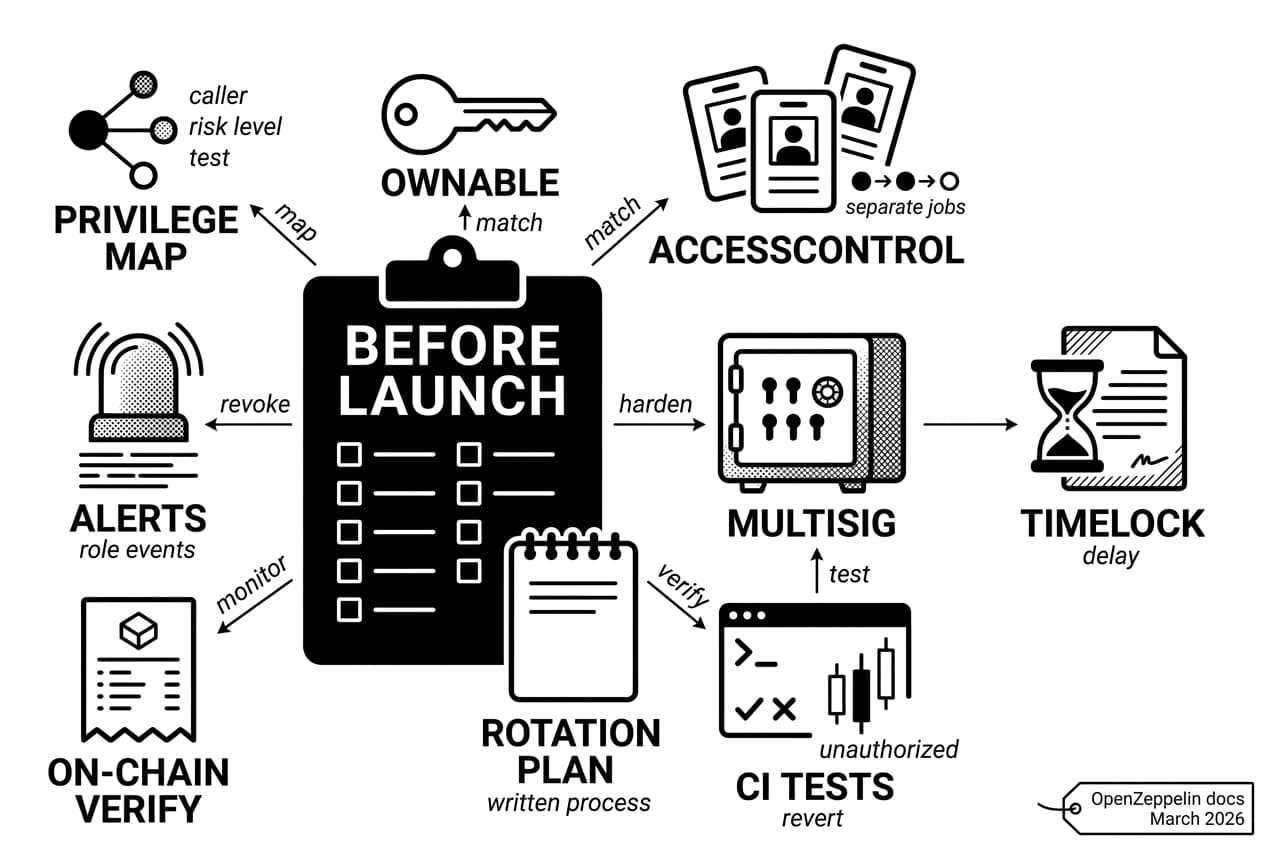
You now have a full workflow for smart contract access control: map privileges first, use openzeppelin ownable for simple single-admin contracts, move to AccessControl when you need separate jobs, and harden dangerous actions with multisigs, timelocks, tests, deployment checks, and alerts.
From here, build a small demo contract that combines both patterns. Run it on a local fork, then on a testnet. Pair that practice with free blockchain security training, and add the finished project to your Web3 developer portfolio projects.
OpenZeppelin's access-control documentation remains the main technical reference for this stack (OpenZeppelin docs, accessed March 2026). Re-read it each time you start a new production contract.
Your access-control checklist
- Privilege map complete: every admin function has a role, caller, risk level, and test.
- Pattern matched to complexity: simple admin uses Ownable; separate jobs use AccessControl.
- No single private-key failure point: owner or admin rights sit behind a multisig.
- Timelock active on high-impact calls: upgrades and treasury actions have a delay.
- Role tests pass in CI: authorized callers succeed and unauthorized callers revert.
- Deployment verified on-chain: owner and roles match the deployment plan.
- Monitoring in place: alerts fire on ownership and role events.
- Rotation plan documented: signer changes and role revokes have a written process.
Check every box before launch. If one is empty, treat it as a blocker, not a nice-to-have.
Frequently Asked Questions
- What is smart contract access control in Solidity?
- Smart contract access control is the set of rules that decides who can call protected functions and which actions they can perform. It is used to secure sensitive operations like minting, pausing, upgrading, changing fees, and withdrawing treasury funds.
Sources
Author

Crypto analyst and blockchain educator with over 8 years of experience in the digital asset space. Former fintech consultant at a major Wall Street firm turned full-time crypto journalist. Specializes in DeFi, tokenomics, and blockchain technology. His writing breaks down complex cryptocurrency concepts into actionable insights for both beginners and seasoned investors.