How to Verify Contract on Etherscan: 2026 Step-by-Step Guide

Why Verifying Your Smart Contract on Etherscan is Essential
Deploying a smart contract to the Ethereum mainnet is a major milestone. But before you celebrate, there's one more essential step: verification. When you verify a contract on Etherscan, you're publishing its source code. This process mathematically proves that the deployed bytecode on the blockchain matches the human-readable Solidity code you wrote. It transforms your contract from an opaque string of numbers into a transparent, open-source project.
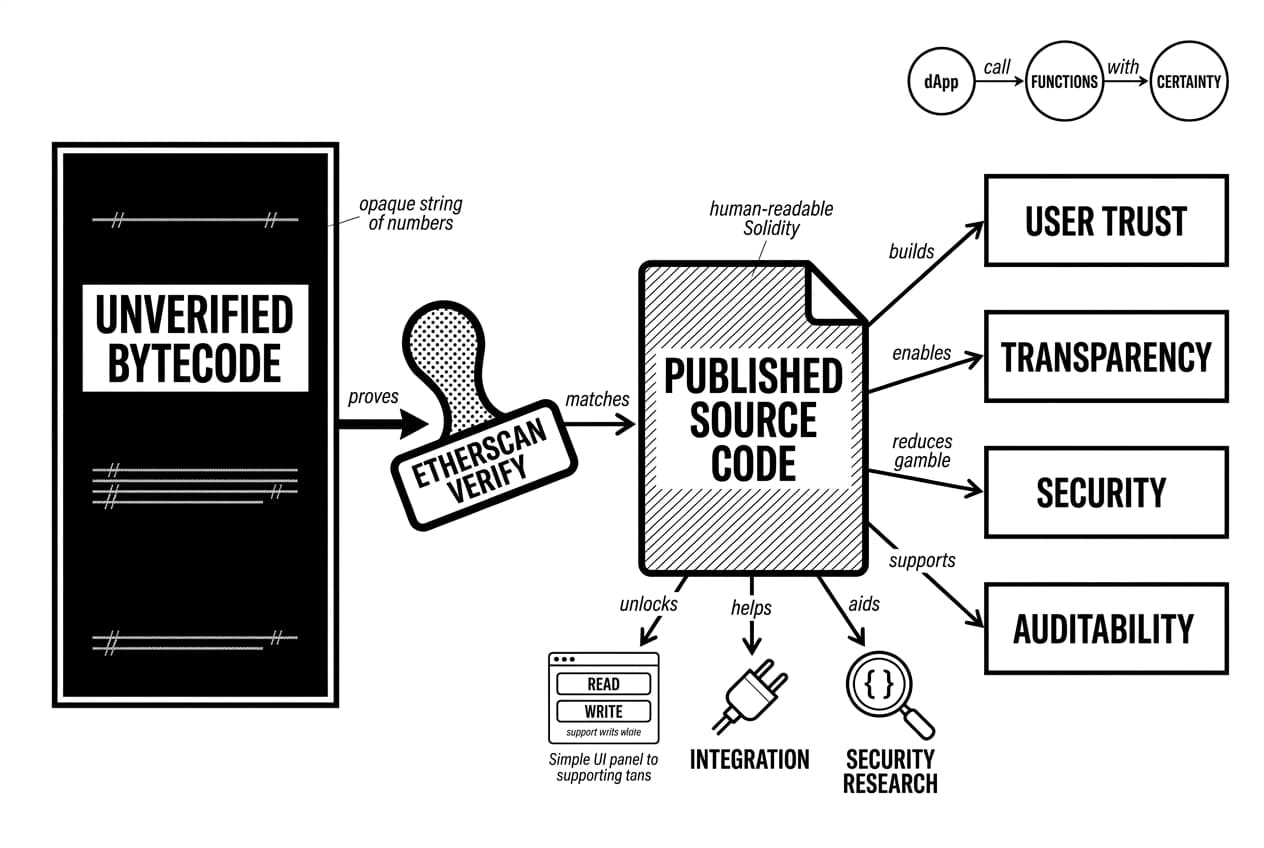
This single action is fundamental for building user trust. Without it, users have no way of knowing what your code actually does. They are forced to trust you blindly, which goes against the core principles of Web3. This transparency is key to security, as interacting with an unverified contract is a huge gamble. It's impossible to know the underlying logic, which exposes everyone to the risks of interacting with unverified smart contracts.
Beyond building confidence, an Etherscan verify action unlocks practical benefits. Verification provides a user-friendly interface for reading from and writing to your contract directly on the block explorer's website. This makes it much easier for other developers to integrate with your project, for security researchers to audit your code, and for your community to call your dApp's functions with certainty.
Prerequisites: What You'll Need Before You Begin
Now that you understand why verification matters, let's get you ready for the process itself. To successfully verify contract etherscan, you’ll need to gather a few key pieces of information first. Preparing these items in advance will ensure a smooth and error-free experience. Think of this as your pre-flight checklist.
Essential Contract Information
Having these details on hand is non-negotiable for a successful verification. You should have them available from your deployment records or development environment:
- Deployed Contract Address: The unique 0x... address of your smart contract on the Ethereum blockchain.
- Exact Compiler Version: The specific version of the Solidity compiler you used, such as
0.8.24. This must match perfectly. - License Type: The open-source license you chose (e.g., MIT, Unlicensed).
- Optimization Settings: You need to know if optimization was enabled during compilation and, if so, the number of runs specified.
Source Code and Constructor Arguments
You will need the full, flattened Solidity (.sol) source code. If your contract imports other files, you will often need to combine them into a single file for the simplest verification methods. Plus, if your contract’s constructor function required any arguments upon deployment, you will need the ABI-encoded version of those arguments. Etherscan provides a tool to help generate this if you don't have it saved.
How to Verify Contract on Etherscan: The Single File Method
With your prerequisites in hand, we can now tackle the most direct way to verify contract etherscan supports: the single file method. This approach is ideal when your entire smart contract exists in one Solidity file or when you've "flattened" your code, combining all imported files into one. Let's walk through the process together.
Step 1: Find the Verification Page on Etherscan
First, head to Etherscan and search for your deployed contract's address. On the contract's main page, you'll find a series of tabs just below the basic address information. Click on the Contract tab. Since your code isn't yet public, you will see a message prompting you to add the source code, along with a link that says Verify and Publish. Click this link to begin the verification process.
Step 2: Enter Contract Details
You'll now be on the "Verify & Publish Smart Contract Source Code" page. The contract address should be pre-filled, so your main task is to provide the exact compilation settings you used.
- Compiler Type: Select Solidity (Single File) from the dropdown menu.
- Compiler Version: This is critical. Choose the exact version you used to compile your contract, such as
0.8.24. A mismatch here is a common cause of failure. - License: Select the open-source license that applies to your code. For many projects, this will be the MIT License (MIT).
Once these fields are set, click the "Continue" button to move to the next step.
Step 3: Paste Your Solidity Code & Constructor Arguments
On the following page, you'll find a large text field for your contract code. This is where you will paste the entirety of your flattened Solidity source code. If your development environment uses multiple files with import statements, you must combine them into one before pasting. Tools like the Hardhat flattener plugin can do this for you.
Just below the code input, you might see a field for Constructor Arguments. If you passed any arguments when deploying your contract (like an initial token supply or an owner address), you need to provide the ABI-encoded version here. This long string of characters is often logged by your deployment script. If your contract's constructor takes no arguments, you can safely leave this field blank.
Step 4: Complete the CAPTCHA and Verify
The final step is simple. Scroll to the bottom of the page and solve the reCAPTCHA challenge to prove you're human. Take a moment to give all the information you've entered one last check for accuracy. When you're ready, click the Verify and Publish button. Etherscan will take a few moments to compile your code and check if the resulting bytecode matches what's on the blockchain. Success will greet you with a green checkmark and your newly verified contract page!
Verifying Multi-File & Complex Contracts: 2 Common Methods
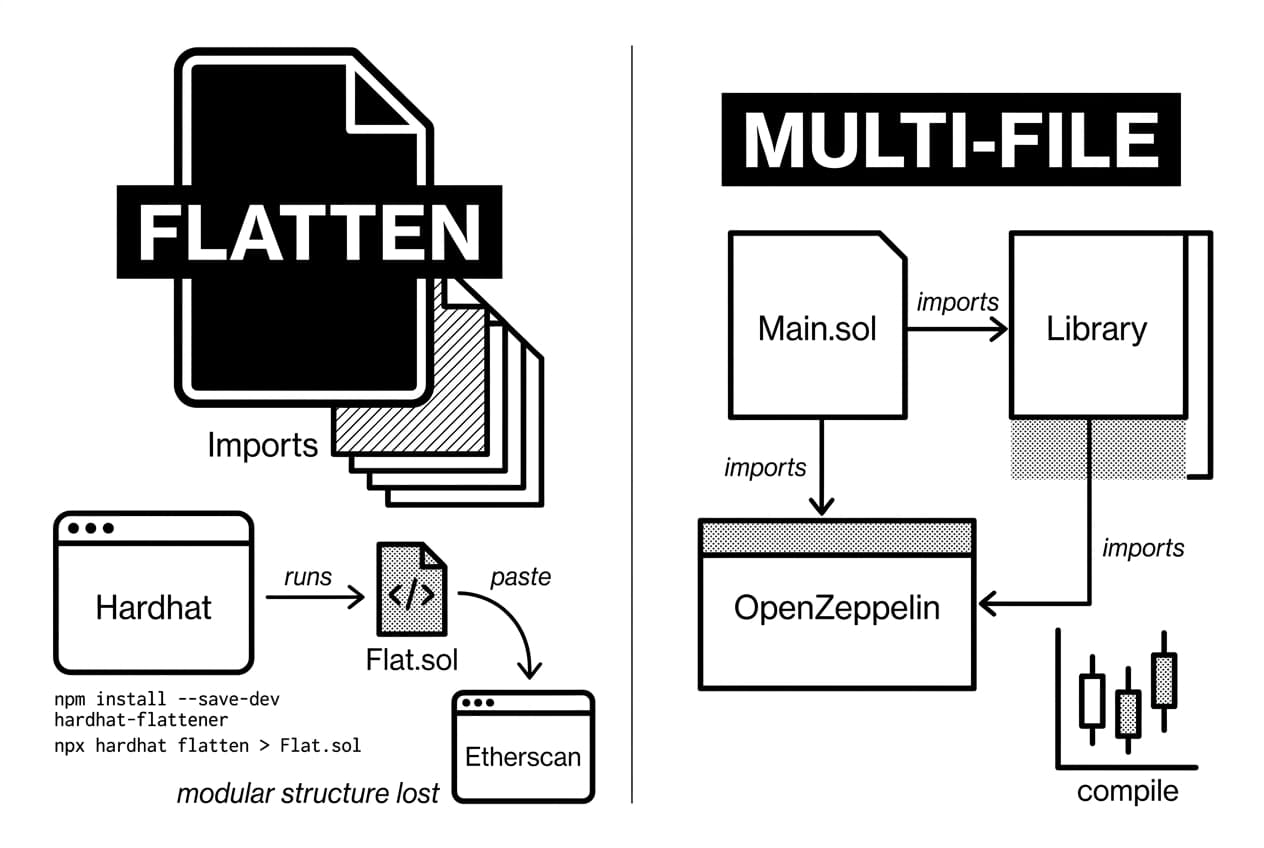
While verifying a single file is a great start, most real-world smart contracts are more complex. They often import code from other files or rely on standard libraries like OpenZeppelin. When you try to paste just one file's code into Etherscan, it fails because it doesn't have the full context. Fortunately, there are two excellent methods to handle this and get your multi-file project verified.
Method 1: Using a Flattener Plugin
One straightforward approach is to "flatten" your contract. A flattener is a tool that takes your main contract file and all its dependencies (imports) and combines them into a single, massive Solidity file. This new file contains all the code in the correct order, ready to be pasted into Etherscan.
This method essentially turns your complex project into a single-file project for verification purposes. Tools like hardhat-flattener are popular for this task.
- Install the tool: In your Hardhat project's terminal, run
npm install --save-dev hardhat-flattener. - Flatten the contract: Run the command
npx hardhat flatten > Flat.sol. This creates a new file namedFlat.solin your project's root directory. - Verify on Etherscan: Open the new
Flat.solfile, copy its entire contents, and paste it into the Etherscan verification page, following the same steps you used for the single-file method.
While flattening works, it can be a bit clumsy. It also strips away the modular structure of your code, which can make it harder for others to read. For a more professional and automated workflow, the next method is highly recommended.
Method 2: Using the Hardhat-Etherscan Plugin (Recommended)
The modern, industry-standard way to handle an Etherscan verify task for complex projects is by using a dedicated plugin. The @nomicfoundation/hardhat-verify plugin for Hardhat automates the entire process. It communicates directly with the Etherscan API, uploading all your source files and linking them correctly without any manual copying and pasting.
This is the most reliable way to verify contract etherscan listings for projects with multiple dependencies.
Step 1: Install the Plugin
First, you need to add the verification tool to your project's development dependencies. In your terminal, go to your project folder and run:npm install --save-dev @nomicfoundation/hardhat-verifyStep 2: Configure Your Hardhat Project
Next, you need to tell Hardhat to use the plugin and provide your Etherscan API key. Open yourhardhat.config.jsfile. First, require the plugin at the top:require("@nomicfoundation/hardhat-verify");
Then, add anetherscanobject within yourmodule.exports. Your configuration might look something like this:module.exports = {solidity: "0.8.20",networks: {sepolia: {url: YOUR_ALCHEMY_OR_INFURA_URL,accounts: [YOUR_PRIVATE_KEY]}},etherscan: {apiKey: "YOUR_ETHERSCAN_API_KEY"}};
Pro Tip: Never hardcode your API keys or private keys directly in your configuration file. Use a package likedotenvto load them from a private.envfile to keep your secrets secure.Step 3: Run the Verification Command
Once your contract is deployed and your configuration is set, verification is just a single command. In your terminal, run the following, replacing the placeholders with your contract's details:npx hardhat verify --network sepolia DEPLOYED_CONTRACT_ADDRESS "Constructor arg 1" "Constructor arg 2"
Hardhat will handle the rest. It automatically detects all imported files, sends them to Etherscan, and completes the verification. If successful, you'll see a link to the verified contract page right in your terminal.
Troubleshooting Common Etherscan Verification Errors
Even with a perfect guide, you might hit a snag. Verification can be finicky, and a small mismatch can lead to a frustrating error message. Don't worry—most issues are common and easy to fix. Let's walk through the most frequent problems you'll encounter when you try to verify a contract on Etherscan and how to solve them.
Error: Bytecode Does Not Match
This is by far the most common error. It means the Solidity code you provided, when compiled with your chosen settings, does not produce the exact same bytecode that was deployed to the blockchain. The cause is almost always a tiny difference in the compilation environment. If you get this error, run through this checklist:
- Compiler Version: Is it the exact same version used for deployment? A difference between
0.8.24and0.8.25matters. Check your project's configuration file (e.g.,hardhat.config.js). - Optimization Settings: Did you enable optimization during deployment? If so, you must use the identical settings for verification. Make sure the "runs" value matches perfectly.
- Source Code Changes: Even an extra comment or a different import path can alter the contract's metadata, which affects the final bytecode. Ensure the code is identical to what was deployed. This is a different check from fully auditing your smart contract code, which focuses on logic and security.
Error: Invalid Constructor Arguments
If your contract has a constructor that accepts arguments (like an initial owner's address or a token name), you must provide these arguments to Etherscan. They need to be ABI-encoded. This sounds complex, but Etherscan makes it easy. You don't have to generate this string yourself. Simply go to the transaction hash of your contract's deployment, scroll to the bottom, and find the "Input Data" field. The long hexadecimal string at the end of this data is your ABI-encoded constructor arguments. Copy and paste it into the verification form.
Forgetting the SPDX License Identifier
A surprisingly frequent cause for failure is a missing license identifier. Since Solidity 0.6.8, compilers expect a comment specifying the code's license at the very top of each source file, like // SPDX-License-Identifier: MIT. If this line is missing from the files you upload, the compiler Etherscan uses might throw an error or produce different bytecode, causing the verification to fail. Always double-check that this line is present in all your .sol files.
How to Read and Interact with a Verified Contract
After you verify contract on Etherscan, your work provides transparency for everyone. For end-users, that green checkmark is a symbol of trust and accessibility. It unlocks the ability to read a contract's data and even call its functions directly from the Etherscan interface, offering a powerful alternative to a project's official web app.
Reading From the Contract
On the contract's page, look for the "Contract" tab. Underneath it, you'll find a "Read Contract" option. This section gives you a direct, gas-free way to look at the contract's current state. It lists all the public variables and functions that simply return information without changing anything on the blockchain.
You can use this to check the total supply of a token, find out who owns a specific NFT, or see configuration details of a protocol. Simply find the function you want to call, fill in any necessary inputs, and click the "Query" button. The result will appear immediately below.
Writing to the Contract
The "Write Contract" tab is where you can actively participate. This area lists the functions that change the contract's state, which always requires a transaction and costs gas. To get started, you must first click the "Connect to Web3" button and approve the connection in your wallet, like MetaMask.
Once your wallet is connected, you can execute functions like transferring tokens, claiming airdrops, or casting a vote. This is a popular method for power users who want to interact directly with NFT contracts during a mint, often bypassing a crowded website. Always be certain of the function you are calling, as any transaction you send is final.
Conclusion: The Power of On-Chain Transparency
You now have a full toolkit for bringing your smart contract's code into the light. Whether you choose the direct single-file upload, use a flattener for more complex projects, or integrate verification directly into your workflow with a Hardhat plugin, the result is the same: you build trust and help your users.
Completing the process to verify a contract on Etherscan is not just a best practice; it's a fundamental contribution to the health of the entire ecosystem. It transforms opaque bytecode into an open book, allowing anyone to inspect, audit, and interact with your contract confidently. This transparency is a cornerstone of decentralized technology, and by verifying your work, you become an active participant in building a more secure and reliable on-chain world for everyone.
Frequently Asked Questions
- How to get verified on Etherscan?
- You submit your contract's source code, the exact compiler version, and any specific settings used during deployment. Etherscan then compiles your code. If the resulting bytecode perfectly matches the bytecode already on the blockchain, your contract earns the "verified" checkmark, making its code readable for everyone.
- How to check if a contract address is legit?
- A verified contract with a green checkmark on Etherscan is the first step. For better security, you should also review the source code for malicious functions, check its transaction history for suspicious activity, and research community sentiment about the project to gauge its reputation and trustworthiness.
- What's the difference between Ethereum and Etherscan?
- Ethereum is the decentralized blockchain network where transactions occur and smart contracts are stored. Etherscan is a separate tool known as a "block explorer." It's a website that provides a searchable, user-friendly interface to view and analyze all the data that exists on the Ethereum blockchain.
- What is 0xdac17f958d2ee523a2206206994597c13d831ec7?
- This is the verified contract address for Tether (USDT), one of the largest stablecoins on the Ethereum network. It serves as a great example of a high-volume, critical contract where verification allows anyone to inspect the code that manages billions of dollars in assets directly on Etherscan.
Sources
Author

Crypto analyst and blockchain educator with over 8 years of experience in the digital asset space. Former fintech consultant at a major Wall Street firm turned full-time crypto journalist. Specializes in DeFi, tokenomics, and blockchain technology. His writing breaks down complex cryptocurrency concepts into actionable insights for both beginners and seasoned investors.